One of the most talked about updates in iOS 10 was the iMessage app. Apple took a very simple texting app and added all kinds of nifty features that people enjoy in other messaging apps. With animated stickers, apps, message animations, drawings, group messaging, and even the option to send a poll to your friends, iMessage is one of the most fun apps to use. But months of iMessaging your family and friends can pile up, and if you don’t manage it, things can get messy. You need to know how to delete text messages on your iPhone.
You might want to delete an individual text message, or get rid of anything more than a month old. Even if you don’t want to delete an entire conversation, you may want to delete parts of a conversation that you don’t want to come up in a Spotlight search. There are several ways to delete text messages, and conversations, in the iMessage app, so let’s take a look at them all.
More: How to use iMessage on iOS 10
How to delete individual messages
If you just want to get rid of a single message on your iPhone, this is how to do it:
- Tap and hold the message.
- Tap More… in the pop up menu.
- Select the individual message you would like to delete.
- Select the delete trash bin icon on the lower left.
- To confirm you want to delete, tap Delete Message on the pop up menu.
How to delete one conversation

If you like to delete a whole conversation on your iPhone, here are the steps you need to follow:
- Open the messages app.
- Swipe left on the conversation you want to delete.
- Choose Delete.
How to delete multiple conversations


Maybe you’d like to delete multiple conversations on your iPhone at once. Here’s how:
- Open the messages app, and tap Edit on the upper left corner.
- Select the messages you want to delete.
- Choose Delete on the lower right corner.
How can I prevent text messages from showing up in Spotlight Search?


It could be embarrassing, awkward, or just annoying to have certain text message conversations show up when you do a Spotlight Search. Here’s how to prevent that from happening:
- Go to Settings > General > Spotlight Search.
- Scroll down to Messages and switch the button to the off position. If the button is white, that means that it is off.
How to delete all my texts at once


What if you have hundreds of old messages and you want to delete them all at once? Follow these steps:
- Go to Settings > Messages > Keep Messages.
- You can choose how long messages are kept for — 30 days, 1 year, or Forever.
The chances are that the Forever option is selected. If you only want to keep messages for 30 days, choose that, and you’ll see a warning that all texts older than 30 days will be automatically deleted. You’ll see the same message if you choose 1 year — any messages older than 1 year will be deleted automatically.
How to delete text messages so they can’t be recovered
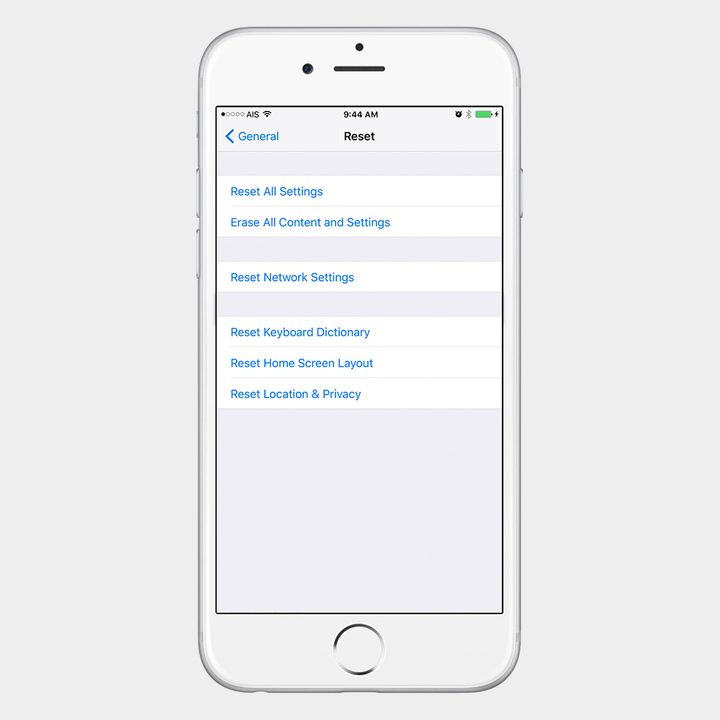
If you are selling the device, or you are just conscious of security and you don’t want your iPhone to fall into the wrong hands and risk the chance that anyone can recover your deleted text messages, then follow the steps below.
Warning: This will delete everything on your iPhone, not just your text messages, so back up everything precious before you do this.
- Go to Settings > General > Reset > Reset All Content and Settings.
- If you have a passcode set, enter your passcode when prompted.
If you want to sell or pass on your device to someone else, this would be the way to do it.
What if you want to erase messages, but don’t want to erase everything else?


If you sync your iPhone with iTunes, then messages that you deleted previously will be deleted from iOS so that they can’t be recovered.
- Open iTunes.
- Plug in your iPhone to your computer.
- Click the iPhone icon in the iTunes app at the top.
- Select what you want to sync, whether it’s apps, music, or photos. In this example, just selecting Sync only checked songs and videos will do the trick.
- When you select Apply the iPhone will sync with iTunes.