  1. Home
  2. Phones
  3. Mobile
  4. News

Gboard is getting a much-needed update for foldables

Add as a preferred source on Google
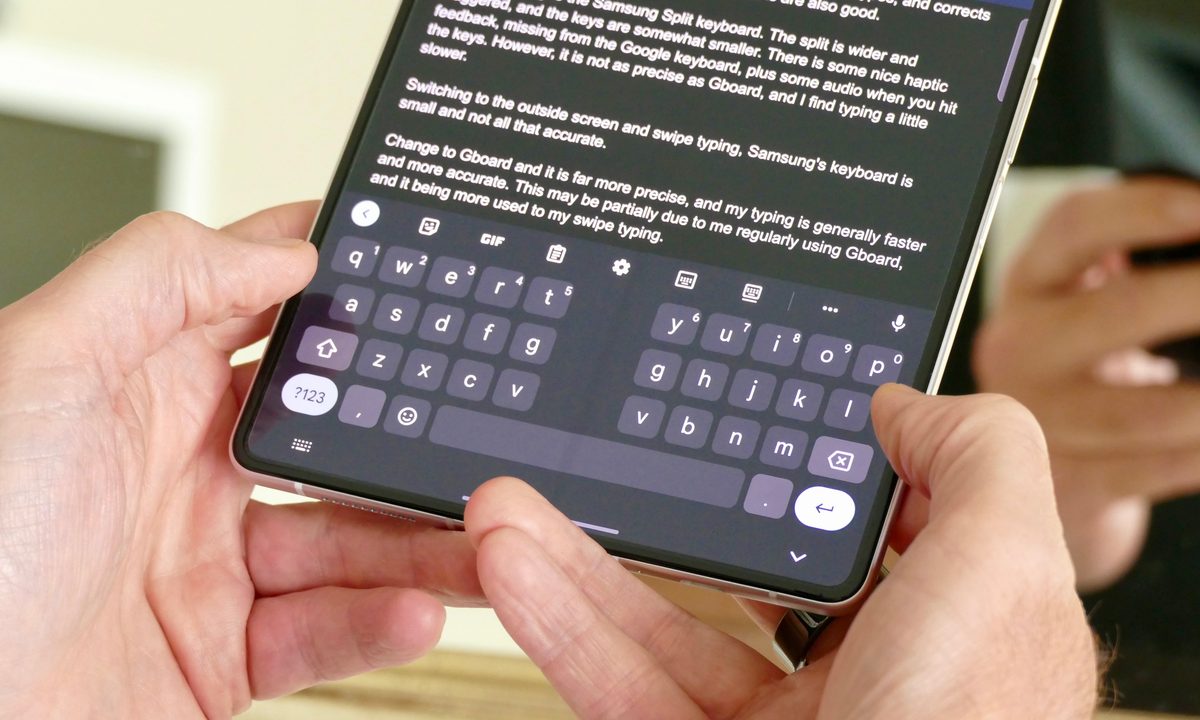
Google Gboard split screen keyboard mode on the Galaxy Z Fold 3.
Gboard split screen mode Andy Boxall / Digital Trends

Folding phones have surged in popularity over the past few years, but some apps have lagged behind in updating their interfaces. Gboard is one of the guilty parties here; while it’s available on nearly every Google-based device, the on-screen keyboard could stand to look and perform better on foldables.

However, Android Authority’s Mishaal Rahman recently noticed a new UI within Gboard while using his Samsung Galaxy Z Fold 6. He checked on another one of his devices, only to find the new UI was absent — until he updated to version 14.6.02-beta.

Recommended Videos

The update repositions toolbars, such as the search bar and category option, to make them easier to use on large-screen devices, especially book-style folding phones. You can use your left hand to navigate categories, use the search function, and more while keeping your right hand free to select specific icons.

The primary change is the removal of unnecessary, distracting toolbars that once sat at the top of the screen. Now, those bars have moved to a left-hand column that contains the search bar, recent emojis and searches, and more. You now scroll vertically rather than horizontally through the different categories.

If you are currently participating in the Gboard beta, update your apps. If you install version 14.6.02-beta, you, too, might have access to this new layout.

It’s not a revolutionary change, but it’s a minor improvement with major returns in terms of usability and optimization. Whether you’re a longtime folding phone user or you want to dip your toes into the water, this new Gboard update will make things significantly easier.

Patrick Hearn
Former Technology Writer
Patrick has written about tech for more than 15 years and isn't slowing down anytime soon. With previous clients ranging from…
Apple users are being targeted by a familiar tech support scam
Apple users face a new wave of fake iPhone and iCloud security warnings
iPhone user

AI has made online scams harder to spot by making deepfakes, voice cloning, and fake messages more realistic. Even so, the old tech support scam is still catching victims. For years, fraudsters often posed as Microsoft support workers. Now, reports suggest many are shifting their attention to Apple users.

Consumers are reporting a rise in fake “Apple High Alert” messages that claim an iPhone, iCloud account, or Apple ID has been compromised. These messages are designed to make people panic and react quickly before they can stop to check whether the warning is real.

Read more
iOS 27 puts a much better dictation experience on your iPhone, and you must enable it
A better dictation system is already on your iPhone. Apple just didn't switch it on.
Electronics, Phone, Mobile Phone

If you have an iPhone 17 Pro, iPhone 17 Pro Max, or iPhone Air running iOS 27 beta, you have a meaningfully better dictation system on your device right now. 

However, Apple did not turn it on by default, and most users have no idea it is there.

Read more
I’ve tried nearly every iOS 27 feature, and these 3 are why I’m still excited about the update
Electronics, Mobile Phone, Phone

It's been a little over a week since Apple's WWDC keynote, and the iOS 27 beta is already out in the wild. While Apple spent plenty of time talking about its Gemini-powered Siri, the thing I was most excited about was getting the update onto my iPhone 16e and seeing what it was actually like to live with.

I've been using the beta every day since then, and one thing has become pretty clear: not every new feature lived up to the hype for me. Some felt more interesting during the announcement than they do in everyday use, while others simply haven't found a place in my routine. But a few features have been the complete opposite. They're the ones I've found myself returning to again and again without even thinking about it. After spending more than a week with iOS 27, these are the three features that have stood out the most — and the biggest reason I'm still excited about this update.

Read more