
It’s been a few months since Android 7.0 Nougat dropped, but Google has already released Android 7.1.1 and a beta of 7.1.2.
The Android 7.1.2 update will not come to the Nexus 6 and Nexus 9, as those devices have run their course of Android version updates. They will continue to receive Android security updates for another year. wHere’s everything you need to know.
Android 7.1.2
As the name suggests, Android 7.1.2 is an incremental update that mostly focuses on “refinements, so it includes a number of bug fixes and optimizations,” according to the Android Developer Dashboard. The beta update is currently available to enrolled Pixel, Pixel XL, Nexus 5X, Nexus Player, and Pixel C devices. If you want to sign up for the beta, you can enroll here.
One of the silent features introduced in 7.1.2 is fingerprint gestures — a Pixel feature that seems to have made its way to the Nexus 5X. Some Nexus 5X owners on the Android subreddit of Reddit claim they are able to toggle fingerprint gestures on in Settings.
The update will also make its way to the Nexus 6P soon, which will likely introduce fingerprint gestures as well. The Nexus 6 and the Nexus 9 will not receive the update, as they are past the two-year support window.
Android 7.1.1
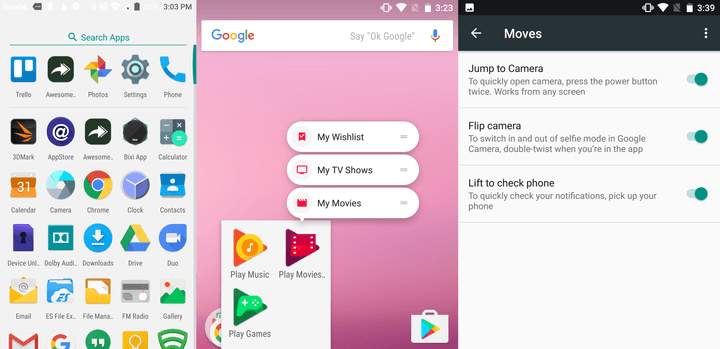
Quite a few new features were introduced in the Android 7.1.1 update.
Notably, App Shortcuts are back. The feature, introduced during the Android Nougat beta program, was briefly scrapped, but it’s returned in fully functional form. App Shortcuts mimic the 3D Touch features introduced in iOS 9 — press and hold an app icon and you’ll get a list of specific actions. The Pixel Launcher, the default home screen on Pixel smartphones, supports the feature, and third-party app developers will be able tap in on smartphones running Android 7.1.1. Apps can have up to five shortcuts, according to the Android Developers website.
In other news, a restart setting has joined Android’s power menu. Now, when you press and hold the power button on the Nexus 5X or Nexus 6P, you will have the option of power cycling the phone instead of switching it off.
A new Moves menu in Android’s Settings menu includes a number of actions that can be initiated by gesture. You can launch the camera by pressing the power button twice, switch in and out of selfie mode by double-twisting your wrist when you are in the app, and lift your phone to quickly check your notifications.
Image Keyboard, another new feature, lets you choose and send content like stickers, emojis, GIFs, and pictures from your messaging app of choice. It’s supported within Google’s Allo, Hangouts, and Messenger, apps for now, with third-party support “on the way.”
Android 7.1.1 includes a brand-new camera app. Among the features are white balance presets, exposure compensation, Automatic Exposure and Automatic Focus locking, and viewfinder grid modes. Another, Smart Burst, takes multiple photos and selects the best one.
Smart Storage automatically removes old backed-up photos and videos from your device to clear up space. They’re backed up to Photos, Google’s picture-centric cloud storage service.
Among the emoji, speaking of, are 100 additions approved by the Unicode Emoji Subcommittee, the industry consortium that oversees the approval of new keyboard characters.
“Earlier this year, we announced a proposal to promote gender equality by adding new emoji that reflect the pivotal roles women play in the world, and represent a wider range of professions for both women and men,” Google wrote in a blog post. “We included gender counterparts for emoji that previously only had male or female representation.”
The new emoji collection comprises 11 new professions available in both genders and various skin tones and ethnicities, and new female and male versions of 33 existing emoji.
A lead Pixel engineer tweeted that the devices have improved touch latency — which is also confirmed in the changelog. In plain English, that means the time it takes for your smartphone screen to respond to your finger should be much less. That’ll have the effect of improving responsiveness.

The method by which Android updates are installed is new, too. Phones will upgrade much like Chromebooks: updates will install in the background automatically, on a separate partition. When the device restarts, it’ll swaps partitions with the updated version — effectively performing the upgrade right under your nose.
Also in tow with Android 7.1.1 is Daydream VR, Google’s virtual reality platform. Circular app icons like the ones on the Pixel smartphones make an appearance, too.
A new Android on the Pixel
Perhaps the biggest Pixel feature that is not available in on any other smartphone is Google Assistant. It is tightly integrated with Pixel — just press the home button to activate the AI bot. You can ask it to help you with almost everything, from ordering an Uber to playing a song on YouTube, and more. A Google Pixel lead engineer tells Digital Trends that Google is “exploring” ways to bring Assistant to other Android devices, but it may take a while or may never even see the light of day.
“Our goal is to make the Google Assistant widely available to users, and we’ll continue to launch new surfaces over the course of the next year,” a Google spokesperson told TechCrunch.
Android 7.1.1 Nougat on Google’s Pixel smartphones looks slightly different in comparison to other Android phones, like Google’s Nexus lineup. For starters, the notification drawer is black and the brightness slider is blue, as opposed to grey and a teal blue slider on Nexus devices. These color changes are meant to accent the Pixel with Google colors — including the white, filled-in navigation buttons.


The Settings menu also features a similar black color accent, but you will immediately notice something new: you can swipe left to a new tab to access Google’s support team. You can start a phone call or a live chat to resolve any issues you have with the device. There is also a screen-share option that lets the support representative look at your phone to make things a little easier.
The Pixel Launcher is also tied to the Pixel for now, and includes a swipe feature to access the app drawer, a new search and voice search icon, the date and weather on the home page, and a dynamic calendar date icon. The latter changes the date on the Google Calendar icon to match with the actual date.
Google rebuilt the camera experience for the Pixels from the ground up. To entice consumers to try it out, the search giant’s providing a free benefit to owners: full-resolution photo and video backup to the Photos cloud. This was already an option in the Photos app, but would eat up storage in your Google account.
Electronic image stabilization, which offers smoother video playback, remains a camera feature exclusive to Pixel smartphones, too.

Because the Pixel smartphones are “made by Google,” they allow for tighter hardware and software integration — similar to how well iOS is integrated with the iPhone’s internals. An Android Sensor Hub processor in Google’s Pixels feature “tightly integrated sensors,” including the accelerometer, gyroscope, cell, GPS, Wi-Fi connectivity, and more.
Article originally published in October 2016. Updated on 02-02-2016 by Julian Chokkattu: Updated to reflect the official release of Android 7.1.2 Nougat.


