1. Home
  2. Phones
  3. Android
  4. Mobile
  5. Virtual Reality
  6. News

Over 60 ARCore apps are now available from the Google Play Store

Add as a preferred source on Google
arcore
Image used with permission by copyright holder
MWC 2026
Read our complete coverage of Mobile World Congress

Google’s ARCore was brought to version 1.0 at Mobile World Congress 2018, and since then a ton of developers have taken advantage of it, the company says.

Google just published a blog post highlighting that a hefty 60 apps have been released that use ARCore. Here’s a quick rundown of some of the biggest and coolest new AR-capable apps.

Recommended Videos

For starters, ’90s kids will appreciate My Tamagotchi Forever, in which you’ll raise your Tamagotchi characters and populate Tamatown — which is a virtual town that can exist in the real world through augmented reality. There’s also Walking Dead Our World, which is kind of like a blend of Pokémon Go and The Walking Dead, allowing you to wander the real world, hide from zombies, and so on.

It’s not just games that are taking advantage of ARCore. Some of the bigger retailers are also jumping on board. For example, through the Pottery Barn 360 Room View app, you can see how furniture would look in your home without having to actually get that furniture in. You’ll be able to do things like change the colors of the furniture, fabric, and so on. eBay is making use of ARCore too — to help you figure out what size box you need. Using the app, you’ll be able to visualize the size of box you need compared to the actual product.

We’ll continue to see more ARCore apps pop up in the near future. For a full list of the new apps, check out Google’s blog post.

According to Google, ARCore works on more than 100 million Android devices, including many flagships. All Google Pixel phones work with it, as well as the Samsung Galaxy S8 and S8 Plus, Note 8, Galaxy S7 and S7 Edge, LG V30, Asus Zenfone AR, and more. Google also announced that it is working with partners to develop more ARCore-enabled phones, including the likes of Samsung, Huawei, Motorola, Sony, and more.

Also in the theme of AR, Google also announced at MWC that it is now expanding the availability of the Google Lens preview. The feature will now be available in Google Photos across all devices with Android or iOS 9 or later, provided users have the latest Google Photos app.

Google Lens is basically Google’s take on image-based search. In other words, you can use the feature to translate text, search for products to buy, and more. Google is also adding new features in the next few weeks — including recognition for common animals, different dog breeds, different plants, and so on.

Eventually, Google wants to bring Lens to Assistant — and it is actually already available as part of Assistant on Google Pixel devices. While it is a handy feature, it will be interesting to see how Google improves it as time goes on.

Updated on March 16: Added news that over 60 apps are now available from the Google Play Store.

Christian de Looper
Christian de Looper is a long-time freelance writer who has covered every facet of the consumer tech and electric vehicle…
I let this Galaxy S26 feature handle my battery, and it actually works
Galaxy S26 on a table

I have never been particularly good at managing my phone’s battery health. I know all the advice by now — avoid charging past 80 percent, do not let the battery drain completely, try not to leave the phone plugged in overnight. I know these habits the same way I know I should probably drink more water or sleep earlier. In theory, they make perfect sense. In practice, I rarely stick to them consistently.

So when I started using the Galaxy S26 and realized that Device Care’s optimization features were quietly handling a lot of this for me, my first reaction was skepticism. Phones have offered “smart” protection tools for years now, and most of them tend to disappear into the background after you switch them on once. Half the time, I forget those settings even exist. This felt different, though. Not because it was flashy or constantly reminding me it was there, but because I could actually feel it adapting to how I used my phone, rather than forcing me to change my habits around it.

Read more
I thought I needed an iPhone Pro until I paid attention to how I actually use it
iPhone 17 Pro

For a while, I had convinced myself that my next iPhone had to be a Pro. Not because I had genuinely thought about what I needed from a phone, but because the marketing slowly wore me down. The triple cameras, the titanium build, the ProMotion display, the idea that it could handle absolutely anything — it all created this lingering feeling that choosing the regular iPhone would somehow mean compromising. Like I would be missing out on the “real” experience. Then I stopped looking at spec sheets and started looking at my actual usage. And honestly, the entire argument for buying a Pro quietly fell apart.

Apple really knows how to make you doubt the regular iPhone

Read more
I used to dread moving files between devices — now I barely think about it
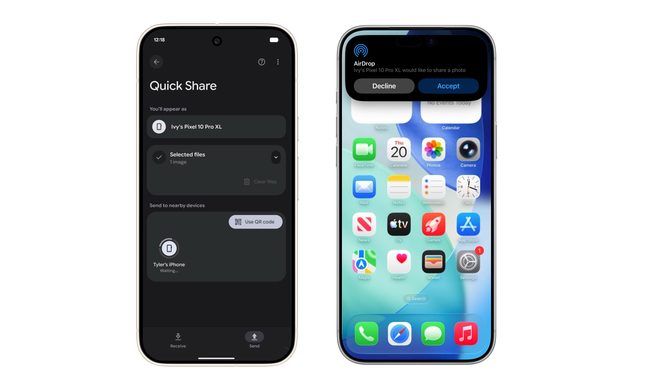
Android Quick Share with iPhone AirDrop

The kind of work I do involves constant file sharing, and with iPhones, Android phones, and a MacBook all part of my daily rotation, moving files between them used to be far more exhausting than it should have been. Something as simple as getting a photo or video from an Android phone onto my MacBook often turned into a mini process of its own. Most of the time, I had to upload files to Google Drive, wait for them to sync properly, and then download them again on the other device. It sounds manageable when you describe it once, but when you repeat that cycle several times a day, it starts feeling like a tax you pay with your time and patience.

This was mostly the result of ecosystems spending years building walls around themselves. Apple’s walls were obviously the tallest, but Android had its own barriers too. For the longest time, it felt like nobody was particularly interested in making these devices cooperate gracefully. But somewhere along the way, that started changing. And honestly, the difference it has made to my everyday workflow is much bigger than I expected.

Read more