  1. Home
  2. Phones
  3. News

Google drops a new Android Canary build, chirping with a bunch of UI changes

Android Canary 2604 is out, and the changes are small, subtle, and kind of nice.

Add as a preferred source on Google
Canary build 2604 on Pixel
Rachit Agarwal / Digital Trends

Google has released Android Canary build 2604 (ZP11.260320.007), containing a few new experimental features. Before anything else, a quick heads up: Canary builds are not meant for everyday use. They can be buggy and unstable, and features introduced here might not always make it into the final stable release. 

If you’re a developer who wants to test new builds and get ahead of upcoming changes, Canary is right up your alley. But if you are a regular Android user, I would recommend installing it only on a secondary device, and not your daily driver Android phone

Android Canary 2604 is now available for those who like to live life on the bleeding edge 😎

As usual, this build is highly experimental! Things are subject to change!

But in case you’re curious, here’s some of the changes I noticed 🧵 pic.twitter.com/EPGIz09gUu

— Mishaal Rahman (@MishaalRahman) April 14, 2026

This release supports system images for a long list of Pixel devices, from the Pixel 8 through to the Pixel 10 Pro, so most recent Pixel owners are covered.

So what has changed?

According to Google’s Mishaal Rahman, two new UI changes are being tested with the new build.

Recommended Videos

The first one is a notification shade update. Once you’ve cleared all your notifications, your phone shows you a “You’re all caught up” message instead of “No notifications.” It’s a small, humanizing touch, which feels nicer to read.

The second change involves the app shortcuts menu. If you long-press on an app icon, you’ll notice the shortcuts menu is now collapsed by default. When you tap to expand the shortcuts, the actions menu automatically collapses. 
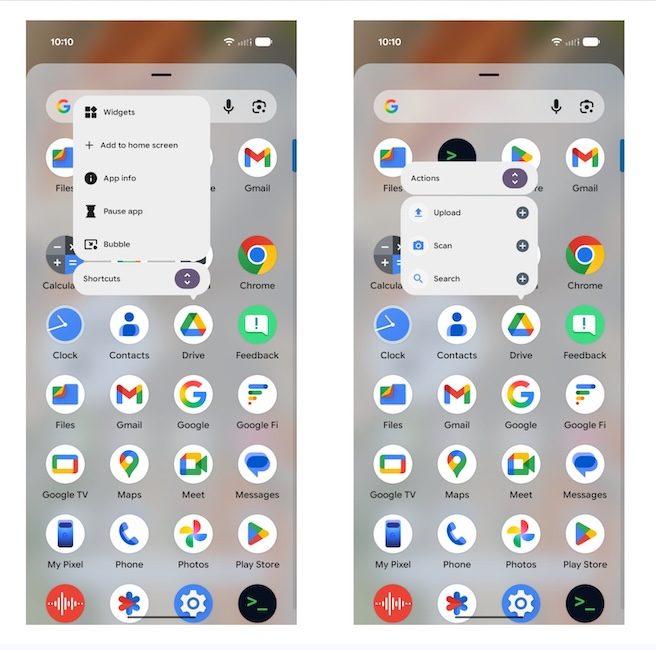
This has been done to keep things organized and less overwhelming, especially for apps that throw a dozen options at you at once. 

That being said, it does introduce an extra step for anyone who uses shortcuts, as they would have to first tap to expand the shortcut menu. 

Will these changes make it to the stable build of Android?

That’s the thing with Canary builds. There are no guarantees. It would depend on how the testers react to these features. 

If you want to test these features on your phone, remember that once you flash a Canary build, you cannot revert to a stable build without a full data wipe. So be very sure before you install it.


Rachit Agarwal
Rachit is a seasoned tech journalist with over seven years of experience covering the consumer technology landscape.
Google Play is getting TikTok-style app previews and AI-powered search
Google's new short-form video feed and conversational search tool are designed to make finding the right app faster and less frustrating.
Google Play updates I_O 2026 featured

Google is expanding how users discover apps and games on Google Play, with a series of new features announced at I/O 2026 that lean heavily on AI and short-form video.

Discovery beyond the store

Read more
Android Halo could be the missing link between Android and AI agents
Nature, Outdoors, Sky

Google is trying to solve one of the biggest problems with AI agents on smartphones: you rarely know what they are doing. At Google I/O 2026, the company previewed a new Android feature called Android Halo, designed to keep users updated on their AI agent’s activity without constantly interrupting them.

So, instead of opening a separate app or waiting awkwardly for an AI task to finish, Android Halo places subtle status updates at the top of your phone’s screen. Whether your agent is working in the background, entering live interaction mode, or sending a message, Halo keeps that progress visible in real time. And honestly, this feels like a smart direction for AI on phones.

Read more
Apple unveils new AI-powered accessibility features across iPhone, Mac, and Vision Pro
Apple Intelligence is coming to accessibility features across its ecosystem
iPhone user

Apple has announced a major set of accessibility updates across iPhone, iPad, Mac, Apple Vision Pro, and Apple TV, with many of the new features powered by Apple Intelligence. The company says the updates are designed to make devices more useful for users with visual, hearing, mobility, and learning disabilities while maintaining Apple’s privacy-focused approach to AI.

The new accessibility features will roll out later this year as part of Apple’s upcoming software updates.

Read more