1. Home
  2. Phones
  3. News

Google prepares a Live Threat Detection update to strengthen security on your Android phone

Google’s plans to give Android users more control over their phone’s safety with a new Live Threat Detection page

Add as a preferred source on Google
Advanced Protection in Android 16.
Nadeem Sarwar / Digital Trends

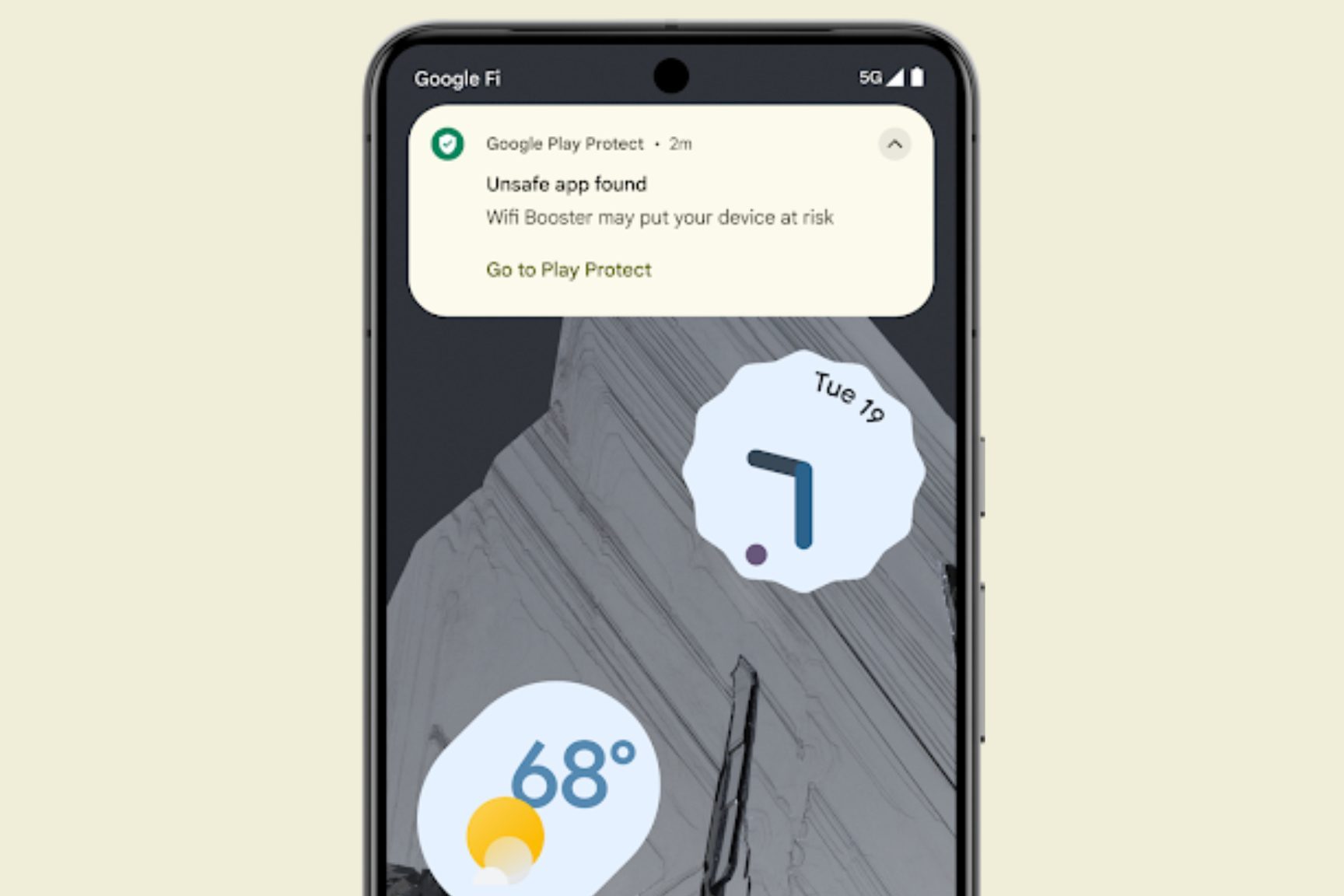
What’s happened? Last year, Google launched a Live Threat Detection feature that notifies users when a malicious app is detected. Now, the company is preparing to make some changes to it.

  • Folks at Android Authority have discovered a new Live Threat Detection page in the “U.43.playstore.pixel3.819384620” version of the Play Protect Service app.
  • This new page (likely in the Settings app) will list the applications that the on-device AI model identifies as harmful.
  • The screenshots contain a page that explains what the feature does, shows the status of any active threats, and provides other information about how it works.

Why is this important? Along with the new Live Threat Detection page, Google is also working on a new alert that warns you when an app is suspected of tracking your location or device activity.

  • While the new page and the alerts aren’t visible to users yet, they might roll out to Android 16 users in the near future.
  • The addition of a Live Threat Detection page strengthens Google’s existing Play Protect and on-device privacy safeguards by turning a background detection system into an user-facing tool.
  • The new alert for potential surveillance behavior significantly tightens defense against spyware and unauthorized tracking.
Recommended Videos

Why should I care? Whether you’re an Android-based custom UI user or a Pixel user, the additions to the Play Protect Service will help you identify malicious apps in time, preventing privacy breaches that typically go unnoticed on smartphones. Even otherwise, users could gain insight into which apps misuse permissions, helping them make faster decisions about uninstalling or restricting them.
OK, what’s next? If and when the dedicated Live Threat Detection page rolls out, it could evolve into a central console for reviewing app activity and the potential risks, possibly even beyond Pixel devices. Expect more privacy-focused, AI-driven features to show up on Android devices in the near future.  

Shikhar Mehrotra
For more than five years, Shikhar has consistently simplified developments in the field of consumer tech and presented them…
The Android Show 2026: Gemini Intelligence, Googlebook, Android 17 updates, and everything else
Gemini Intelligence, Googlebooks, Android 17, and redesigned Android Auto. Google didn't hold back at its pre-I/O show, and the main event is still a week away.
The Android Show 2026

Every year, Google front-loads its Android announcements in a separate pre-show the week before its annual I/O conference. This year, the company did exactly that, and The Android Show: I/O Edition was anything but a warmup act. 

Google showed up well prepared, with plenty of software and a major hardware announcement that took everyone by surprise. One by one, let's talk about everything, including a deeply integrated AI overhaul, a long-overdue security upgrade, an Android Auto makeover that feels like it was designed for 2026, and a brand-new laptop category. 

Read more
Samsung’s One UI 8.5 made checking free storage harder because apparently math is a feature now
One UI 8.5 just made life a little more difficult for some reason
One UI 8.5 update

With its latest major software update, Samsung has made a tiny change to One UI, which has left Galaxy users pretty frustrated. The One UI 8.5 update has removed the available storage indicator from the Device Care menu in One UI 8.5. So now, users can only see the total storage capacity and how much space is currently used, without clearly displays the amount of free space left.

Why this update has annoyed Galaxy users

Read more
Android’s new Pause Point feature puts a 10-second speed bump between you and mindless scrolling
Pause Point gives you a short window to reconsider opening a distracting app, with breathing exercises and alternative suggestions built in.
Android Pause Point screenshot.

Google is adding a new tool called Pause Point to Android's Digital Wellbeing suite that interrupts mindless scrolling with a 10-second check-in before opening a distracting app.

A middle ground between timers and lockouts

Read more