  1. Home
  2. Phones
  3. Mobile
  4. How tos

How to enable ChatGPT superpowers for Siri in iOS 18

Add as a preferred source on Google
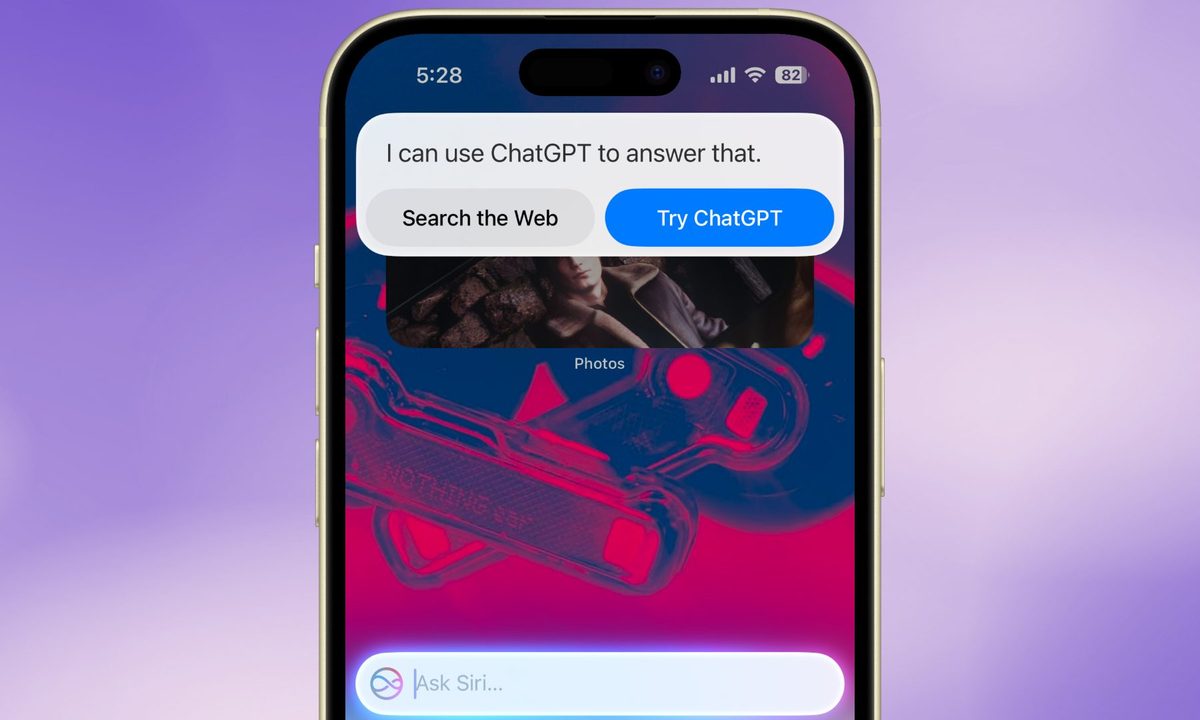
Siri offloading user query to ChatGPT.
Nadeem Sarwar / Digital Trends

Ever since Apple announced Apple Intelligence earlier this year, one of the most highly anticipated features was ChatGPT-Siri camaraderie. In a nutshell, queries will be offloaded to ChatGPT if Apple's Siri can't provide a satisfactory answer. Siri is simply getting an even smarter companion. Thanks to the multimodal (the ability to comprehend text and multimedia content) skills of ChatGPT, users will also be able to ask questions that require processing an image or file.

Recommended Videos

Difficulty

Easy

Duration

5 minutes

What You Need

  • A smartphone compatible with Apple Intelligence

This integration makes Siri far more useful than it ever was, and it's now available to anyone running an iPhone compatible with Apple Intelligence. Siri and ChatGPT are best buddies forever now that iOS 18.2 has been released to the public. Here's how to make sure it works.

Make sure you have a compatible iPhone or iPad

First thing's first: You need to be sure your iPhone or iPad actually supports Apple Intellience. We have a full list of compatible iPhones and iPads, but in short, if you have an iPhone from this year (i.e., an iPhone 16 series phone) or the iPhone 15 Pro or 15 Pro Max, then you're good to go.

If you have an iPad, then it's a little more complex. In short, you'll need an iPad with at least an M1 chip, which includes the iPad Air and iPad Pro from the last two years. Also included is the iPad mini 2024, which uses the A17 Pro processor.

Enabling ChatGPT Siri integration step 5.
Nadeem Sarwar / Digital Trends

How to enable ChatGPT integration for Siri

Months after announcing it, Apple finally enabled it with the iOS 18.2 update. And here's the best part. Users don't have to install any app or even make an OpenAI account for using ChatGPT on their iPhone. Here's what you need to do in order to enable ChatGPT for Siri commands:

Step 1: Make sure that your iPhone is running iOS 18.2 or a later version.

Step 2: Open the Settings app.

Step 3: Look for the section titled Apple Intelligence & Siri.

Enabling ChatGPT Siri integration step 1.
Nadeem Sarwar / Digital Trends

Step 4: Scroll down to the Extend Apple Intelligence & Siri section. Now, select the ChatGPT option underneath.

Enabling ChatGPT Siri integration step 2.
Nadeem Sarwar / Digital Trends

Step 5: Select Set up against the ChatGPT option at the top of the screen.

Enabling ChatGPT Siri integration step 3.
Nadeem Sarwar / Digital Trends

Step 6: On the pop-up page that appears, select Next, followed by Enable ChatGPT.

Enabling ChatGPT Siri integration step 4.
Nadeem Sarwar / Digital Trends

Step 7: On the ChatGPT page in Settings, there's another Siri header with a toggle that says Confirm ChatGPT requests. Enable this one, as well.

As mentioned above, Siri is simply tapping into the natural language and reasoning capabilities of ChatGPT, which the latter acquired after training on a vast amount of data. Therefore, users don't need to create a dedicated account or sign-in to their existing OpenAI account.

However, for users that seek to access the more advanced ChatGPT features, such as custom chatbots, they require a sign-in for verifying the subscription status. These features would require access to the ChatGPT app, which can be downloaded directly from the ChatGPT dashboard in the Settings app.

Nadeem Sarwar
Nadeem is the Managing Editor at Digital Trends.
Google’s new desktop mode makes one thing clear: Samsung DeX was onto something
Android 16 finally brings a real desktop mode to Pixel phones, but Google’s long-awaited move mostly proves Samsung spent years getting the hard parts right
File, Webpage, Person

I’ve been waiting for Android to take desktop mode seriously for years. Back in 2019, I bought a OnePlus 7 Pro and wasted an embarrassing amount of time trying to brute-force its half-baked desktop mode into something useful.

The idea made perfect sense to me even then. Phones were already absurdly powerful, and the thought of carrying one real computer in my pocket felt less like science fiction and more like delayed common sense.

Read more
The MacBook Neo made me realize Apple still doesn’t know how to do a truly great cheap iPhone
MacBook Neo gave me an iPhone 17e epiphany
iPhone 17e rear camera.

Apple’s main business still revolves around the iPhone, with roughly half of the revenue being brought in by these devices. But this is why it feels so strange that the company managed to build a better entry-level Apple laptop than an entry-level iPhone.

The MacBook Neo starts at $599 in the US, with buyers getting a full aluminum build, a 13-inch hi-res Liquid Retina display, Apple silicon, and all-day battery life. Apple is clear about what it has built. This isn't a Pro machine with the powerful M series processors. But despite the various cutbacks in hardware, it still feels like a complete product.

Read more
You can’t buy the Galaxy Z TriFold anymore: It’s officially sold out
With a 10-inch display and a lifespan shorter than most gym memberships, the TriFold is already the stuff of tech legend.
Samsung Galaxy TriFold folding, TriFold Phone

Samsung has quietly updated the Galaxy Z TriFold’s product page with a message: the company’s first tri-folding phone is now completely sold out with no restock in sight. If you were hoping to get one sometime in the future, perhaps when the phone goes on sale, it’s time to let go. 

“The limited-run Galaxy Z TriFold is now completely sold out,” an updated message on the Galaxy Z TriFold’s landing page says. The message also asks people to keep visiting Samsung’s website for “one-of-a-kind innovations” and shop for other foldables or mobile devices. 

Read more