  1. Home
  2. Phones
  3. Mobile
  4. News

Ray-Ban Meta glasses get ‘major’ update with minor feature

Add as a preferred source on Google
The Ray-Ban Meta smart glasses next to a pool.
Phil Nickinson / Digital Trends

Someone maybe should tell Meta that point releases — software updates that move things along, but maybe don’t justify entire whole-number increases in the version scheme — are a thing. But here we are, and the Ray-Ban Meta glasses have received an update to Version 8.0, a little less than seven months since things really kicked off with Version 2.0.

What changes from Version 7.0 to Version 8.0? You can now share photos to your Facebook story without having to touch anything. It’s gone hands-free. You’ll need to go into the Meta View app and connect your Facebook account, but otherwise, you’re free to tell your glasses to share whatever it is you’re looking at that simply must be shared right that second. So not quite as big a deal as when the Ray-Ban Meta tripled their recording time.

Recommended Videos

The phrase that’ll get things going, according to the changelog, is “Hey, Meta, share a photo to my Facebook Story” if you’re doing things live. Or if you want to share a picture you just took, it’s “Hey, Meta, share my last photo to Facebook.”

For what it’s worth, there’s also the requisite “bug fixes and performance enhancements” listed in the changelog.

From there, it’s just a few taps to get things going. Do note that connecting your Facebook account to Meta View will give the Facebook app access to Bluetooth, which you’ll need to manually approve.
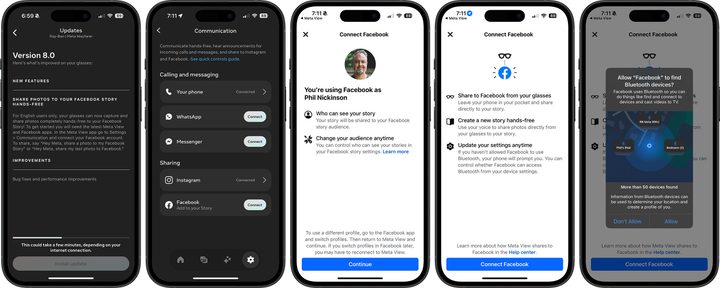
Ray-Ban Meta software update screenshots.
Screenshots

There’s also a security feature I noticed for the first time while setting this up, although it might not be new. You can auto-lock your contacts, which would keep someone from grabbing your glasses yo use them to make calls, send messages, listen to incoming messages, or share photos and videos. Turn this feature on and you’ll have to unlock your phone to do any of the above. The glasses will stay unlocked until you remove them. It’s a bit like how Apple handles things with the Apple Watch, and it’s a good feature to have.

The Meta app does warn that using auto-lock may reduce battery life, though.

Phil Nickinson
Former Section Editor, Audio/Video
Phil spent the 2000s making newspapers with the Pensacola (Fla.) News Journal, the 2010s with Android Central and then the…
The iPhone 18 Pro just leaked through a factory drop test, and Apple cannot be thrilled
Next Pro iPhone just fell out of Apple's secret vault
iPhone 18 Pro revealed in a massive leak

Most iPhone leaks are predictable. You'll see a case show up or an early leak showcase the mold of the upcoming iPhones. But the leak this time around is a bigger deal, since it has basically just revealed the device as it's being tested.

A new post from leaker Ice Universe claims to show the iPhone 18 Pro undergoing a drop test. The clip itself is short, but it gives us a proper look at an unreleased Pro iPhone in a controlled test environment. This reveals that it is durable enough to handle a basic fall, though the thickness is still surprising, and the weight is still unknown.

Read more
Leaked cases give us the clearest look yet at Samsung’s upcoming foldables
Electronics, Mobile Phone, Phone

Samsung's annual Unpacked event is just around the corner, and the company is set to take the wraps off its new foldables in July. We are expecting the Galaxy Z Fold 8, the Galaxy Z Fold 8 Wide that will compete directly with the iPhone Fold, and the Galaxy Z Flip 8 to take center stage. Ahead of the big day, a fresh batch of leaked cases, courtesy of Android Headlines, has given us our best look at these phones.

What do the cases tell us about the Fold 8 and Fold 8 Wide?

Read more
I tried a hidden video trick in iOS 27, and it saved me a ton of frustration
Better quality, smaller file size, and no status bar. iOS 27's video frame feature beats screenshots on every count.
Electronics, Mobile Phone, Phone

If you've ever been on vacation and chose to record video instead of taking photos only to avoid missing the fun moments, thinking you’d pause and take screenshots later, you might have ended up questioning your decision later. 

You see, the process involves multiple steps, starting from hunting for the right frame, pausing, and taking a screenshot. If it doesn’t look good, you go back to the video, pause somewhere else, and try taking another screenshot. You see where I’m going with this?

Read more