
  1. Home
  2. Social Media
  3. News

WhatsApp calls are about to get a lot better with noise cancellation

Noisy WhatsApp calls may soon be much easier to deal with

Add as a preferred source on Google
WhatsApp
Unsplash

The next WhatsApp update could bring a simple new upgrade that could significantly improve the calling experience. WhatsApp is rolling out a built-in noise cancellation feature for both voice and video calls in the latest beta build on Android.

The feature was spotted in the latest WhatsApp beta build for Android version 2.26.14.1, and it is currently available through the Google Play beta program.

Why this update is great for you
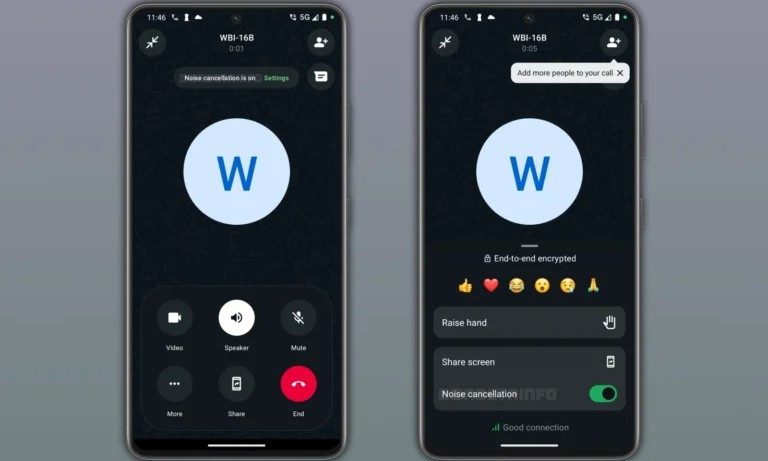
As described in a WABetaInfo report, the new option helps filter out background sounds in real time so the speaker’s voice comes through more clearly. The feature is pretty straightforward. If you are taking a call at a busy street, in a crowded room, or somewhere near traffic, WhatsApp will do a better job of cleaning up the background audio before sending it to the receiver.

Recommended Videos

So this isn’t a flashy new feature, but it’s definitely more of a practical one. Call quality upgrades rarely get the same attention as big interface changes, but this is the kind of improvement most people will notice. But considering how noise cancellation changes audio, users will get the option to toggle the feature on and off.

How it works

The report notes that some beta testers can now find a new option in the calling menu to manage noise cancellation. It is typically enabled by default once available, so it automatically applies during voice and video calls unless the user chooses otherwise.

There is a slight catch though. The feature only helps the other person hear you more clearly. So if you enable noise cancellation on your end, it only cleans up outgoing audio and doesn’t automatically improve the other caller’s voice for you.


Vikhyaat Vivek
Vikhyaat Vivek is a tech journalist and reviewer with seven years of experience covering consumer hardware, with a focus on…
You can now tell Instagram’s algorithm exactly what you want to see on your main feed
Instagram's Your Algorithm feature now lets you control what shows up in your feed
instagram-your-algorithm-main-feed

Instagram has been quietly shaping your feed for years without ever really asking what you wanted. That changes now.

Instagram head Adam Mosseri announced that Your Algorithm, a feature that lets you see and edit the topics Instagram thinks you are into, will soon be available across your main feed. It was already live on Reels and the Explore section, and this week's update brings it to the one place most people spend the most time.

Read more
UK’s film body is saving internet memes and viral videos. Yes, “Charlie bit my finger” is on the list.
Old memes are now a part of internet history
Charlie Bit my Finger Meme

The internet's goofiest little masterpieces are getting the archive treatment. The British Film Institute has preserved around 430 online videos as part of a collection meant to protect culturally significant internet moments. These include roughly three decades of British online culture, covering everything from early livestream experiments to viral memes that somehow became part of everyday language.

How memes are now a part of modern history

Read more
Instagram finally lets you rearrange your profile grid any way you want
You can now drag and drop posts anywhere on your Instagram profile grid
instagram-reorder-grid

Instagram users have been asking for this feature for years, and it’s finally here. Instagram is finally rolling out the option to reorder the grid, letting you move posts around your profile however you like.

Previously, everything on your grid appeared in chronological order, and you could pin up to three posts at the top. Instagram announced this change on X. The feature is available on the mobile Instagram app only, covering both smartphones and tablets.

Read more