  1. Home
  2. Tablets
  3. Audio / Video
  4. How tos

How to install banana plugs on speaker wire for easy connectivity

Add as a preferred source on Google
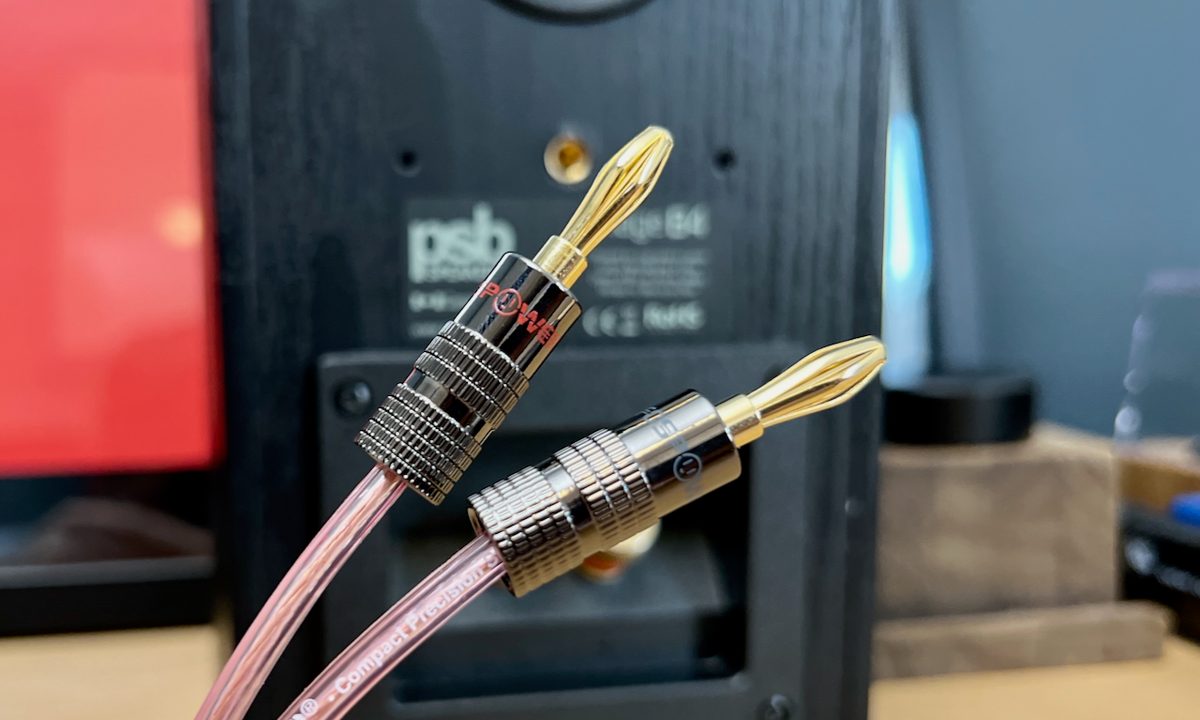
A set of banana plugs installed on speaker wire.
Derek Malcolm / Digital Trends

We set up and tear down a lot of home theater and audio/video gear on a daily basis — everything from speakers and subwoofers to amplifiers, receivers, turntables, and everything in-between. And one thing that gets old really fast is cutting, stripping, and winding raw speaker wire. It's messy, it makes connecting and disconnecting components a chore, and it can leave exposed wire hanging off the back of your speaker or receiver terminals that can result in unwanted noise or poor performance.

One of the best things you can do to improve your speaker wire situation is to install that can be plugged right into compatible speaker or receiver/amplifier terminals, similar to RCA plugs. It's cheap to do, and they look clean, provide a secure connection, and make connecting and disconnecting your components really easy.

Here's how to install banana plugs on raw speaker wire.

Recommended Videos

Difficulty

Easy

Duration

10 minutes

What You Need

  • Wire strippers, cutters, or an exacto knife

  • Raw speaker wire

  • Small screwdriver

  • A pack of banana plugs

A set of banana plugs on a table.
Derek Malcolm / Digital Trends

Grab a pack of banana plugs

There are a few different types of banana plugs you can find at your local Best Buy, audio shop, or on Amazon, but they're pretty much the same as far as installing them goes. For our purposes, we're going to go with the that you don't have to solder and that have a small screw that you tighten.

You can find banana plugs with various fastener types and every style from to and more. It's up to you what works best.

Speaker wire stripped at half an inch for installing banana plugs.
Derek Malcolm / Digital Trends

Prepare your speaker wire

After you've cut your speaker wire to the length you need, here's how to prep the ends for the banana plugs.

Step 1: Depending on the speaker wire you're using, there may be an outer jacket that conceals two separate wires inside, one red and one black. If this is the case, using your wire strippers, carefully strip back around 2 inches of that outer jacket to expose and separate the two wires.

Different types of speaker wire, like the wire we're using, comes joined together. Use an exacto knife to separate the two wires. They may or may not be color-coded.

Step 2: With your wires separated, use the wire strippers to strip roughly a half-inch of each wire's insulation from the ends to expose the raw wire. Be careful not to cut or damage any of the wire's strands.

Stripped wire and an open banana plug ready for installation.
Derek Malcolm / Digital Trends

Connect the wires to the banana plugs

With the wires exposed, you can now connect them to the banana plugs.

Step 1: First, you may have to prepare the banana plugs to accept the raw wire. In our example, you have to unscrew and separate the outer shell of the plug's housing from the internal stem. Also make sure to loosen the screws that will hold the wire in place.

Tightening the screws on a banana plug.
Derek Malcolm / Digital Trends

Step 2: Next, insert the raw end of wire into the banana plug's core and tighten the screws to secure. Do this for both the black and red plugs and then do the same for the other end of the wire, if installing on both ends.

A set of banana plugs installed on speaker wire.
Derek Malcolm / Digital Trends

Step 3: Put the outer casing of the plug back on and screw it tight. That's it, you're done.

A set of banana plugs plugged in to a speaker.
Derek Malcolm / Digital Trends

Connecting banana plugs to amps and speakers

This is the easy part. Most speakers and receivers/amplifiers will have speaker terminals that have a hole in the middle for inserting banana plugs. Some have little plastic covers over the holes that you just have to remove first. Make sure to save them in a ziploc bag or a container for safe keeping.

Similar to plugging in an RCA cable, all you have to do is plug and play!

Note: Keep in mind, though, that banana plugs will not work with those spring clips found on many speakers and receivers/amplifiers.

With banana plugs installed on all your speaker wires, connecting and disconnecting your components will not only be much easier -- especially for those of you with components tucked away in a media unit that you have to pull in and out or crawl under to access -- but the electrical connection will be much stronger and more stable than messy raw wire. Plus, it couldn't be easier to do.

Derek Malcolm
Former Contributing Editor, A/V
Derek Malcolm is a contributing editor and evergreen lead for the A/V and Home Theater section of Digital Trends. Derek…
Asus Pad comes out as a brazen iPad wannabe, but looks like a solid OLED Android slate
Asus looked at the iPad and said “Yeah, we’ll have one too”
Asus Pad

ASUS has officially unveiled the new Asus Pad, and honestly, the inspiration is impossible to ignore. From the flat metal chassis and symmetrical bezels to the magnetic keyboard accessories and stylus support, the tablet looks heavily influenced by Apple’s iPad lineup. But underneath the familiar design language sits what could actually be one of the more compelling Android tablets launched this year.

The Asus Pad arrives at a time when Android tablet makers are aggressively trying to close the gap with Apple in premium productivity-focused hardware. While many Android tablets still struggle with app optimization and ecosystem polish, companies increasingly realize that buyers care just as much about display quality, battery life, and hardware design as they do about software exclusives.

Read more
Dumb ebook readers are about to get darn smart for you with useful AI and Android support
Your e-reader is finally getting the glow-up it deserved.
Supernote nomad in hand

E Ink and MediaTek have teamed up to bring something genuinely exciting to a product category that has seen a surge in popularity in recent years. Your next e-reader might just transcribe meetings, translate languages in real time, and finally show you colors that don't look washed out.

The two companies announced an expanded collaboration built around MediaTek's new generative AI e-reader chips, the MT8115 and MT8126. These support both Linux and Android, and pack a dedicated NPU that delivers up to 7.4 TOPS of AI computing performance. 

Read more
Xiaomi Pad 8 Pro review: I swapped my trusty iPad for this and didn’t miss it at all
A rare Android tablet that will make you stick around with it for the long game.
Person using the Xiaomi Pad 8 Pro Android tablet.

For years, I've kept a default disclaimer ready whenever I am asked to recommend Android tablets. "It's good/meh, for an Android tablet." That little clarity did a lot of heavy lifting. It excused the issues with laggy apps stretched haphazardly across an oversized screen, the ho-hum firepower, and software that always felt like a phone wearing a costume two sizes too big. So when the Xiaomi Pad 8 Pro landed on my desk, I had my disclaimer loaded and ready to unload indiscriminately.

I'll save you the suspense and tell you it never came out. This slate is a genuine powerhouse, the kind of tablet that goes after the iPad Air and the Galaxy Tab S-series without flinching, and then upturns the value debate with its attractive asking price. It runs Qualcomm's top-tier Snapdragon 8 Elite, which means it can chew through all kinds of mobile tasks with ease.

Read more