

When Apple showed off the Apple Watch Ultra last September, I was excited to see it. The design alone was unique and a great change of pace from the tried-and-true design of the mainline Apple Watch Series 8. And the Action button was interesting and allowed for new possibilities for using the Apple Watch.
But one thing that was concerning for me, as well as plenty of other people, was the size. The Apple Watch Ultra only comes in one size, which is 49mm. It’s the largest Apple Watch, even beating out the 45mm of the Series 8. How would this 49mm Apple Watch Ultra look on smaller wrists, especially those of women?
Though I really liked the Apple Watch Ultra when it launched, I never thought about buying one myself just because I don’t do the “extreme” activities it was designed for. And, well, it’s very big. But I was gifted one recently, and after having it for a few weeks now, it’s really not as bad as I originally thought.
I’ve never been a watch person
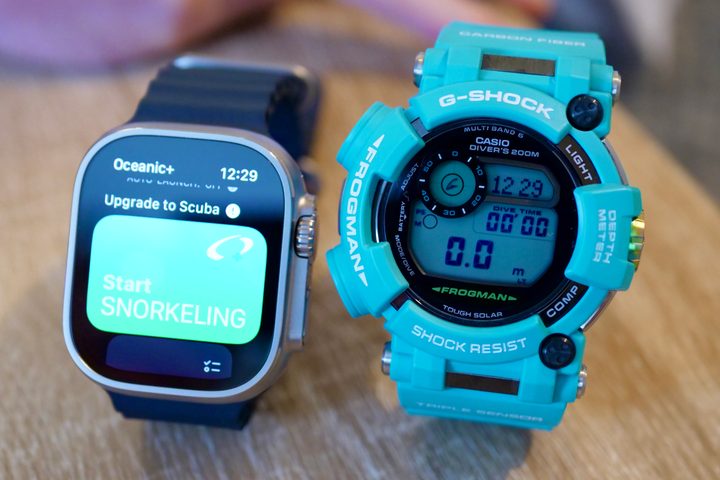
Before Apple came along with the Apple Watch and made smartwatches and wearables popular, I was never really a person who cared about watches. I remember I wore some watches when I was a kid, but I didn’t particularly care about those too much — it was just a way for me to know what time it was (this was a simple time before smartphones). I didn’t care how the watch really looked or if it would match my outfit or whatever occasion it was. Did it tell me the time? Yes? Then that’s all I needed.
There’s also the notion that watches for women had to be small and dainty; otherwise, they wouldn’t look “feminine” enough. It’s treated more like a piece of jewelry, and honestly, that just isn’t my cup of tea. Even now, I don’t really wear jewelry besides my engagement and wedding rings, and I only wore earrings once in my life to my high school prom — and I hated it. I wear necklaces every now and then, but it just becomes a hassle for me to put them on and take them off every night, so I stay away from them.
So, before the rise of smartwatches, I never considered myself much of a watch person. They were treated more like jewelry in my eyes, which I am also not big on, so they didn’t have much of a purpose for me. Just tell me the time, you know?
I’m not bothered by the Apple Watch Ultra size
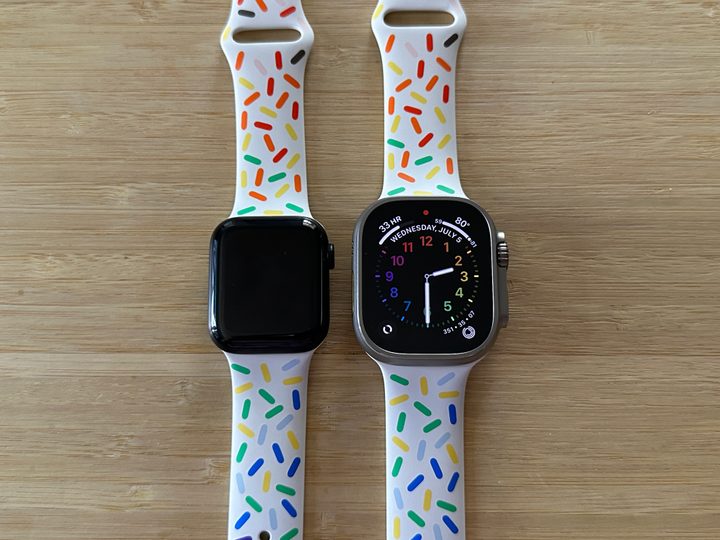
Now, I mentioned that women’s watches are typically small and dainty for that feminine look. The Apple Watch Ultra is the complete opposite of that with its large and bulky 49mm size. I think that I, along with others, have been trained for too long to think that the Apple Watch Ultra is just too big for women to wear — but it really isn’t.
Ever since I started to wear the Apple Watch in 2015, I have always opted for the smaller size option. I had the 38mm Series 0, 38mm Series 3, and 40mm Series 5. That’s because I was always under the impression that since my wrists are on the smaller side, I should have a smaller watch. And though I was fine with this for a while, I realize I was missing out on things like larger, easier-to-read displays and more informative watch faces.
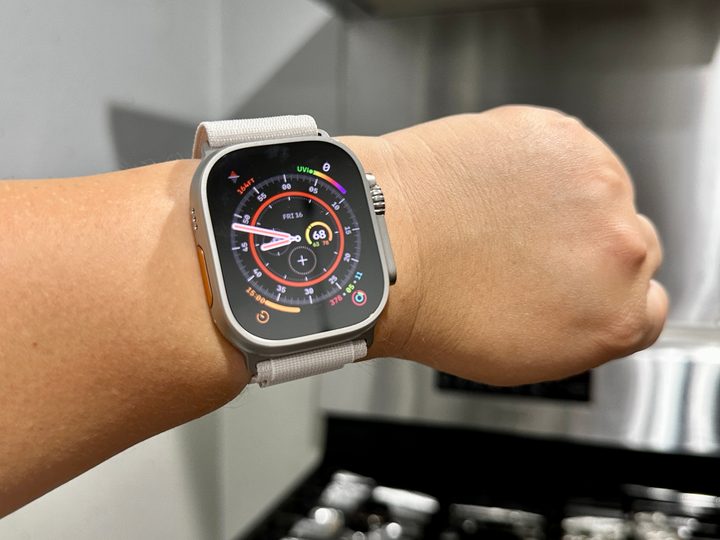
When I got my Apple Watch Ultra with the Starlight Alpine Loop watch band, I slapped that on immediately, and then I looked at my wrist with a look of shock and awe. “This thing is huge!” I said loudly to my husband.
Because of the Alpine Loop band, which I’m not that big of a fan of (at least for now), it looked like the top edge of the Apple Watch Ultra was hanging off my wrist. Clearly too big, right? One of my friends on Instagram said the giant size of the Ultra looked a little goofy on me. The Alpine Loop band certainly wasn’t helping.
I’d only purchased Apple’s Pride Edition Sport Band a few weeks before getting the Apple Watch Ultra, but of course, the one I had didn’t fit since it was for the smaller model. So I bought another Pride Edition Sport Band, this time in the larger version, and immediately put it on the Ultra once it arrived. So far, the edges of the Apple Watch Ultra don’t seem to be hanging off my wrist now, and it’s more comfortable for me to wear, so the choice of watch bands used for this really does matter.
Now that I’ve been wearing the Apple Watch Ultra with the Pride Edition Sport Band, I don’t feel like the Apple Watch Ultra is too big anymore. It feels just right on my wrist, the way my old titanium Series 5 did.
I know some people wear their Apple Watch upside down (Digital Crown and side button on the left, Action button on the right) to prevent things like accidentally pressing the side button or crown, but I haven’t had this issue in all my years of having an Apple Watch, even with the Ultra. Despite having a slightly bulkier design where the crown and button stick out a bit more than the mainline Apple Watch Series 8, it doesn’t bother me. I quickly got used to it after a few days.
The Apple Watch Ultra is for everyone, especially women

Even though the Apple Watch Ultra is primarily geared toward people who do extreme activities like hiking in the mountains, diving in the ocean, and running marathons, it’s honestly a smartwatch for everyone, including women.
One of the first things I’ve noticed since I got the Apple Watch Ultra is that having a large display is actually amazing. As someone who has only been using the smallest Apple Watch previously, I can’t believe I’ve been missing out on all that extra screen estate these years. It’s not only easier to read everything (I’m an old millennial), but it’s nice being able to see more of a notification or message on the Apple Watch Ultra screen at once without having to scroll for more.
The Action button is also a great addition (although it could be better) that I wish Apple would consider adding to the regular Apple Watches eventually. Not only does it make it easier to start workouts and mark segments (that’s what I’ve been using it for), but the Siren feature makes it possible for you to call for help by drawing attention to yourself.

Though I haven’t been in a situation where I need to activate it yet, I think it’s a great tool for women (or anyone, really) to have. I always have a fear of walking alone at night these days, and I think activating the Siren, which emits a continuous sound of up to 86 decibels, would be helpful in deterring predators (along with pepper spray or some other weapon) in vulnerable situations.
Apple finally added temperature sensors to both the Apple Watch Series 8 and Apple Watch Ultra. However, its implementation is pretty limited, as it can only take your body temperature readings at night while you sleep. But these temperature readings are used to help establish a baseline, and if a female uses Cycle Tracking in the Health app, the temperature readings can help determine estimated ovulation and menstrual cycle predictions, which are helpful for family planning.
With that in mind, those who say that the Apple Watch Ultra “isn’t for women” are really wrong, as it’s quite the opposite of that. The Apple Watch Ultra is for everyone — especially women.
Buy at Amazon


