
“Why you can trust Digital Trends – We have a 20-year history of testing, reviewing, and rating products, services and apps to help you make a sound buying decision. Find out more about how we test and score products.“
Logitech’s Brio 4K Webcam briefly had bragging rights as the maker of the only 4K Webcam, but Altia Systems’ Panacast 2 has changed that—and then some. Perhaps to sophisticated be called a mere “webcam,” — Altia calls it a “camera system” — it’s $1,000 price tag relegates it to businesses, and the most dedicated video conferencing consumers. This is a webcam on steroids
It promises a 180-degree coverage area with automatic panoramic zooming and exceptionally clear video. It’s also small and elegant in appearance. Unfortunately, the zooming feature costs extra, as does a very slick add-on called Whiteboard that automatically centers on a whiteboard during, well, a whiteboard presentation. As our Panacast 2 Camera System review will show, this gadget is high-tech and impressive — but by the time you get it decked out the way you want it, it could cost you about $1,350. For most individuals, (and even most companies) this is the kind of investment that requires serious consideration.
Small and Elegant
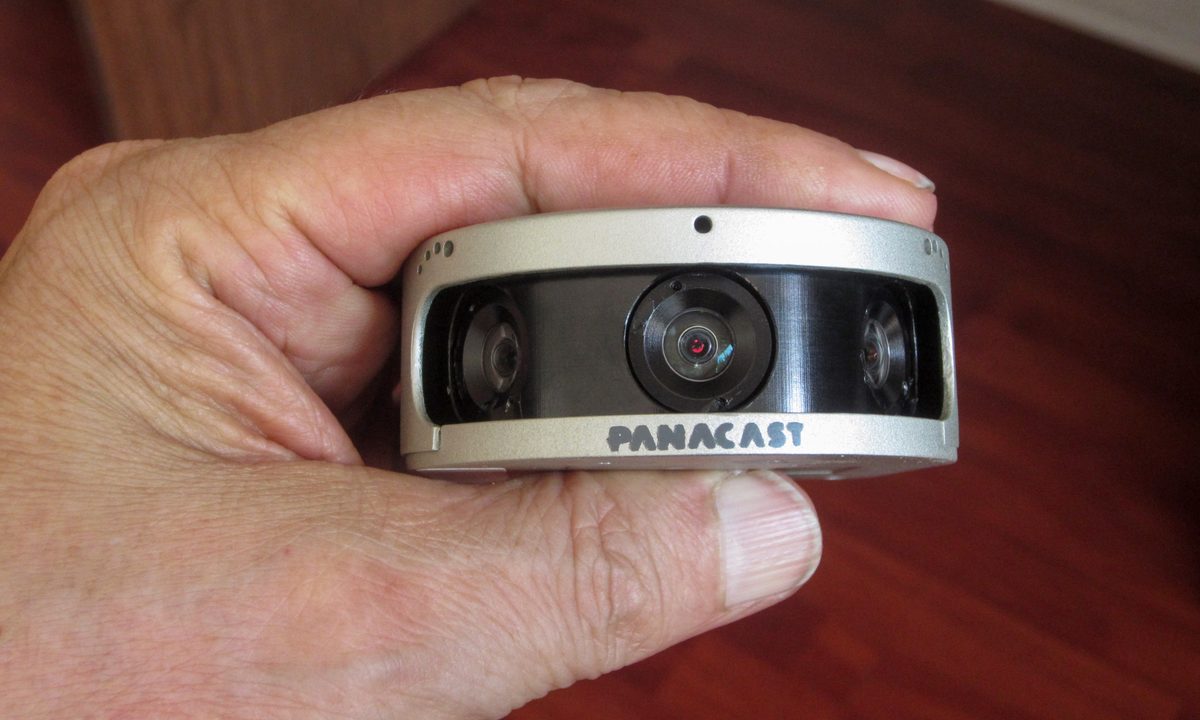
At just under an inch high, by 2.4 inches across, by 2.9 inches from front to back, and weighing 4.4 ounces, the Panacast 2 is tiny. Its encased in a classy silver cast aluminum case. Inside, you’ll find three integrated high-resolution video cameras that work in sync to provide the device’s 180-degree panoramic view.
And what a view it is. In the video itself, though we tried, we found it impossible to discern where the three video signals merge. It easily displayed most of the area in a small room, but that’s just the start. An important part of the Panacast 2—what makes it unusual—is its ability to zoom in and out automatically, based on the activity of people in the field of view.
Though we tried, we found it impossible to discern where the three video signals merge.
If one person is in the viewing area, the cameras zoom and center on that person. If another person then comes in to the cameras’ field of view, the Panacast 2 automatically zooms out to encompass that second person in the frame. As additional people come into the cameras’ viewing area, it continues to pull back, until it literally encompasses a 180-degree panorama. And, when people leave the field of view, the Panacast 2 reverses the zooming process, narrowing its perspective.
What truly impressed us was how smoothly the transitions take place, with little to no jittering, jerking, or noticeable compensation for the change in view. It just works.
Unfortunately, this functionality will cost you an additional $150 (yes, on top of the original $1,000!). The Panacast 2 doesn’t come by default with intelligent zooming turned on.
Another unique feature is a $200-per-year software add-on called Whiteboard. If you buy this, the camera — with the aid of a small target affixed to a physical whiteboard — centers itself on the actual whiteboard, excluding all else in the field of view except the presenter who might be standing in front. When the presenter moves away from the whiteboard, or somebody else in the field of view speaks, the camera automatically moves the perspective away from the whiteboard.
That’s one smart camera.
Just plug it in
Since the intelligent zoom and whiteboard are switched on from inside the camera, there is no software to install. The Panacast 2 uses Windows default video drivers, and the camera itself works with all popular video conferencing platforms, including Skype, Zoom, Cisco Webex, Google Hangouts, Office 365, Go to Meeting, and Intel Unite, among others.

To install it, all you do is plug it in via the included USB 3.0 cable. The camera does not, however, get its power through the data connection. Instead, you get a second USB cable (with a power jack at one end and standard USB fixture at the other) that you can plug into a USB port on your PC (or Mac) or into the included AC adapter, which, of course, plugs into any standard power source. We tried both methods, and it worked fine either way.
To 4K, or not to 4K
While the Panacast 2 has several terrific features, it can’t send 4K video to the other end of your video conference unless that person also has a 4K monitor or TV. Video quality is also affected by Internet bandwidth and other quality of service issues, though nowadays to a lesser degree. These may seem obvious points, but they’re worth remembering. 4K is this camera’s least accessible feature. If you’re set up to use it, though, it looks great.
Without question, the Panacast 2 performs as advertised and does so quite well, which leaves you with a $1,150 minimum price tag to contend with.
The Panacast 2 is a USB webcam on steroids.
Oh, sure, you can get it for just under $1,000, but the Panacast 2 isn’t nearly as impressive without the intelligent zoom feature. If you buy this, you’re going to want that. Otherwise, what’s the point?
The price of the Panacast 2 automatically makes it an exotic, novel product. Most people can’t afford it, and don’t need it. If you do a ton of video conferencing, however, or you need a camera that can handle you solo as easily as it can handle a crowd, check out this slick webcam. Or don’t – because once you do, you might find going back to a ‘normal’ webcam difficult.


