
USB cables and ports are one of the most common types of connectors for everyday devices like computers, smartphones, tablets, smart TVs, A/V receivers, game consoles, and many other components. Engineered for data transmission and charging capabilities, there are currently two main types of USB cables and ports: USB-A and USB-C.
When it comes to data transfer, charging, and other useful features, there are quite a few differences between USB-A and USB-C. This is why we’ve put together this guide to explain how these connections are similar, and what sets them apart from each other.
See more
What is USB-A?

USB Type-A connections refer to the physical design of the USB port. Every USB connection makes up a port in the host device, a connecting cable, and a receptor device. USB-A is a traditional USB host port design and one of the easiest to recognize on devices.
It’s a horizontal port with the bottom portion dedicated to pin connectors. This arrangement creates the infamous, one-sided USB connection that only works with the cable perfectly inserted — no matter how many times you have to try.
Interestingly, there is no USB-B host port. The USB-B connector is the receptor port on the USB device you are connecting to the host computer. Type B connections also are easy to recognize because of their square shape with rounded corners on one side, almost like the shape of a tiny house. USB type B is mainly for external peripherals, with a USB-A connection on one end and a USB-B connection. There are USB-B to USB-B cables, but they’re rarely used.
Note that there are also subsets of this design, like USB Mini-A and USB Micro-A, with different port designs, but these aren’t as important for our current discussion.
What is USB-C, and how does it differ?
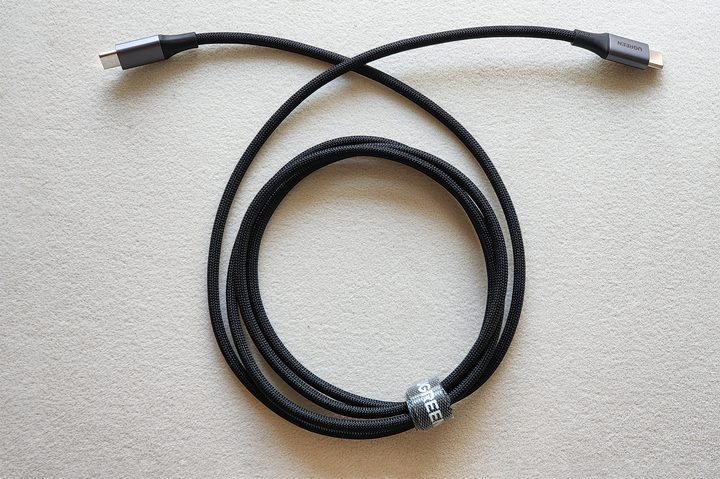
USB-C is a newer port type officially announced in 2014, although it took several years for the ports to reach widespread consumer devices, as we see today. Designed to solve many of the old USB-A port problems, USB-C is an entirely new type of USB port. Critical features of USB-C include:
- A slimmer design that fits into a port no matter which direction it’s flipped,
- A total replacement of USB-A, B, mini, and micro USB connections
- A 100-watt, 20-volt connection is far more powerful than the older port and can handily power even larger devices.
- Potential for a much higher data transfer rate than USB-A.
- Support for power delivery to charge up devices on either end (with the right cables) and charge larger devices.
- Support for video delivery at much higher quality, including transmitting 4K video to a screen.
- Support for alternate modes that allow for lots of different adapters for specific connections like HDMI or VG — or older types of USB connections.
- Potential compatibility with Thunderbolt 4 and Thunderbolt 3 connections means a USB-C port can double as a TB4 or TB3 port with extra hardware.
So, USB-C is a better connection?
With the right data standard (see below), the USB-C connection is much faster and more versatile than USB-A. In time, you can expect USB-C connections to replace all older USB-A connections and other ports. This switchover will, however, probably take years.
For now, USB-A shows up alongside the USB type C connector in many computers, primarily to deal with compatibility issues. People may still have an older device, including smartphones, beloved controllers, receivers, TVs, keyboards, and many peripherals that require a USB-A/B connection.
Most people don’t want to buy an adapter to make USB-C backward-compatible with all their stuff. As the use of these older devices fades, USB-C will become the go-to port that everyone knows to look for — and we already see this happening in some sectors.
Where does USB 3.2 fit into this?

USB 3.0 to 3.2 refers to a specific USB protocol for data when it comes to USB connections: Instead of describing the physical port, this refers to the data formats the port can handle. A notable change came with USB 3.0, which required a modification of the USB-A and USB-B designs to gain more capabilities and a faster data transfer speed. USB-A cables that support USB 3.0 and above come with a blue pin protector instead of the standard gray one.
USB 3.2 is divided into two different types. The fully updated version called USB 3.2 Gen 2×2, which is named after both the second generation and how it uses two 10Gbps lanes to reach a total of 20Gbps. The second type is an older USB 3.1 10Gbps standard that, with its latest updates, can also be referred to as USB 3.2 Gen 2.
And just to throw one more wrench into the mix, USB type A and USB-C ports can support various standards, anywhere from USB 2.0 to USB 3.2. There are no universal names for these protocols to make matters more complex, so not everyone uses the same name. For example, USB 3.1 Gen 1 is also called USB 3.0. Fortunately, USB 3.2 is backward-compatible with all other USB connections, although USB-C ports may require an adapter. You also must make sure that your USB cables and devices support 3.1 data capabilities when possible.
What about USB4?

Announced in 2019, the USB4 standard (also known as USB 4.0) is the latest addition to the USB cable and port lineup. While the technology is slowly being rolled out to modern PCs and other devices, Apple was one of the first companies to include USB4 ports on its 2020 M1 MacBook Air and Pro laptops, and M1 Mac mini.
Actually, these Apple ports are considered Thunderbolt 4 connections, that just so happen to support the USB4 standard. Not every USB4 cable and port will work with Thunderbolt 4 though.
So what are some key features for USB4? For starters, data transmission rates for the protocol are required to be at least 20Gbps, but you’ll find a lot of USB4 ports capable of 40Gbps transfer rates. And with the 2022 USB 2.0 update, you’ll even find some USB4 ports that can push up to 80Gbps.
USB4 can also deliver up to 100 watts of via power delivery, and is also backward compatible with USB 3.x, 2.x, and 1.x hardware.
The TLDR of USB-A and USB-C
If you’re feeling confused, we understand. Luckily, there are only a few simplified, crucial points that you would do best to remember:
- USB-A and USB-C can both have a degree of data standards, up to USB 3.2, which outlines their overall data capabilities.
- USB 3.2 is backward-compatible with other standards, making it an excellent standard for users, although it may call for you to use extra adapters.
- A USB-C connection is the only one that can support the full potential of USB 3.2
- Ensure that all of your external cables, cords, and devices are compatible with the USB data standard. It’s just simple matching: if you get a port with USB 3.2, your cable and connected device must also support 3.2.


