
Microsoft Office, or Microsoft 365 as it’s known today, is the full suite of Microsoft work-related applications. It includes iconic programs like Word, Excel, PowerPoint, and Outlook, as well as more modern additions like Teams and OneDrive. You can use a number of these for free in their web versions, or you can pay a monthly subscription to use their downloaded, local versions.
There is no single price for Microsoft 365, as it’s only available on the software as a service (SAAS) model, but the monthly cost differs depending on whether you’re a home user or business user, and whether you’re looking to subscribe for just yourself, or an entire team.
Here’s how much Microsoft Office is for different types of users.
How much is Microsoft 365?
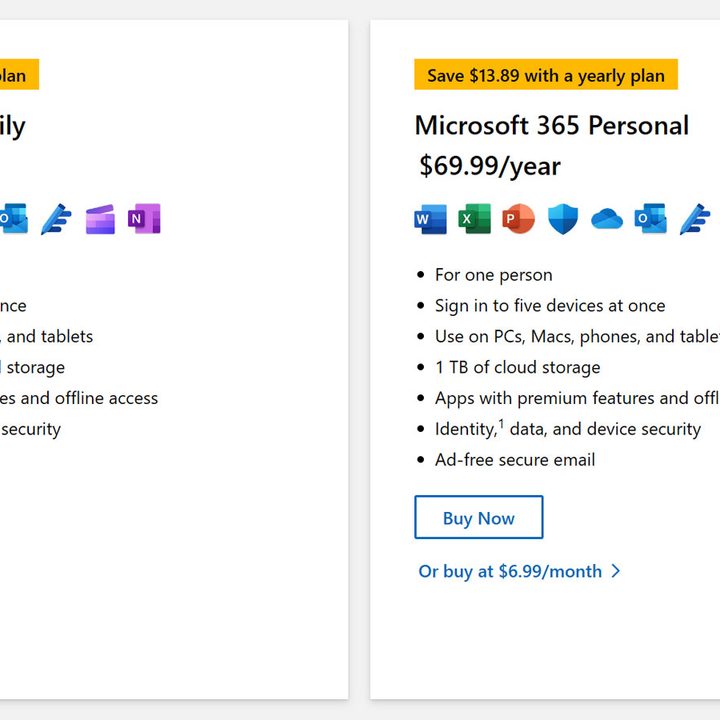
Microsoft 365 is available for home users with a monthly price of $7, of an annual price of $70. For that you get access to all the important Office applications, including Word, Excel Powerpoint, Outlook, and more. This gives you a single user access but on any of your devices, and up to five at the same time. You also get a terabyte of cloud storage space on OneDrive.
If you want to give the gift of Office apps to your whole family, you can sign up for the Microsoft 365 Family subscription at $10 a month, or $100 for the year, and you get access for up to six accounts to the various Office apps. You’ll also get 6TB of storage, so you get a terabyte each.
If you time it right, though, you can get some of these apps for less. Check out our latest Microsoft Office deals page to see if there’s a discount you can take advantage of.
How much is Microsoft 365 for business?
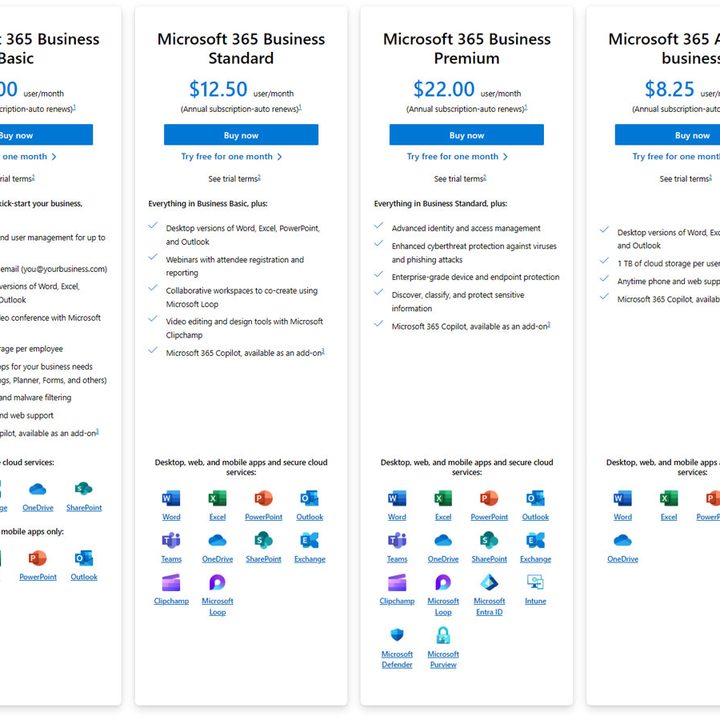
If you want to get Microsoft 365 for business, there are a few more options to select from. The cheapest option might be slightly less than the personal user option for home, but it doesn’t actually include most of the apps you’re looking for. Instead, it only gives you access to Word, Excel, and their like in the web apps. You do get cloud storage, but none of the main apps.
You can get the basics for $8.25 a month in the “Apps for Business” package, but it doesn’t come with cloud storage.
For the complete packages, you’ll need to spend at least $12.50 a month, and up to $22 per month for all of what Microsoft 365 offers. This is per user, per month, too, so if you’re looking to give a whole team access, the costs can add up.
Do you need to pay for Microsoft 365 every year?
Unfortunately, yes. There is no longer an option to buy Microsoft Office applications and then have them forever. If you don’t mind using the web-only versions then you can technically use them for as long and as often as you like, but then you’re limited to the web-version’s abilities, and there’s little privacy for your data.
You can opt to pay for it monthly instead, if you prefer, though that is more costly overall. The annual plans offer the best value for money.
If you’d rather just find another option for your office apps, check out our guide to the best Microsoft Office alternatives.
Can you get Microsoft Office for free?
Microsoft 365 isn’t available for free entirely, but there are a range of ways to use much of it for free, and you can take advantage of a free trial to have full use for a month before having to pay anything. For more help on saving money with Office, check out our guide on how to get Microsoft 365 for free.


