
They say you can’t beat the classics, and Apple apparently agrees. If industry rumors are to be believed, Apple is bringing back an old favorite to its MacBook Pro and MacBook Air in the form of MagSafe, marking a surprising about-face for the famously stubborn company.
No, we are not talking about the clip-on charging puck you get on the latest iPhones — the original MagSafe was a magnetic charging connector that swiftly disconnected when tugged to prevent your precious laptop being dragged to its doom and smashing on the floor. Its apparent return has been hailed as a step in the right direction for Apple’s laptops decked out solely in USB-C flavors, yet a lot of people seem to have forgotten what makes USB-C charging so great. The MagSafe revival might not be as good as everyone seems to think.
There are a few reasons to be cautious. The first is that it undercuts the idea of single-cable dock setups. With just one USB-C cable, you can hook up your MacBook to a multiport docking station, which provides power and a plethora of bonus ports. You can even connect a monitor or two, all with a sole cable snaking its way out of your MacBook. Throw MagSafe into the mix, though, and it is not quite the same. You will be powering up your Mac via the docking station, while having a spare (MagSafe) charging port going unused.
Having a single dedicated charging port also means you will no longer be able to juice up your MacBook on whichever side takes your fancy. One of the benefits of USB-C is that it can carry power as well as data, so on a device with USB-C ports on both sides, you can charge it up wherever works best. If your charging cable does not quite reach to the single MagSafe port, you have a problem. On a Mac powered by USB-C? Just plug it in on the other side.
USB-C ports are more flexible in other ways. We mentioned how they can carry both power and data, and that makes them extremely versatile. One USB-C port can do pretty much anything you need it to — it is one reason Apple only included a single slot on the 12-inch MacBook. MagSafe, though, is locked into a solitary purpose, with no other options or possibilities. It feels like wasted space, especially when Apple is expected to continue including USB-C ports — which already boast charging capabilities — on its future MagSafe-enabled MacBooks.
Talking of wasted space, there is the issue of size: A MagSafe port is roughly twice as wide as a USB-C equivalent. Not only is this less sleek in appearance, but it takes up more real estate, both inside and outside your MacBook. For a company as fanatical as Apple is about cramming as much tech into its devices as possible — just watch an iPhone teardown video to see what I mean — that has got to be irksome.
Reviving MagSafe the right way
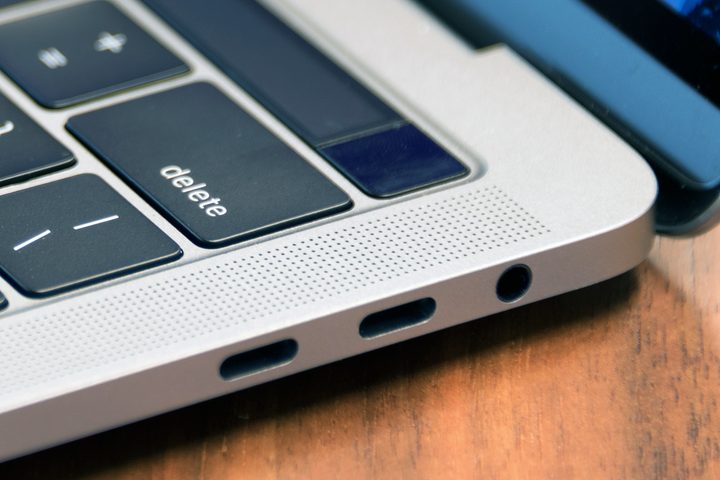
Knowing Apple, going back to implementing a chunkier, less flexible charging tech runs against the company’s way of doing things. CEO Tim Cook’s army of engineers know the value of space inside their devices. And it makes me doubt that a facsimile of the MagSafe tech that was ditched in 2016 is going to make a triumphant return completely unchanged.
I could be wrong here. Reporter Mark Gurman believes the resurrected MagSafe will be “similar to the elongated pill-shape design of the older MagSafe port,” and he has an excellent track record. But let’s imagine for a moment what Apple should do with MagSafe.
The perfect way forward, in my mind at least, is a compromise between the two worlds of USB-C and MagSafe — something that uses the USB-C port, yet brings the magnetic safety of Apple’s proprietary charging tech.
Other companies have attempted this before. There is the Griffin BreakSafe, for example, or the Magrig, both of which combine a USB-C dongle with a charging cable that magnetically attaches to it. Even Apple has worked on a similar idea. The problem with these designs, though, is that they leave the dongle in your MacBook when the cable detaches. It is my bet that most people would just leave this dongle in their laptops at all times, thus permanently decreasing the number of spare ports they have. That is not the way forward, and it is not the Apple way either.
No, Apple can do something better, something less clumsy, something that works like the old MagSafe, yet preserves all the benefits of USB-C. Just look at MagSafe on the iPhone 12: Apple knows how to make a magnetic charger that snaps on and off effortlessly and does not waste a valuable slot. That shows the company is aware of how much its device ports matter. Now it needs to apply that thinking to the Mac.
If Apple simply reverts to the old way of doing things, I will be happy to have MagSafe back on the Mac, but a little disappointed knowing the biggest tech firm on the planet took the easy way out. And that we could have had something so much better.


