A seemingly obscure little class-action lawsuit filed in 2021 exploded into the mainstream news, alleging that Google continues to track users when they’re using incognito mode on Chrome.
Of course, any savvy web user knows there’s no such thing as complete privacy on the internet. But it seems what we expect of Google Chrome’s incognito mode and what Google actually does are two different things.
It turns out Google can track everything you do, as if incognito mode did not exist. And it’s not only Google who can see you. Your internet service provider (ISP) and your employer and most of the websites you visit can also see what you’re doing.
Incognito mode is so leaky that even Google employees were joking about renaming it. That’s now what you expect from what people consider to be one of the best browsers.
Let’s dive right in.
Google can see everything you’re doing
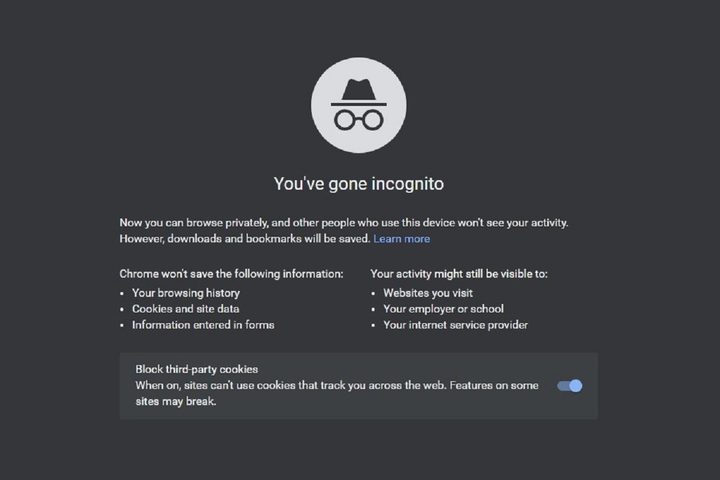
When you open incognito mode in Chrome, you’re met with a black screen featuring a cartoon icon of a spy-like hat and glasses. The first line of text reads: “Now you can browse privately.”
But it turns out you cannot browse privately, and that spy guy is actually a double-agent, spying on you.
That’s because Google continues to track everything you’re doing, incognito mode be damned.
Bloomberg uncovered Google employee emails, where engineers swapped jokes with each other about incognito mode.
“We need to stop calling it Incognito and stop using a spy guy,” One Google employee said in an email thread. Another compared the spy guy to Homer Simpson’s Guy Incognito doppelganger from an episode of the cartoon.
Your ISP can see what you’re doing
It’s not only Google tracking you when you switch to incognito mode in Chrome. Your internet service provider can also see what you’re doing.
ISPs often do the initial dirty work for record labels and movie studios when someone pirates their intellectual property. They’ll send a letter to their customer warning them that the movie or song they downloaded was illegal. However, your ISP is not obligated to do this.
So why would your internet company care what you do online? Money, of course.
Bleeping Computer reported in 2021 that a Federal Trade Commission report found ISPs were collecting and selling user data. This data included real-time user locations, web-surfing habits, sexual preferences, and other sensitive information, which was then sold to third parties.
Imagine the juicy details they’ve gleaned from your incognito adventures.
Your employer can see what you’re doing
If you’re surfing incognito at work, your network admins are able to see exactly what you’re doing. While Google claims incognito mode prevents others from seeing websites you visited, this doesn’t extend to your employer. They can access a complete history of every site you visited. That can happen even if you know how to delete your browser history.
However, this doesn’t end with employer-provided computers. If you’re using your workplace Wi-Fi, then your boss can potentially see what you’re doing on your own phone. They can even log your keystrokes and figure out your passwords to your social sites.
Google Chrome incognito cannot protect you, even on your own device.
Chrome cannot block fingerprinting
Google Chrome’s incognito mode does not block cookies completely. Instead, it deletes any cookies that may have been installed while you were surfing, and only after you close incognito mode.
But sites don’t need cookies to track you. They’re increasingly using browser fingerprinting to track you around the internet, a technique to identify you without cookies.
The system is simple in theory. Everyone has a unique setup. The combination of browser, computer, ISP, location, social media accounts in which you remain logged in, and other individually unique identifiers gives a site enough information to build a profile about you. They assign you a code, and then follow you around the internet, collecting data on everything you do.
Chrome’s incognito mode cannot stop that. Fingerprinting makes the mode practically useless.
Google disagrees
Despite lawsuits, internal employee emails, and a public unhappy with the appearance of being misled, Google insists we’ve all got it wrong.
“Incognito mode offers users a private browsing experience,” Google’s spokesperson, Jose Casteneda, said in a company statement. “We’ve been clear about how it works and what it does.”
Chrome has had a privacy option since 2008, but it wasn’t until 2015 when Google changed it to incognito mode and introduced the now-famous spy guy icon.
What Google says is clear can seem somewhat vague and misleading to others. Images of spies and a few short lines about blocking cookies may not give you the entire story.
Which browsers are private?
To be fair to Google, Chrome is not the only browser with limited privacy. Microsoft Edge’s InPrivate mode has the same lax protection as Chrome. Apple Safari’s Private Window does not cloak your IP address or block your boss from seeing what you do, although it does prevent cross-site tracking.
Other browsers offer a higher degree of privacy protection. Firefox’s Privacy Mode not only hides your surfing history and deletes cookies, but it also actively blocks trackers and fingerprinting through Enhanced Tracking Protection.
Brave is another secure browser that blocks trackers. You can also surf through the Tor network on Brave, which would help hide your data.
Here’s how to truly be incognito on the internet
So what do you do if you don’t want giant corporations, ISPs, network admins, and websites tracking everything you do online? The sad truth is, there is no way to completely mask yourself, but there are some measures you can take to limit what others can see.
For starters, you should use a secure browser. Firefox, Brave, DuckDuckGo, and a few others work hard on privacy. Of the three mainstream browsers, Apple’s Safari is probably the most secure, but you’re still giving up some data when surfing in a private window.
The next step is to use a VPN. Don’t rely on free VPNs to remain incognito. Chances are they’re tracking you just as much as the others. Also, the big three tech giants — Google, Microsoft, and Apple — all claim to offer VPNs through their premium-tier subscriptions. However, these are not true VPNs and will not mask your activity from your ISP or your boss.
What you need is one of the best VPNs, one that offers no-logging and encryption, and has plenty of nodes in different countries around the world. You also want to make sure they don’t apply data or bandwidth caps. You’ll need to pay for these luxuries, but on today’s internet, it’s worth every penny.
In the meantime, Google Chrome continues to dominate the browser landscape. This lawsuit may cost Google a lot of money when it is over, but Google will continue to find new ways to track you. It’s time you stop relying on incognito mode to keep your web browsing private.