  1. Home
  2. Phones
  3. Mobile
  4. How tos

How to type to Siri on your iPhone

Add as a preferred source on Google
Siri being shown on an iPhone 15 Pro on iOS 18.
Bryan M. Wolfe / Digital Trends

One of the big selling points of the iPhone 16 line is Apple Intelligence, which ships in iOS 18. Though it took a while for the iOS 18.1 update to actually bring Apple Intelligence to everyone with a compatible iPhone, it was worth the wait.

Recommended Videos

Difficulty

Easy

Duration

5 minutes

With Apple Intelligence, users can experience new Writing Tools, Clean Up in Photos, prioritized notifications, summarizations, and more. Apple Intelligence also makes Siri smarter, and you can either speak directly to Siri or even type your query anytime, anywhere.

But how do you type to Siri? We’ll show you how to do it.

How to enable Type to Siri in iOS 18.1

Before you can type to Siri, you have to make sure that this setting is enabled first. It should be set up when you first set up Apple Intelligence, but it’s also good to double-check.

Step 1: Launch Settings on your iPhone.

Step 2: Go to Apple Intelligence & Siri.

Step 3: Select Talk & type to Siri.

Step 4: Make sure that the toggle for Type to Siri is set to On. If you don’t want to use this feature, tap the toggle to off.

How to type to Siri

Once you have the Type to Siri option on, you can activate it at any time by double-tapping the bottom edge of your iPhone. This works on the home screen or in any app you’re currently in, so it can be invoked anytime.

Step 1: Make sure that Type to Siri is enabled using the steps above.

Step 2: Double-tap the bottom edge of your iPhone.

Double tap the bottom edge of your iPhone, type in inquiry to Siri.
Digital Trends

Step 3: Type in your query to Siri.

Step 4: Once done, tap the Up arrow button to submit your request.

Here are some examples of what you can type to Siri.
Digital Trends

Not sure what to type to Siri? Siri can answer almost anything for you. And since Apple added in a vast database of Apple product knowledge, Siri can also provide you with product support and help guides, right from your iPhone.

Here are a few examples:

  • “What’s the weather like today?”
  • “What is the current air quality?”
  • “What’s the next event on my calendar?”
  • “What do I need for groceries?”
  • “How do I toggle Wi-Fi on my iPhone?”
  • “How do I change my wallpaper on iPhone?”
  • “How do I use App Library?”
  • “Show me pictures of (some random object)”

That’s all there is to it. Now you can type to Siri anytime for whatever silly request you have.

Christine Romero-Chan
Christine Romero-Chan has been writing about technology, specifically Apple, for over a decade. She graduated from California…
Apple wants you to verify your identity before you get Education discount on products
Apple moving the US Education Store off the honor system also seems about making a globally consistent verification infrastructure that could eventually support more aggressive Education Store expansion.
Computer, Electronics, Laptop

Getting an Apple Education discount in the United States used to be as simple as claiming you’re a student or a teacher; it didn’t need a formal verification. That era is officially over. 

Starting May 8, 2026, Apple now requires formal identity verification for all Education Store purchases in the US, ending the informal honor system that was in place for years (via MacRumors). 

Read more
Whoop’s response to Fitbit Air and Google Health is real doctors, not just an AI chatbot.
In the race to own your health data, Google chose an AI, and Whoop chose a doctor. That single decision may define which fitness tracker serious health users reach for in 2026 and beyond.
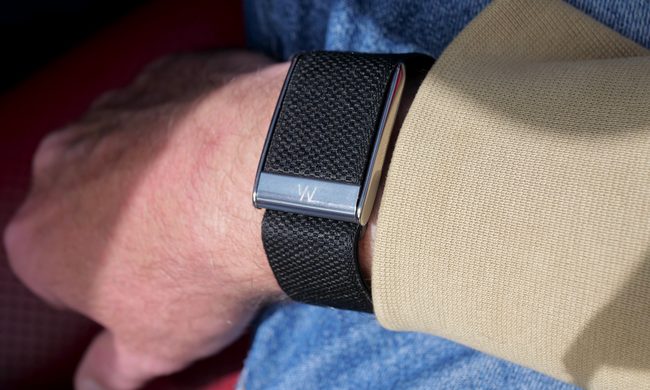
A person wearing the Whoop 5.0.

Recently, Google launched the Fitbit Air as a direct rival to the Whoop screenless fitness band, rebranded the Fitbit app to Google Health, and released a Gemini-powered AI coach. Exactly one day later, Whoop has responded with on-demand video consultations with licensed clinicians for US users. 

The contrast is hard to ignore. While Google is betting on AI as your general health advisor, Whoop is doubling down on real, licensed doctors, and making the case that they can serve its fitness-focused users considerably better (via CNBC).

Read more
Apple leak prophesizes a Spatial iPhone with a holographic 3D screen. It’s about time!
Samsung is reportedly building the holographic display, with a tentative 2030 target.
Apple-spatial-iphone-concept-image

Holograms on your iPhone sound like science fiction. But according to a fresh leak, Apple may actually be working on it. A leaker on X known as "Schrödinger" claims Apple is developing a "Spatial iPhone" with a holographic display, reportedly being built by Samsung.

The display is codenamed "MH1" (Mobile Holographic 1), and the details being floated are quite wild. You should take all of this with appropriate skepticism, though, as none of it is officially confirmed.

Read more