  1. Home
  2. Phones
  3. Mobile
  4. How tos

How to use Apple Intelligence Writing Tools on your iPhone

Add as a preferred source on Google
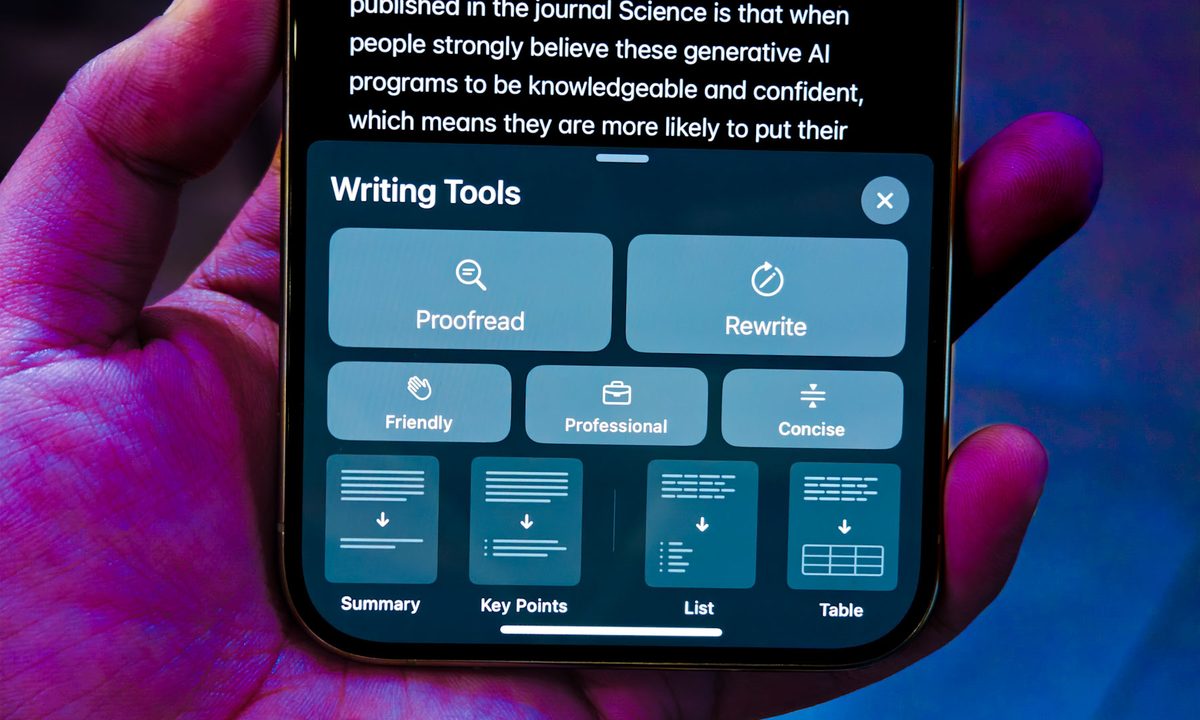
Writing Tools on iPhone 15 Pro.
Nadeem Sarwar / Digital Trends

Apple has finally joined the AI game with Apple Intelligence features in iOS 18.1, which are now available to everyone with a compatible phone. You can finally start using all of these cool new AI features, such as Writing Tools, smarter Siri, Clean Up in Photos, and more.

Recommended Videos

Difficulty

Easy

Duration

5 minutes

What You Need

  • A compatible iPhone

  • iOS 18.1

The Writing Tools are one of the main features of iOS 18's Apple Intelligence, but how do you access them after turning on Apple Intelligence? It’s actually pretty easy.

How to proofread text with Writing Tools on iPhone

Say you just wrote something and need a quick spelling and grammar check, but no one else is available to give it a look at the moment. Proofread is one of the Writing Tools available, and it’s accessible at any time on your iPhone.

Step 1: While you write, select the text that you want to refine.

Step 2: Select Writing tools from the pop-up menu. If it isn’t showing, select the arrow button (>) to reveal more options.

Step 3: Select Proofread.

Step 4: Apple Intelligence then checks the text for any grammatical and spelling errors. Any changes will have a glowing underline.

Step 5: From there, you can View changes and explanation for the change, Discard a change (Use original), or Switch between the updated and original versions of the text.

Step 6: If you don’t want these changes, just select Revert. If you do want the changes, then tap Done.

View changes, view explanations, view original, select Revert to change back or Done to save.
Digital Trends

How to rewrite text with Writing Tools on iPhone

Perhaps you just wrote down a lot of text and want to rewrite it so that everything reads just right. Apple Intelligence can do that for you too.

Step 1: While you write, select the text that you want to refine.

Step 2: Select Writing tools from the menu.

Step 3: There are two options you can go with here: Rewrite or Rewrite with a particular tone (Friendly, Professional, or Concise).

Select text, select Writing Tools, select Rewrite.
Digital Trends

Step 4: Select the option you want.

Step 5: Apple Intelligence rewrites your text based on your selection.

Step 6: If you don’t like it and want to try again, select Retry. Or you can switch between the updated and original versions by selecting Original.

Step 7: Select Done when you are satisfied.

Choose one of three tones to rewrite your text into with Apple Intelligence.
Digital Trends

How to summarize and organize text with Writing Tools on iPhone

Have a lot of text and just want an easily digestible summary of key points? Apple Intelligence can do that too.

Step 1: Select the text you want to refine.

Step 2: Select Writing tools.

Step 3: Select Summarize for a summary of the text.

Step 4: Select Key points to get a summary of just the key points.

Step 5: Select List to organize the text into a list format.

Step 6: Select Table to organize the text into a table.

Step 7: Once you view your summarized text, there are more options you can take with the summary.

Step 8: Select Copy to copy the summary.

Step 9: Select Replace to replace the original text with the summarized text. This is not available if the source text is not editable.

Step 10: Select Share to share the summary.

Christine Romero-Chan
Christine Romero-Chan has been writing about technology, specifically Apple, for over a decade. She graduated from California…
Next-gen Siri will sync your AI chats and spread them across Apple’s walled garden
Apple wants Siri to become ChatGPT with an iCloud subscription
Siri

Apple’s long-delayed AI overhaul may finally be starting to take shape, and the company appears ready to push Siri far deeper into its ecosystem than before. According to a new report from Mark Gurman, Apple is developing a major Siri upgrade that will synchronize AI conversations across devices through iCloud, turning the assistant into a more persistent and connected AI system inside Apple’s tightly controlled ecosystem.

The upcoming Siri redesign is reportedly being prepared as part of Apple’s broader iOS 27 and iOS 28 strategy, with the company positioning the assistant more directly against AI products like Google Gemini and ChatGPT. Instead of functioning as a simple voice tool, Siri is expected to evolve into a conversational AI assistant capable of maintaining synced chat histories across iPhones, iPads, Macs, and other Apple hardware.

Read more
iPhone 18 Pro’s big camera upgrade might cut deeper in your wallet
Apple’s next big iPhone camera upgrade might hurt your wallet
iphone 18 pro

Apple’s next-generation Pro iPhone could arrive with one of the biggest camera upgrades the company has introduced in years. But according to new analyst reports quoted by Forbes, that improvement may also come with a significant increase in manufacturing costs - raising fresh questions about whether future iPhone prices could climb even higher.

The focus of the latest leak is the iPhone 18 Pro and iPhone 18 Pro Max, which are expected to debut a new variable aperture camera system. Supply chain analyst Ming-Chi Kuo claims the upgraded camera module could cost Apple roughly 50 percent more than the camera hardware currently used in its Pro models.

Read more
Motorola just leaked its next Android phone, and it could be the perfect mid-ranger for you
More than the confirmed specifications, I’m concerned about the Indian pricing and the US availability.
Electronics, Mobile Phone, Phone

Motorola has done something unusual. Before officially unveiling the Edge 70 Pro+ on June 4, 2026, in India, the brand had published all the specifications, pictures, and other marketing material related to the phone on its website. 

It’s all there, before the launch, leaving nothing for the rumor mill to speculate about. And it isn’t accidental, because the landing page hasn’t been taken down. It just says that the product is currently out of stock while revealing everything else. 

Read more