

Apple has begun rolling out Apple Intelligence to those with eligible iPhones through the latest iOS 18.1 update. Apple Intelligence was originally shown off during WWDC 2024 in June and has been available to those on the developer and public betas. However, as of today, iOS 18.1 is available to everyone, though Apple Intelligence is only available for the iPhone 15 Pro models and the entire iPhone 16 lineup.
With iOS 18.1, those users can now access several Apple Intelligence features, including Writing Tools, a more natural and capable Siri, summarize notifications, a smarter Photos app, and priority messages in Mail. Be aware that these are just a fraction of Apple Intelligence features — there are even more AI tools coming in iOS 18.2, which is currently in beta.

First, the Writing Tools. These are integrated into iOS 18.1 systemwide and allow users to rewrite, proofread, and summarize text in pretty much any app. This includes Mail, Messages, Notes, Pages, and even third-party apps.
Rewrite adjusts the tone of the message to different versions for the task at hand. Proofread checks the grammar, spelling, word choice, and sentence structure while also providing suggestions and explanations that can be reviewed. Summarize allows users to select text and get a summary in the form of an easy-to-read paragraph, bulleted key points, a table, or just a list.

Siri should be smarter than before, as it now can understand natural language and is more flexible and integrated into the overall system experience. With Apple Intelligence, Siri gets a new design interface with a glowing light that wraps around the edge of the screen. Siri can understand speech when users stumble over their words and maintain context from one request to the next. You can even type to Siri at any time. Apple also gave Siri extensive product knowledge, so you can ask Siri for support with other Apple products.

The Photos app has also gained some new superpowers. It now features natural language search, which also works on videos, not just photos. By natural language, it means Siri will be able to understand requests like “Maya skateboarding in a tie-dye shirt.” For videos, it will jump to that specific moment in the clip that matches your inquiry. Siri will even offer smart completion suggestions.
Photos now has the Clean Up tool. With Clean Up, you can remove unwanted objects or people in a photo. There is also the new Memories feature that lets users create movies by typing in a description.
Priority Messages in Mail is a new section that sits at the top of your inbox. This Priority Messages section will show you the most urgent emails, such as same-day invitations or a boarding pass. Across the entire inbox, you can get summaries of messages without having to open it, as well as summarizations of long threads. There is also Smart Reply, which provides suggestions for quick responses to your messages by identifying questions in an email.
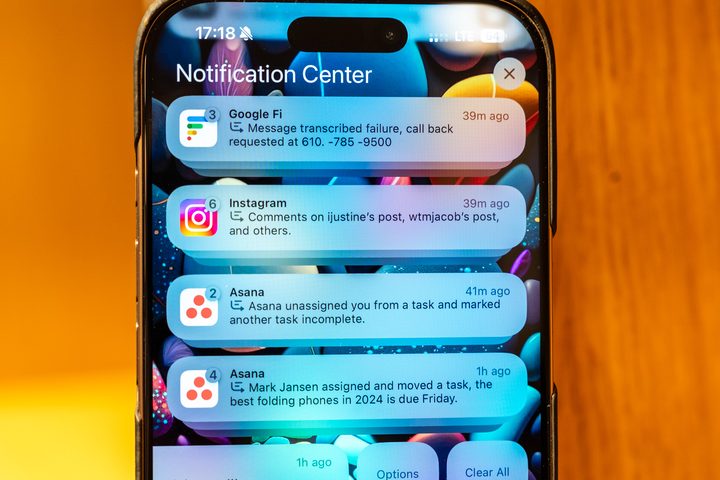
Notifications will also be prioritized and summarized. Reduce Interruptions is also a new Focus mode that will only show notifications that may need immediate attention.
The Summarization tool also works in the Notes and Phone apps. For Notes, users can record, transcribe, and summarize audio. The Phone app now lets you record calls, and participants will automatically be notified, so you’re not impeding on any privacy concerns. Once a recorded call ends, Apple Intelligence gives you a summary of key points.
These are just a few of the Apple Intelligence features that are now available for everyone on iOS 18.1 who has a compatible device. Apple will add more Apple Intelligence features in December and the coming months with iOS 18.2 and beyond. These upcoming features include Genmoji creation, Image Wand, ChatGPT, Visual Intelligence, and more.
You can get iOS 18.1 now on your iPhone by going to Settings > General > Software Update. Once you have updated, you must enable Apple Intelligence by going to Settings > Apple Intelligence and Siri > Join Waitlist.


