
For the average computer user, surfing the web usually doesn’t come with a lot of invisibility. If it’s not an advertising agency trying to target you, it could be a nefarious criminal looking to steal your passwords. While it’s significantly harder than it once was, it is possible to stay anonymous online.
We’ve found five different ways for you to help protect your identity and sensitive information while you surf the web.
Level 1: Browse in private whenever possible
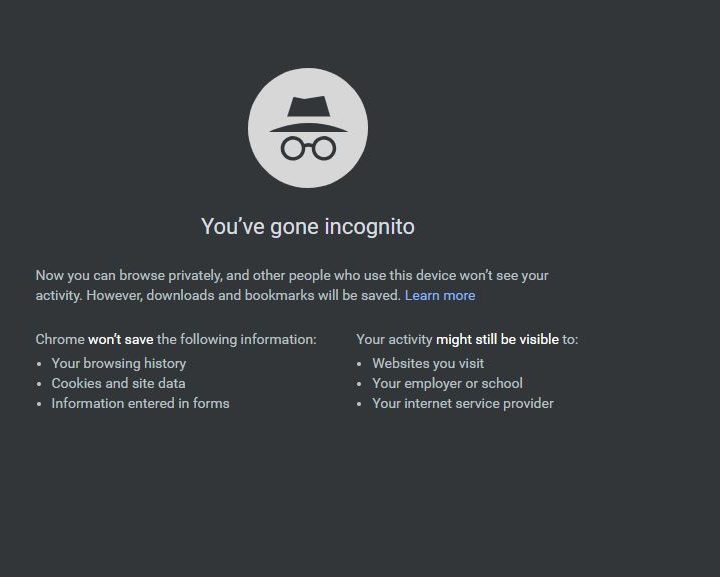
Browsing in private mode is the simplest thing you can do to make some of your general internet usage a bit more anonymous.
Here’s how it works: You leave cookies every time you visit a website. These cookies are stored on your computer and hold a modest amount of data based on what websites you’ve visited, allowing other web pages to deliver an experience tailored to you. That could be Facebook showing you an ad for that new MacBook you searched for on Google or YouTube, seeing that you’ve been looking up videos about the new Samsung Galaxy Note 9 phone. These cookies can be used to create a unique fingerprint based on the data that’s been collected.
Just browse in incognito mode to avoid all that. All modern browsers have a private browsing feature, including on mobile. As this mode warns, internet service providers (ISPs) and others may still be able to track all your browsing activity. Still, it helps keep you more private from the websites themselves and anyone looking at your history on the local machine.
Level 2: Avoid Google (or Bing or Yahoo)

Google, Bing, and Yahoo might be the three most popular search engines, but the trio also collects the most data about you to serve relevant ads and personalize services. Especially when logged in with your account, these search engines can collect your name, email address, birthday, gender, and phone number. Asides from that, Google and Bing can also collect important data such as device location, device information, IP address, and cookie data.
To avoid being tracked when searching on the web, we recommend you use a service like DuckDuckGo. This an independent search engine that doesn’t give you personalized search results. Everyone who searches sees the same results, and anything you search for won’t be collected or stored. The search engine also claims it has nothing to sell to advertisers, which means you won’t ever be subject to targeted ads seen when using Google and other websites.
If you really can’t give up Google for various reasons, you can customize it to be targeted less. Log into your Google account and choose Privacy & Personalization, then choose Ad Personalization from the next screen. Where it says Ad Personalization ON, turn the toggle off. You can also go through all the brands that track you via your Google Account activity and turn them off one by one if you want to block tracking selectively.
Level 3: Hide your IP address and location

The next important thing you can do to stay anonymous is to hide your IP address, which is the easiest way to trace online activity back to you. If someone knows your IP address, they can easily determine the server’s geographic location that hosts that address and get a rough idea of where you’re located. Broadly speaking, there are three ways to obscure your IP address and hide your location.
First, you can use a virtual private network (VPN). For most intents and purposes, a VPN obscures your IP address, and a proxy does the same — and in some cases, even better. A VPN is a private, encrypted network that “tunnels” through a public network (usually the internet) to connect remote sites or users. Today’s VPNs do far more than encrypt your data, however. You can choose which VPN server that you want to connect with anywhere in the world, making it appear that your point of origin is anywhere you want it to be. The best VPNs also refuse to track your activity themselves (some keep logs) and have extra features like kill switches that will instantly cut your connection if it looks like something is going wrong with encryption.
However, you can also use TOR. Short for The Onion Router, TOR is a network of virtual tunnels that allows people and groups to improve their privacy and security on the Internet. Browsing with TOR is a lot like simultaneously using hundreds of different proxies that are randomized periodically.
Level 4: Use anonymous email and communication

Using proxies, VPNs, and TOR will obscure your IP address from prying eyes, but sending emails presents a different anonymity challenge. Let’s say you want to send somebody an email, but you don’t want them to know your email address. Generally speaking, there are two ways to go about this.
The first is to use an alias. An alias is essentially a forwarding address. When you send mail through an alias, the recipient will only see your forwarding address and not your real email. Since all mail is forwarded to your regular inbox, this method will keep your real email address secret, but it will not, however, keep you from being spammed like crazy.
Secondly, you can use a disposable email account. This can be done in two ways: Either you can create a new email account with a fake name and use it for the duration of your needs, or you can use a disposable email service. These services work by creating a temporary forwarding address that is deleted after a certain amount of time, so they’re great for signing up for stuff on sites you don’t trust and keeping your inbox from being flooded with spam.
Also, using a VPN and communicating through an anonymous email address will keep your identity hidden. However, it still leaves open the possibility of your emails being intercepted through a middleman. To avoid this, you can encrypt your emails before sending them using HTTPS in your web-based email client, which adds SSL/TLS encryption to all your communications. For webchats, you also can consider using TOR chat, an encrypted chat service that is hard to break.
Level 5: Leave no trace on a computer with TAILS

As incredible as it may seem, you don’t have to be a magician to be able to use the internet on any computer without leaving any evidence of your usage behind. A Linux OS called TAILS offers you the tools that achieve this kind of online privacy. The TAILS system is small enough to fit on a USB flash drive, so you can plug it into any computer you’re using.
TAILS loads up TOR when you plug the device in and opens up your operating system home screen. Then, you use the internet as usual. Since you’re using the operating system from the flash drive, none of the programs or internet history will show up on the computer you’re using. The TOR encryption also ensures that your online activity, including files, emails, and instant messages, remains completely untraceable. Everything you’ve ever done online on any computer fits into this small device that only you can access.
You can download TAILS directly from its organization at any time. TAILS makes frequent updates to stay current and to continue to improve its security so that it guarantees no traces. This is a great option to use to ensure total privacy when using other computers, but you’ll have to make sure you’re keeping it up-to-date without maxing out the storage size of your flash drive.


