1. Home
  2. Computing
  3. News

Perplexity’s Comet browser goes free and it’s an easy pick over Chrome or Safari

This is the AI browser of the future, and it delivers far more substance than hype.

Add as a preferred source on Google
Assistant sidebar in Perplexity Comet browser.
Nadeem Sarwar / Digital Trends

I recently wrote about the massive shift happening in the browser world, and how AI-powered skills and shortcuts have dramatically changed the experience. Perplexity’s Comet is leading that race, and after months of remaining exclusive to paid users, it is now freely available for all without any invite hassles. 

Why does it matter? 

Comet is built atop the Chromium engine, which means all your browsing data (extensions, history, bookmarks, and log-ins) can seamlessly be carried over. It offers a sleek UI with a lovely dark mode look, but there are a few functional add-ons that set it far apart. 

Recommended Videos

The persistent Assistant, which can be accessed in a sidebar within every tab, is a fantastic way to dig for further information without having to open another tab. It is contextually aware, which means you can ask it to summarize information and take any action related to the content appearing on the screen. 
Moreover, you can easily combine multiple tabs to take actions, such as clustering a dozen Amazon tabs to compare products. And thanks to the connector system, the AI assistant can also take action across services such as Gmail and WhatsApp using natural language commands. It’s pretty terrific to witness in action. 

How does it redraw the lines? 

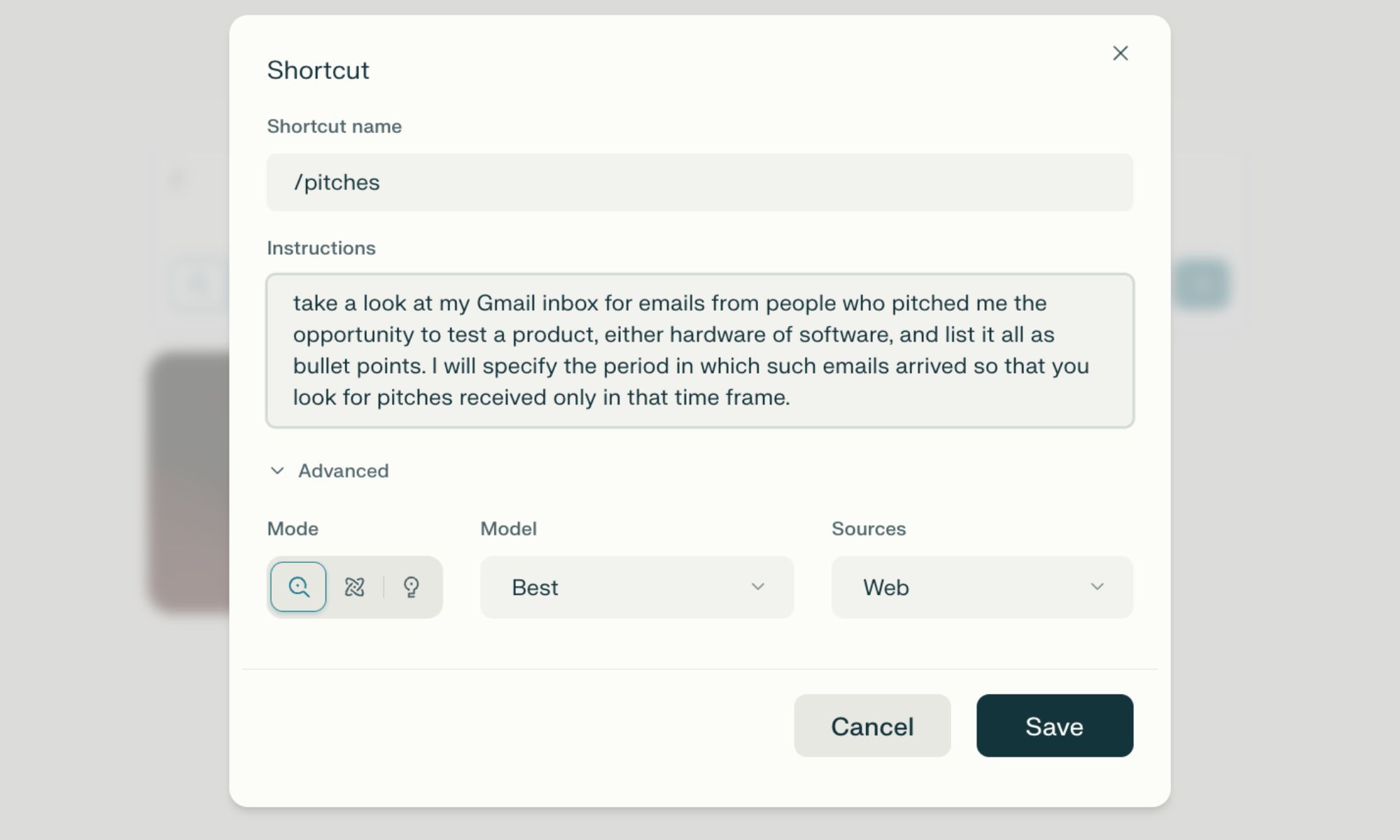
My favorite Comet feature is shortcuts. Think of it as custom agents designed to autonomously perform multi-step tasks with a simplem one-word command. You can create these shortcuts by just describing their intended action, giving them personalized names, and summoning them using a “/” query. It’s pretty simple, but extremely convenient.

I have created shortcuts that do a deep background research, pull up information from specified sources, find discount codes, launch my work tabs with a single click, and more. You can switch between multiple AI models, such as OpenAI’s GPT or Anthropic’s Claude, and take advantage of agentic features such as Deep Research, similar to what you get with ChatGPT and Gemini. 

Talking about agentic usage, the built-in AI agent can also handle multi-step tasks autonomously. For example, it can place an order on Amazon by just saying “order items for making chicken salad. Pick the fastest delivery option.” Overall, the browser is a rewarding experience, primarily because it can handle repetitive tasks and make quick work of activities that would otherwise take plenty of manual work. 

Nadeem Sarwar
Nadeem is the Managing Editor at Digital Trends.
Your Windows 11 PC can now natively run AI workloads, even if it lacks the Copilot+ badge
Windows 11 laptop on a table

For the better part of a year, Microsoft has been telling us that the future of AI on Windows belongs to Copilot+ PCs. If you wanted Microsoft’s most advanced local AI features, you needed a machine with a dedicated Neural Processing Unit (NPU). That was the deal. Now, Microsoft appears to be rewriting the rules.

According to updated documentation, Windows 11’s local Language Model APIs can now run on non-Copilot+ PCs, provided they have an Nvidia GeForce RTX 30-series GPU (or newer) with at least 6GB of VRAM. On the surface, this sounds like a developer-focused update. In reality, it could be one of the most significant shifts in Microsoft’s AI PC strategy since Copilot+ PCs launched last year. More importantly, it raises a question that has been lingering ever since the AI PC era began: Did we really need NPUs for all of this in the first place?

Read more
The Windows 11 June update makes your Start menu and Search feel much more snappier
Low Latency Profile is the first targeted fix Microsoft has shipped for shell responsiveness, and the June update brings it to every eligible PC rather than just Insider preview testers.
Windows 11 Laptop

If you’ve ever clicked on the Start button and watched the menu appear after a second or two, you already understand the problem Microsoft is trying to solve with its June 2026 Windows 11 update. 

The update (KB5094126) rolled out on June 9, 2026, for WIndows 11 24H2 and 25H2, and targets the shell responsiveness issues that have quietly frustrated users since its launch in 2021. The headline change is the broad rollout of the Low Latency Profile.

Read more
OpenAI teams up with Visa to enable secure payments through AI agents
ChatGPT could soon buy things on your behalf thanks to OpenAI's new Visa partnership
openai-chatgpt-visa-payment

Imagine telling ChatGPT to reorder your paper towels or find the best wireless headphones in your budget, and it just handles the purchase without you lifting a finger. That is exactly what OpenAI and Visa are now building toward.

The two companies announced a strategic partnership at the Visa Payments Forum, with plans to bring Visa's global payment infrastructure directly into OpenAI's AI agent experiences, including ChatGPT and the Atlas browser.

Read more