
AMD’s Ryzen 3950X and 3900X lead the previous generation of Ryzen processors. The Zen 2 microarchitecture behind these two AMD CPUs brought multiple improvements and cemented AMD as the desktop market leader. Although the 3950X and 3900X sit next to each other in the Ryzen 3000 lineup, nearly $250 separates the two.
It’s a question if you want a high-end or super high-end processor, really. Still, we’ve rounded up everything you need to know about the 3950X and 3900X, how they compare, and which one you should buy in 2021.
Pricing and availability
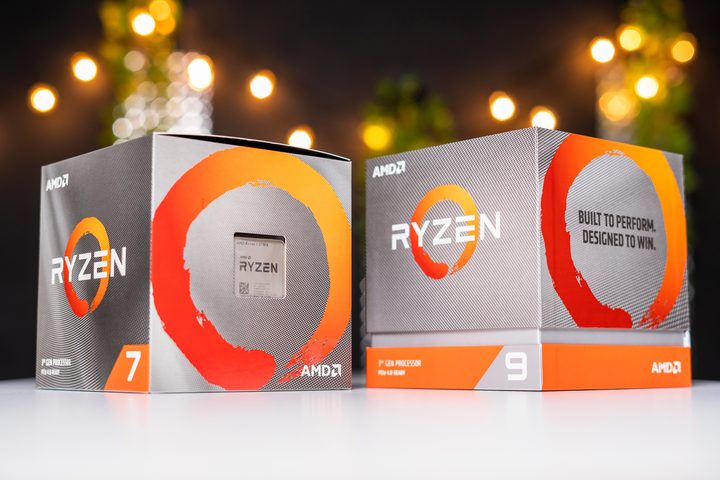
The AMD Ryzen 3900X was launched alongside the rest of the Ryzen 3000 range in July 2019 at $499. The AMD Ryzen 3950X was initially scheduled for a September 2019 release, but that was pushed back to November over alleged issues with hitting its rated clock speed. It was eventually unveiled and released in November 2019 for $750.
With the launch of Ryzen 5000, both processors have seen a slight dip in price. The 3900X now sells for around $485, and the 3950X sells for around $710. A surge of demand in 2020 caused shortages of nearly all processors. As of March 2021, we didn’t have any issues tracking down either of these processors. That said, you may have to look at a few retailers.
If you’re interested in the 3900X or 3950X, it’s best to pick up one now. Availability isn’t a big issue at the moment, but AMD will begin phasing out these processors before long.
Performance
The Ryzen 3900X was the flagship chip of the Ryzen’s third generation (before the 3900XT, that is). The 3950X beats both. These are both extremely powerful, high-end CPUs. They’re arguably HEDT chips, despite their targeting of the more mainstream sector, and their specifications reflect that. They’ve each been found faster than Intel’s most capable HEDT CPUs, too.
| CPU | Cores | Threads | L3 cache | Base clock | Boost clock (single core) | TDP |
| AMD Ryzen 3900X | 12 | 24 | 64MB | 3.8GHz | 4.6GHz | 105w |
| AMD Ryzen 3950X | 16 | 32 | 64MB | 3.5GHz | 4.7GHz | 105w |
The biggest differences between these two CPUs are their core and thread counts. With an additional four cores and eight threads, the Ryzen 3950X is the more capable multithreaded CPU. Finding tasks that can take advantage of that many cores and threads, though, is another matter. Unless you are doing heavy video editing or video transcoding, then you are unlikely to really make use of those additional threads. They would certainly be spinning their wheels in gaming.
Indeed, the 3900X is arguably an overkill CPU just for gaming, but if you game and stream at the same time, both of these CPUs excel. Amazingly, considering its additional cores, the 3950X is slightly faster than the 3900X at gaming too, but only slightly.
Benchmarks put the 3950X a few frames ahead of the 3900X at 1080p. As the resolution climbs, though, the gap shrinks. At 1440p and above, you won’t notice a difference in gaming between the 3950X and 3900X. Your GPU becomes a bottleneck at higher resolutions, so you’re effectively wasting money with the 3950X if you’re primarily focused on gaming.
The differences come in CPU-intensive tasks like video transcoding and 3D modeling. In Blender, the 3950X outperforms the 3900X by nearly 30%. However, the 3950X doesn’t stand up in all applications. There’s little difference between it and the 3900X in Adobe Premiere Pro, for example, and their multi-threaded compression performance is identical.
When it comes to the raw power of these high-end chips, the question really is whether you can make use of the extra cores and whether saving those few seconds (or maybe minutes in the case of heavy workloads) will be worth spending twice as much. The 3950X isn’t twice as powerful, showing the effects of diminishing returns.
Certain applications show little difference between the two processors, as well. If you’re worried about Premiere performance, for example, the 3900X still gets most of the way there.
TDP is the same for both chips, but note the lower base clock of the 3950X. You’ll want to make sure you have strong cooling for either of these processors, but especially so with the 3950X to make sure it maintains a high boost clock speed.
3900X offers far more bang for your buck, but …
If we look at these two chips purely in the microcosm of this head-to-head, there are two definitive statements that we can make. The 3950X is the better of the two chips, but the 3900X represents far greater value for money. On a dollar-to-performance basis, there isn’t much of a comparison. The 3950X gives you a couple of extra frames per second when gaming and reduces run times of certain productivity tasks between 10% and 30%, depending on how heavily multithreaded the application is.
If you’re solely a gamer, then there’s a strong possibility you haven’t heard of either of these chips. The 3700X and 3800X are incredibly similar to both new options, but they don’t compare to the 3900X and 3950X price tag. To get the best value for the money, you can’t go wrong with the 3900x, which is comparable to the other options while being affordable. We noticed one major downside, though: if your software uses up to 24 threads, chances are pretty likely it’ll do the same with 32 threads.
While that isn’t a guarantee, the odds are high. Finding the right multithreaded chip will shave seconds off of your computer’s rendering time, so it might be worth investing in the 3950x instead.
However, if you have some extra money to play with, we recommend you splurge on the Theadripper 3000 CPU. This chip takes multithreaded power to a completely different playing field with its 128 threads and 64 cores.


