

Looking for a business-minded laptop with a 360 hinge and a touchscreen? We’ve got two of the best options in this category to compare.
The first is Dell’s Latitude 7400 2-in-1, which offers a rock-solid build, a small chassis thanks to some tiny bezels, and a low-power Full HD (1,920 x 1,080) display that contributes some of the best battery life we’ve seen. Lenovo has its challenger, though, in a newly redesigned ThinkPad x1 Yoga that trades the usual carbon fiber for an all-aluminum build. Is that enough to take on the outstanding Latitude 7400?
Design

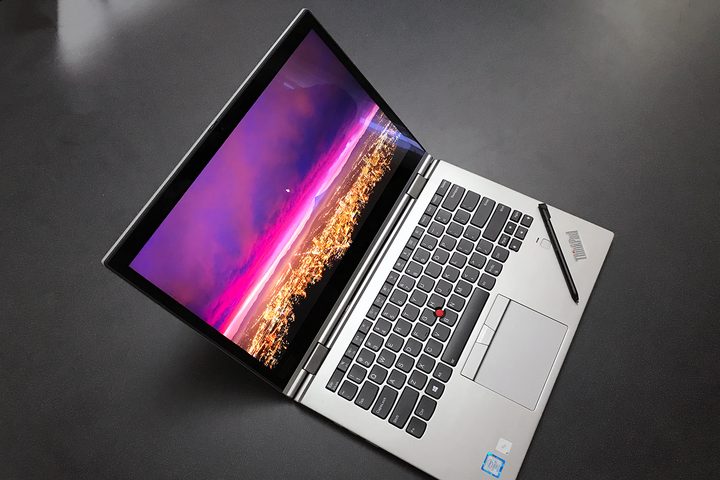
We called the Latitude 7400 2-in-1 a “sleek” laptop in our review, and we meant it. It’s dark silver color combines with forward-sweeping angles to compel us to dub it the DeLorean of laptops. It’s a great look. The ThinkPad X1 Yoga 4th-gen is also a sleek laptop, in a dark gray that maintains the usual ThinkPad aesthetic with red logo and nubbin in the middle of the keyboard. You can’t go wrong with either laptop.
Also, both are incredibly well-built. They’re solid as a rock, without any flexing or bending in the lid, keyboard deck, or chassis bottom, and they both are designed to meet MIL-STD-810G standards for durability. These laptops can take a beating and keep on working.
In terms of their sizes, the Latitude 7400 2-in-1 wins out. It uses extremely small bezels to fit its 14-inch display into one of the smallest chassis you’ll find in this class of machine. The ThinkPad X1 Yoga doesn’t quite keep up, especially in its top and bottom bezels. You’ll find the Latitude 7400 to fit more comfortably in your backpack. Interestingly, they both weigh 2.99 pounds, which is relatively light for 14-inch 2-in-1s.
Both laptops have outstanding keyboards with copious amounts of travel and precise, snappy mechanisms. If we had to choose between the two, we’d opt for the ThinkPad’s excellent version — there aren’t many better keyboards on the market. Both also have nicely sized touchpads with Microsoft Precision touchpad support and excellent Windows 10 multitouch gesture performance, while the ThinkPad adds in the usual red TrackPoint that offers yet another way to control the cursor.
You won’t have any problems connecting peripherals to either of these 2-in-1s. The Latitude 7400 2-in-1 has two USB-C 3.1 ports with Thunderbolt 3, a full-size HDMI port, two USB-A 3.1 Gen 1 ports, a microSD reader, a smart card reader, and an optional cellular SIM slot. The ThinkPad X1 Yoga is similar, with two USB-C ports with Thunderbolt 3, 2 USB-A 3.1 Gen 1 ports, an HDMI port, and an Ethernet extension port for connecting to a wired network. There are also several docks available for the ThinkPad that make use of its side mechanical docking connection, and it also has an available cellular connection. Both support gigabit 802.11ac Wi-Fi and Bluetooth 5.
Performance
Similarly, the Latitude 7400 2-in-1 and ThinkPad X1 Yoga offer a choice of 8th-generation Intel CPUs, from the Core i5-8265U up to the Core i7-8665U with vPro for better business security. Both can be configured with up to 16GB of RAM and fast 1TB PCIe SSDs.
A primary point of divergence between these two laptops is in their display choices. The Latitude 7400 2-in-1 is limited to a 14-inch Full HD touch display that uses proprietary technology to reduce power and contribute tremendously to battery life. The ThinkPad X1 Yoga, on the other hand, offers a range of displays, including a touch 14-inch Full HD display, a WQHD (2,560 x 1,440) touch panel, and a 4K UHD (3,840 x 2,160) screen with Dolby Vision HDR400 high dynamic range (HDR) support.
You won’t be disappointed with the performance of either of these laptops. However, the ThinkPad X1 Yoga offers a broader variety of displays.
Portability

The Latitude 7400 2-in-1 is a tiny laptop, fitting into a chassis that’s closer to a 13-inch laptop in size. That gives it a slight advantage over the ThinkPad X1 Yoga, which isn’t a large laptop on its own.
We do need to make special note, though, of the Latitude 7400 2-in-1s spectacular battery life. Given its low-power Full HD display and its large 78 watt-hour battery option, it showed off some of the longest battery life we’ve seen. For example, it lasted almost 22 hours looping our test video, the longest we’ve recorded, and over 14.5 hours in our web browsing test. The ThinkPad X1 Yoga is limited to a 51 watt-hour battery and doesn’t enjoy a low-power option, and so its battery life is bound to be significantly less.
The Latitude 7400 2-in-1 is the most portable 14-inch convertible on the market. It gains a strong win here.
The Latitude 7400 2-in-1 is a winning combination

The Latitude 7400 2-in-1 is a costly machine. It starts at $1,599 for a Core i5-8265U, 8GB of RAM, a 128GB SSD, and ramps up to $2,803 for a Core i7-8665U, 16GB RAM, and a 1TB SSD.
The ThinkPad X1 Yoga is no budget laptop either. It starts at $1,595 fora Core i5-8265U, 8GB of RAM, a 256GB SSD, and a Full HD touch display. At the high end, you’ll spend $2,666 for a Core i7-8665U, 16GB of RAM, a 1TB SSD, and a 4K display.
The Dell Latitude 7400 2-in-1 wins out for its extremely long battery life and tiny chassis, although the ThinkPad X1 Yoga remains an excellent choice for anyone who wants a higher resolution display.


