  1. Home
  2. Computing
  3. News

Intel’s most powerful CPUs may not launch until 2024

Add as a preferred source on Google
Intel Core i9-13900K held between fingertips.
Jacob Roach / Digital Trends

Intel’s next two generations of desktop CPUs are both exciting and confusing. Luckily, new information has come to light around what to expect.

The report comes from German publication Igor’s Lab, which claims to have seen Intel’s internal performance projections for these next two generations of chips. The report also affirms some of the details in Intel’s desktop road map, including that the 14th-gen fall release will be a Raptor Lake Refresh rather than true Meteor Lake desktop chips. It also says the 15th-gen Arrow Lake is anticipated to launch in 2024.

Recommended Videos

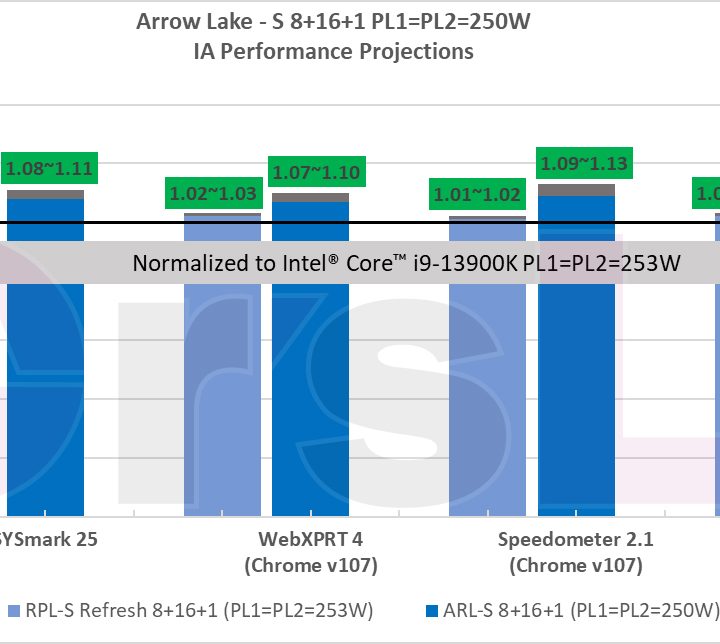
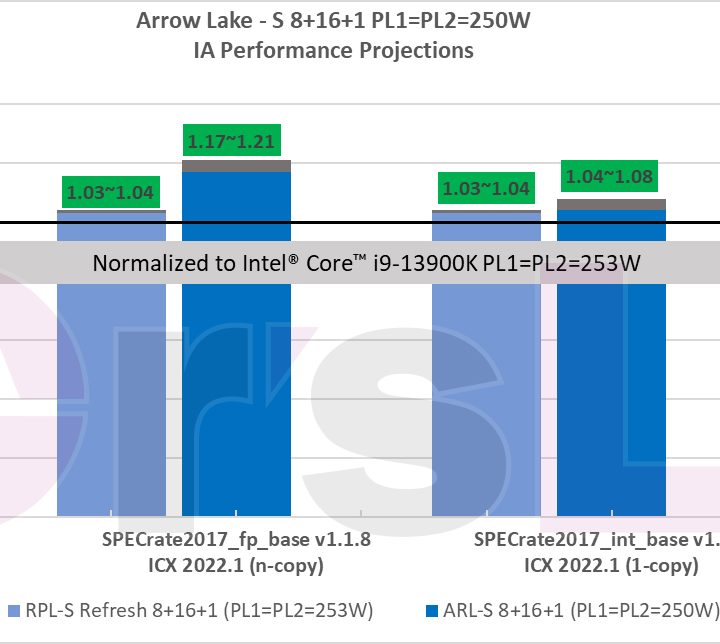
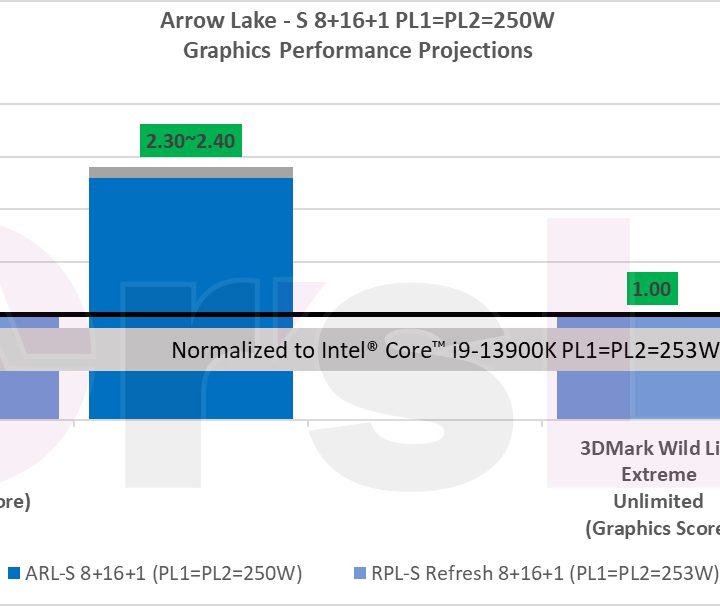
To ensure a fair comparison, Intel has used the current-gen Core i9-13900K for normalization with corresponding models of Raptor Lake Refresh and Arrow Lake. It is important to note that these numbers are just an estimate and will potentially differ from the final performance numbers of the upcoming CPUs.

All three processors share the same configuration, with eight performance cores and 16 efficiency cores. The numbers also suggest that Arrow Lake will consume almost the same power as Raptor Lake. The PL1 and PL2 for Raptor Lake and Raptor Lake refresh is set to 253 watts, while Arrow Lake is set to 250W.
Intel 14th-gen and 15th-gen performance projections slide
Image credits: Igor’s Lab Image used with permission by copyright holder

The first graph suggests that Raptor Lake Refresh will offer a performance increase between 1% to 3%, which will be primarily due to increased clock speeds that are expected to go as high as 6GHz. Arrow Lake, on the other hand, delivers a 7% to 20% performance increase, where the highest improvements are set to be in multi-core operations.
Intel 14th-gen and 15th-gen performance projections slide 2
Image credits: Igor’s Lab Image used with permission by copyright holder

The next slide focuses on the SPEC CPU benchmark package that contains standardized, CPU-intensive suites for measuring and comparing compute-intensive performances. This ensures a comparative measurement of compute-intensive performance across broad a spectrum of hardware using workloads derived from real user applications. Here, Raptor Lake Refresh experences a gain of 1% to 4%, depending on the application. Arrow Lake gains performance ranging from 3% to 21%, which is a significant jump, specifically in the floating-point runs.
Intel 14th-gen and 15th-gen iGPU performance projections slide
Image credits: Igor’s Lab Image used with permission by copyright holder

The last graph gives us information about the integrated graphics. Raptor Lake Refresh uses the same HD 700 series GPU as the Core i9-13900K, with 32 EUs and clock speeds of up to 1.65GHz. Since both are using the same configuration, the performance is also similar. However, Arrow Lake will be using the new Xe LP graphics, and will also be the first desktop CPU where the integrated GPU is mounted using Foveros packaging that stacks chipsets vertically. While there is no confirmation around the number of EUs or the clock speeds, the slide suggests an impressive increase of 220% to 240% compared to the 100% of Raptor Lake.

Arrow Lake is also expected to arrive with a new socket that is rumored to be LGA1851. While the dimensions of the socket are expected to be similar to the LGA1700, it will have 9% more pins. Thus, Intel should introduce motherboards with 800-series chipsets. As for cooler manufacturers, they might need to introduce new mounting hardware once again. Of course, none of this information is final and could change at the last minute.

Kunal Khullar
Kunal Khullar is a computing writer at Digital Trends who contributes to various topics, including CPUs, GPUs, monitors, and…
Windows 11’s modern Media Player is somehow worse than the version from 17 years ago
The modern Media Player for Windows 11 is slower and heavier than the classic version
Windows 11 media player user interface

Microsoft has released a new Insider Preview update for the modern Windows 11 Media Player. However, the app is facing criticism after tests revealed it uses more memory and opens local video files more slowly than the classic 17-year-old Windows Media Player.

The update adds some useful fixes, including better captions, clearer codec errors, and improved file recognition. But the biggest complaints remain higher RAM usage and paid codec support for some common video formats. The update is not available to everyone yet. Media Player version 11.2605.14.0 has only arrived on Experimental Insider builds as part of Microsoft’s June 12 Insider Preview releases.

Read more
If you have a Mac, you should try this free and beautifully-designed disk space tool
Radix is a free open-source alternative to paid Mac disk analyzers
File, Electronics, Mobile Phone

Running out of storage on a Mac is common, but Apple’s built-in storage tools are not always great at showing what is actually taking up space. You usually get broad categories, but finding the exact folders, downloads, app files, or old projects causing the problem can still take some work.

Radix is a free, open-source Mac app that tries to make that process clearer. It is a disk space analyzer that scans a folder, drive, or volume and displays the results in an interactive sunburst chart. Rather than digging through folders manually, you get a visual overview of how storage is being used across your drive.

Read more
This free Mac app puts stunning glassy widgets on your lock screen
WidgetScreen brings weather, calendar, battery, and music widgets to your Mac lock screen
Aquatic, Water, Animal

The Mac lock screen has always felt a little underused. You see the time, your wallpaper, and not much else. macOS already supports desktop widgets, but once your Mac is locked, that extra information disappears.

WidgetScreen is trying to fix that in a pretty simple way. The free Mac app, made by UK computer science student Sam Cook, adds glassy widgets to the lock screen so you can quickly check things like the weather, clock, calendar, battery, music playback, countdowns, and system information.

Read more