


After releasing its “pro” Powerplay wireless charging system and mice last summer, Logitech returns with an affordable wireless mouse for mainstream PC gamers. Called the G305, the new peripheral is based on Logitech’s Lightspeed wireless technology promising wired-like performance only seen in the company’s premium mice lineup. What you won’t see here is a premium price. The G305 ships this month for $59.99.
PC gamers looking for lots of bling in a mouse need to look elsewhere. The Logitech G305 takes a simplistic approach, sporting a slim, compact design for easy portability. Yet despite its initial ambidextrous appearance, it’s mostly built for right-handed gamers, shoving two thumb buttons onto the left side. Lefties can still use this mouse, but Logitech reserves leftie-friendly features for its higher-priced mice.
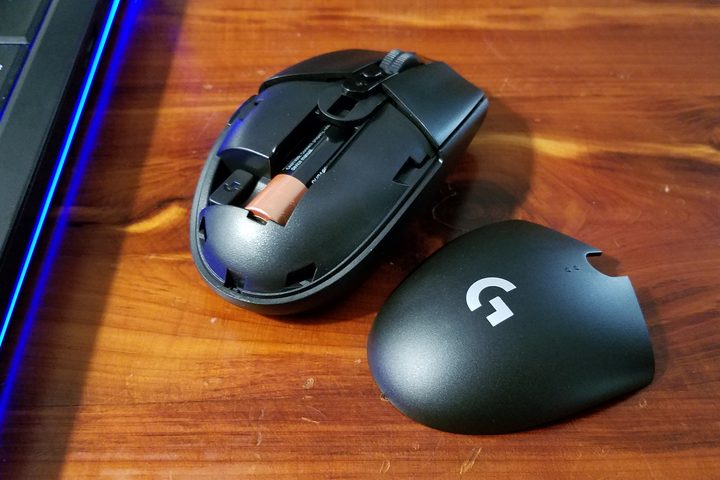
That said, if you’re migrating from a higher-class gaming mouse like Logitech’s G903, the G305 will feel minimalistic in size and features. Its slim form factor makes it a great solution for gaming-on-the-go, and the bundled miniature USB dongle fits nice and snug next to the single AA battery under the palm rest lid. Overall, it’s a solid, high-quality device that doesn’t feel too small in your hand.
Lightspeed wireless performance
Logitech’s marketing push behind the G305 focuses on two components: The optical sensor and wireless connection. We’ve seen the Hero sensor before in Logitech’s G603 gaming mouse, short for High Efficiency Rating Optical. Logitech built this sensor from scratch to squeeze out lots of high-performance tracking without gobbling the peripheral’s battery. Logitech says this sensor provides up to 10 times more power efficiency than its 3366 optical sensor.
As for the wireless connectivity, we know this technology well: Lightspeed. In this case, Logitech boasts that it brought professional-grade wireless gaming to the mainstream. It’s still a 2.4GHz connection, but what’s important to note here is that Logitech’s proprietary wireless technology enables wired-like report rates of one millisecond. That’s how many times the mouse can report to the parent PC each second. Bluetooth ranges between 7.5 and 11.25 milliseconds.
We tested the mouse in some rounds of Destiny 2, a first-person shooter that requires some twitchy reflexes. Partnered with an Alienware R4 laptop, we didn’t experience any input lag using the mouse. Given it uses the same wireless technology as the “pro” G903, we expected the G305 would provide top-notch performance. It didn’t fail those expectations, even in the Crucible.
But the cost of a one-millisecond report rate is an overall reduced battery life. To tackle this problem, you can use the free Logitech Gaming Software desktop client to adjust the rate between 125Hz (8ms), 250Hz (4ms), 500Hz (2ms), and 1,000Hz (1ms). Thus, if you’re not gaming, the default 125Hz setting is ideal and doesn’t present any noticeable lag during general use. You’ll find two power modes as well – Lo (nine months) and High (250 hours) — that simply toggles between 125Hz and 1,000Hz rates.
Not a slouch in customization
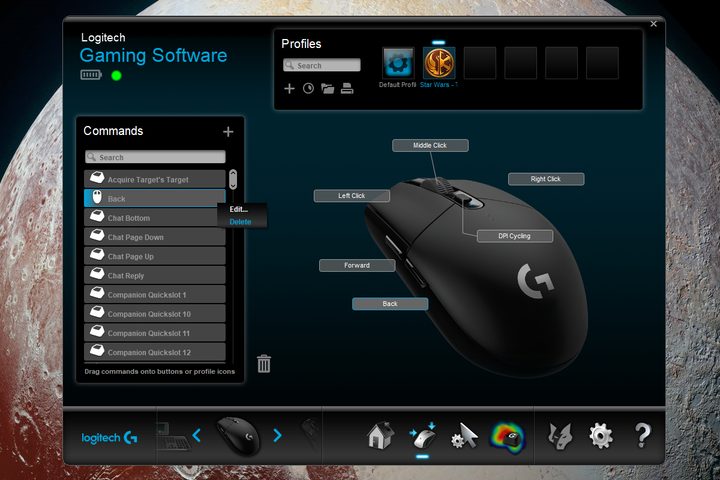
On the customization front, Logitech provides plenty of choice. The software enables you to re-assign the six physical buttons with a new command, edit a command, use the button’s generic functionality, or un-assign a command. Assigning a new command brings up a new window presenting three categories: Mouse function, keystroke, and multi-key macro.
By default, the button mounted behind the mouse wheel cycles through your DPI settings. The mouse sensitivity ranges between 200dpi and 12,000dpi that you can set using five customizable levels. Just hit the DPI button to cycle through each color-coded setting indicated by a single LED: Yellow, white, red, purple, and blue. You can also re-assign the thumb buttons to DPI Up and DPI Down if that works better for you.
Finally, you can save one set of mouse settings to the peripheral — DPI sensitivity levels, button assignments, and report rate — using its on-board memory. It’s a general mouse “profile” that doesn’t load with a specific game, and comes in handy when you’re connecting the mouse to another PC without the Logitech Gaming Software client installed.
Want to attach specific settings to a specific game? Just switch the software over to “Automatic Game Detection” mode, which stores all settings on your PC. The software will scan for new games and list them at the top of a newly-unlocked Profiles section. You can then assign specific commands to the mouse buttons (and compatible Logitech keyboard keys) that will automatically load when the game starts.
At $60, G305 wireless mouse pushes the mainstream boundaries. You don’t have to pay premium prices for a cordless mouse with great wired-like performance and customization solutions.


