
Apple is proceeding with compensating the owners of MacBook laptops sold between 2015 and 2019 that featured the infamously faulty butterfly keyboards.
After settling a class-action lawsuit in July, in which the company agreed to pay $50 million in damages, Apple is now moving forward with payments for those eligible. Here’s how to know if you’re included, how much you’ll get paid, and how to submit your claim.
How to know if you’re eligible
Apple has begun emailing MacBook owners with instructions on how to know if they are eligible for compensation and how to be approved for their payments. Recent emails sent out to MacBook owners indicate that a settlement has now officially been reached, meaning Apple has continued to deny any of the claims about defective keyboards, but has agreed to settle with a $50 million payout.
Our very own editor-in-chief, Andrew Martonik, posted an excerpt from the initial settlement emails he received personally:
Apple "butterfly keyboard" class action lawsuit just progressed. wow. pic.twitter.com/o7d6W6xtkT
— Andrew Martonik (@andrewmartonik) December 21, 2022
That email sent out to owners reads as follows: “Dear MacBook Owner, You are receiving this email because you previously reached out to our firm regarding your MacBook laptop. On November 28, 2022, the Court granted preliminary approval of $50 million nationwide settlement that would benefit MacBook purchasers who had their “Butterfly” keyboard repaired. You can find more information about the settlement, eligibility, the approval process, and your options at www.KeyboardSettlement.com.”
If you received this email, you’ve been included in the lawsuit based on your purchase of a MacBook with a butterfly keyboard. The lawsuit covers MacBooks including models of the 12-inch MacBook, MacBook Air, and MacBook Pro released between 2015 and 2019. The full list is as follows:
- MacBook (Retina, 12-inch, early 2015)
- MacBook (Retina, 12-inch, early 2016)
- MacBook (Retina, 12-inch, 2017)
- MacBook Air (Retina, 13-inch, 2018)
- MacBook Air (Retina, 13-inch, 2019)
- MacBook Pro (13-inch, 2016, Two Thunderbolt 3 ports)
- MacBook Pro (13-inch, 2017, Two Thunderbolt 3 ports)
- MacBook Pro (13-inch, 2019, Two Thunderbolt 3 ports)
- MacBook Pro (13-inch, 2016, Four Thunderbolt 3 ports)
- MacBook Pro (13-inch, 2017, Four Thunderbolt 3 ports)
- MacBook Pro (15-inch, 2016)
- MacBook Pro (15-inch, 2017)
- MacBook Pro (13-inch, 2018, Four Thunderbolt 3 ports)
- MacBook Pro (15-inch, 2018)
- MacBook Pro (13-inch, 2019, Four Thunderbolt 3 ports)
- MacBook Pro (15-inch, 2019)
To identify your own MacBook, just click on the Apple logo in the top left over the Menu Bar, then click About This Mac. The name of the model will then appear in the pop-up window.
How much money will you get paid?
Compensation comprises three main groups that are eligible for a monetary settlement.
Group 1 Settlement Class Members include customers who had at least two repairs to their MacBook Pro that entailed swapping out the top case of the keyboard within a four-year period after purchase. This group is eligible for compensation between $300 and $395 and will receive an automatic payment in addition to an email notice about the settlement.
Group 2 Settlement Class Members include customers who had at least one repair to their MacBook Pro that entailed swapping out the top case of the keyboard. This group is eligible for compensation up to $125 and is required to submit a claim form to receive compensation.
Group 3 Settlement Class Members include customers who had at least one keycap replacement repair to their MacBook. This group is eligible for compensation up to $50 and is required to submit a claim form to receive compensation.
How to submit your claim
A California court granted preliminary approval on November 28 to proceed with sharing details on how customers can be compensated, following Apple’s agreement to the $50 million payout.
Claims must be submitted, either online or by mail by 11:59 p.m. PT on March 6, 2023. Proof of repair or purchase will be required to file a claim, either from Apple or from the settlement member.
Settlement members also have the option to object to the settlement and must do so by submitting a claim to the court in writing by February 10, 2023, or by attending a final hearing, which will take place on March 16, 2023.
Any Group 1 members who have not received an email or who need to confirm or update their mailing address can do so at KeyboardSettlement.com.
To get more information and submit claim forms, settlement members can visit the settlement website. Settlement members can also mail completed forms to:
re: MacBook Keyboard Litigation Settlement
c/o JND Legal Administration
PO Box 91341
Seattle, WA 98111
Compensation is expected to go out after the final approval hearing on March 16. However, the case is still subject to appeals, which could delay payments, according to CNET.
Why did Apple get sued?
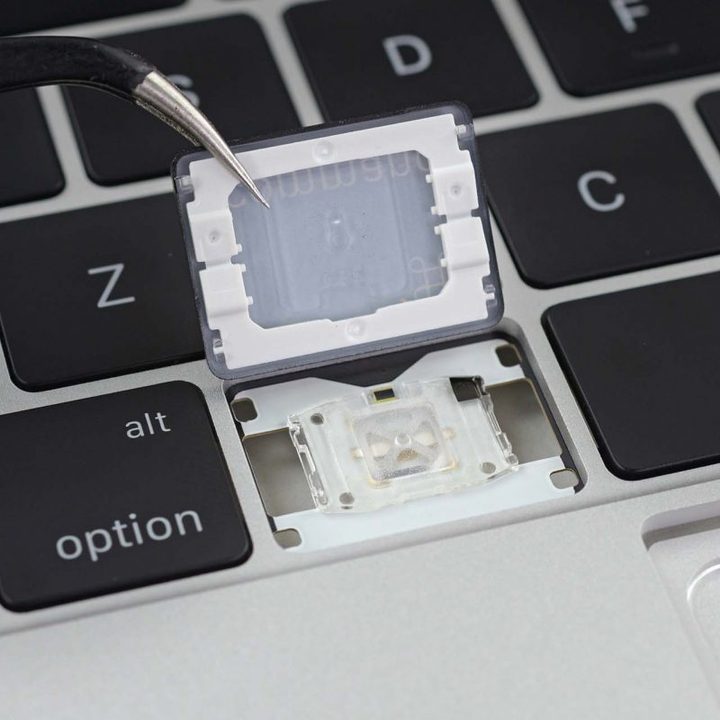
The class-action lawsuit originated in California in 2018. Apple was accused of concealing details about the quality of its butterfly keyboard design to keep devices on the market. Faults in the keyboard design led to repeatedly mistyped keys, keys feeling “sticky,” or keys consistently failing to type, according to PCMag.
Apple’s efforts to address the issues with a repair program reportedly did little to resolve underlying faults on MacBook, MacBook Pro, and MacBook Air laptops, and rather only replaced old butterfly keyboards with new ones, the publication added.
Apple replaced its Magic Keyboard MacBooks in 2020 with models that featured a more conventional “scissor switch” mechanism that has been included in every MacBook since then.


