
Microsoft’s cross-platform strategy has been one of the more striking aspects of its recent transition from the Windows company to the “cloud-first, mobile-first” productivity solutions company. It’s no longer true that Microsoft only makes apps for Windows, and in fact, some of its apps work best on iOS and Android.
One example of this phenomenon is the Outlook Mobile app, which has offered features and functionality on iOS and Android that have been pulled over from Microsoft’s purchase of the popular Accompli email app, but that haven’t yet made their way to the Windows 10 Mail app. One of those features is the Focused Inbox, which was promised by Microsoft but not yet delivered — a situation that is to be rectified in February 2017, as Neowin reports.
Focused Inbox lets users more clearly and efficiently organize their email inboxes by putting important messages in their own folder. With Focused Inbox turned on, the inbox will have two tabs labeled “Focused” and “Other,” letting users quickly triage the messages that Outlook assumes are the most important. Fortunately, Focused Inbox can also be turned off, for users who find Outlook’s predictive powers to be less than accurate.
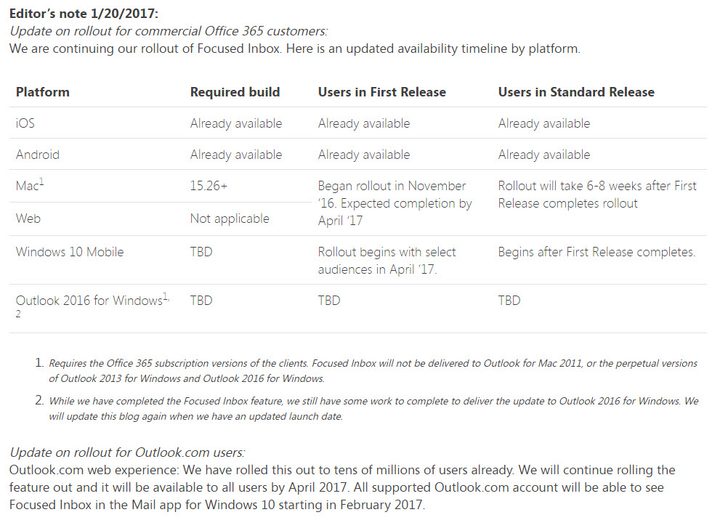
Microsoft indicated in October that the Focused Inbox feature would make its way to the Windows 10 Mail app on mobile devices and to Outlook 2016 in November, but that deadline obviously passed with no update in sight. However, Microsoft updated a recent blog post indicating that “All supported Outlook.com account(s) will be able to see Focused Inbox in the Mail app for Windows 10 starting in February 2017.”
Now, it appears that Microsoft is pushing the Focused Inbox to some Windows 10 users, with it showing up in the latest update to the Windows Mail app. There is no rhyme or reason to who is receiving the Focused Inbox at this point. Users on the production version of Windows 10 are receiving it and so Microsoft does not seem to be limiting it to Windows Insiders — or, at least, not to Windows Insiders builds.
If you are on the list, you will first get the following notification when you launch the Mail app after updating it.

Then, you will get another popup when you click over to your Outlook.com account in the app.

Focused Inbox works for Outlook.com accounts only at the moment, while the Outlook app on iOS and Android supports the feature for other email accounts as well. The Focused Inbox works just as described and as it works on the other platforms. Email that the app decides is particularly important will show up under the Focused tab, and everything else will show up under Other. The jury is still out on exactly how smart the system is in filtering messages.
It looks like Office 2016 still isn’t going to see the Focused Inbox feature anytime soon. There is no word yet on when everyone will get the Focused Inbox in The Windows 10 Mail app — perhaps that is a feature that will officially show up for everyone in the upcoming Creators Update expected in April. However, at least there is some movement in bringing the Windows 10 Mail app more in line with its iOS and Android counterparts.
Edited on 02-17-2017 by Mark Coppock: Microsoft has pushed the Focused Inbox to some users on Windows 10.


