  1. Home
  2. Computing
  3. News

Steam enters beta on Chromebooks, tripling number of supported devices

Add as a preferred source on Google

After a long incubation period, Valve’s Steam gaming platform is now available on the beta channel of version 108 of ChromeOS, bringing along improved user experience, broader availability, and greater compatibility with popular gaming titles.

Gaming publisher Valve had, at the beginning of this year, been collaborating with the ChromeOS gaming team in releasing Steam in the alpha channel of ChromeOS. Graduating to the more stable and reliable beta channel means more users can try Steam out for themselves.
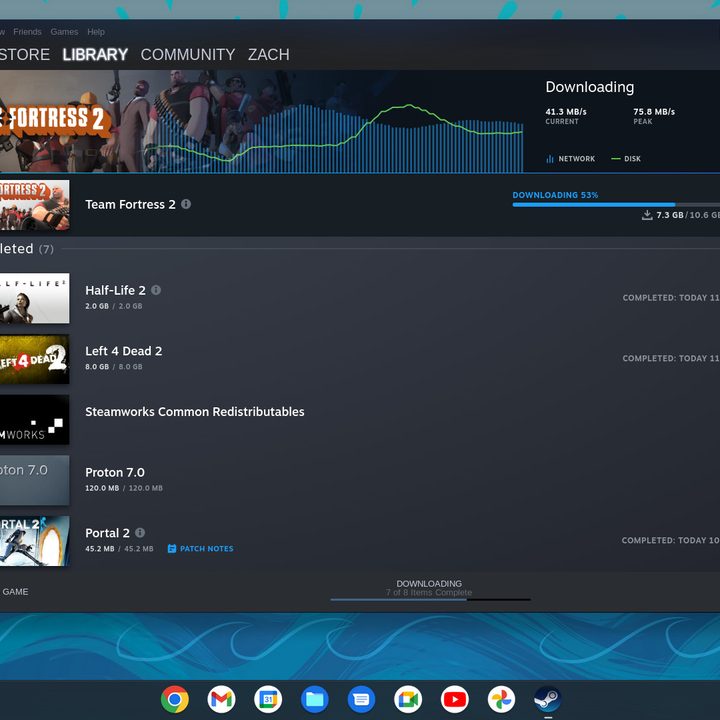
Valve Steam on ChromeOS 108 screenshot.
Digital Trends

With this release (ChromeOS beta 108.0.5359.24 or greater), Google is tripling the number of supported devices — this time adding support for devices with AMD Ryzen 5000 C-Series and Intel 12th Gen Core CPUs, while lowering the minimum CPU requirement for i3 and Ryzen 3. It’s also good to see that the new cloud gaming Acer, Asus, and Lenovo Chromebooks are included in that list.

Recommended Videos

Storage in the Steam environment has also been reworked by way of sparse disk and ballooning. This should prevent a preexisting issue that prevented games from accessing storage when trying to download content outside of Steam. The ChromeOS team also says that this change should improve file access performance for Proton games.

Steam beta also beings a couple of improvements in power management. There are power notifications (when games are running in full screen) to ensure that the gamer doesn’t inadvertently run out of juice in the middle of a game. The team reportedly was also able to extend battery life by reducing CPU overhead in DirectX and Vulcan titles.

Scaling of low-resolution games on high-resolution screens is also new to this release, which potentially means better compatibility and overall experience when gaming on QHD or UHD displays.

Ultimately, these Steam improvements can be enjoyed in 50 new titles on top of the current recommended list. Follow these instructions to set up Steam in beta.

Aaron Leong
Former Computing Writer
Aaron enjoys all manner of tech - from mobile (phones/smartwear), audio (headphones/earbuds), computing (gaming/Chromebooks)…
Windows 11’s modern Media Player is somehow worse than the version from 17 years ago
The modern Media Player for Windows 11 is slower and heavier than the classic version
Windows 11 media player user interface

Microsoft has released a new Insider Preview update for the modern Windows 11 Media Player. However, the app is facing criticism after tests revealed it uses more memory and opens local video files more slowly than the classic 17-year-old Windows Media Player.

The update adds some useful fixes, including better captions, clearer codec errors, and improved file recognition. But the biggest complaints remain higher RAM usage and paid codec support for some common video formats. The update is not available to everyone yet. Media Player version 11.2605.14.0 has only arrived on Experimental Insider builds as part of Microsoft’s June 12 Insider Preview releases.

Read more
If you have a Mac, you should try this free and beautifully-designed disk space tool
Radix is a free open-source alternative to paid Mac disk analyzers
File, Electronics, Mobile Phone

Running out of storage on a Mac is common, but Apple’s built-in storage tools are not always great at showing what is actually taking up space. You usually get broad categories, but finding the exact folders, downloads, app files, or old projects causing the problem can still take some work.

Radix is a free, open-source Mac app that tries to make that process clearer. It is a disk space analyzer that scans a folder, drive, or volume and displays the results in an interactive sunburst chart. Rather than digging through folders manually, you get a visual overview of how storage is being used across your drive.

Read more
This free Mac app puts stunning glassy widgets on your lock screen
WidgetScreen brings weather, calendar, battery, and music widgets to your Mac lock screen
Aquatic, Water, Animal

The Mac lock screen has always felt a little underused. You see the time, your wallpaper, and not much else. macOS already supports desktop widgets, but once your Mac is locked, that extra information disappears.

WidgetScreen is trying to fix that in a pretty simple way. The free Mac app, made by UK computer science student Sam Cook, adds glassy widgets to the lock screen so you can quickly check things like the weather, clock, calendar, battery, music playback, countdowns, and system information.

Read more