
Have you ever wondered how 3D printing works, what types of 3D printing exist, or just what 3D printing is used for these days? You’ve come to the right place: We’re going to cover the basic definition of 3D printing, how different versions are used, and some of the incredible things that additive manufacturing techniques are capable of.
3D printing: Basic definition
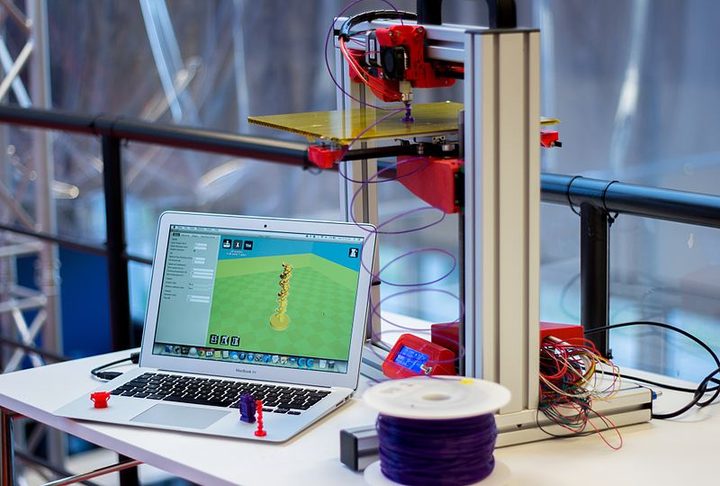
3D printing is a manufacturing process that creates a three dimensional object by incrementally adding material until the object is complete (this contrasts with subtractive manufacturing techniques such as carving or milling, in which an object is created by selectively removing parts from a piece of raw material). A 3D printer is simply a machine that can take a digital 3D model and turn it into a tangible 3D object via additive manufacturing. While these printers come in many forms, they all have three basic parts.
1. Digital file
The digital file instructs the printer exactly how to create the 3D object. It does this by dividing the object into layers and describing the dimensions of each layer with great accuracy. You then upload the finished digital file into the printer and watch it go to work. Many programs can create these files, including Tinkercad and Blender, which are both beginner-friendly options.
2. Printing machine
The machine has to accurately replicate the layers described in the digital file. That means that it needs enough free and clean space to construct the object, which is why 3D printers typically have a box, vat, or compartment to work in. While techniques vary, these machines usually employ nozzles and/or lasers to lay down the material and then set or cure it for each layer. As you can imagine, these machines must be calibrated very carefully: The most advanced 3D printers only operate in vacuums or at certain temperatures.
3. Printing material
The printer shapes or extrudes the printing material, which forms the printed object. While 3D printed objects are typically made of a single material, that material can be made of many different substances. One of the most popular is ABS plastic, the colorful, extruded plastic used in most home printers. However, 3D printers can also use various types of nylon and resins, some designed to be very hard and durable (all the better for testing prototypes. Other printers may use metals like steal, silver or gold. Some use ceramic materials, while others use synthetic sandstone. There are also many hybrid materials that combine plastics with other materials to add more properties.
Types of 3D printing

3D printing techniques have been around for decades. An important turning point occurred around 2009, when a consumer-friendly version of 3D printing called FDM (fused deposition modeling) became publicly available after that patent expired. That led to a boom in affordable 3D printing devices, and today when most people think of 3D printers they imagine the FDM extrusion style. However, there are many types of 3D printing used in various industries: Here are several of the most important (and if you want to buy your own 3D printer, here’s where to look).
Fusion Deposition Modeling (FDM): FDM uses a simple nozzle to extra plastic filaments, which cool down into the 3D printed shape. This is the cheapest version of 3D printing, and the kind available to consumers. Since it only needs a box, a nozzle, and a system to turn the digital data into movement, this type of printer can come in many different sizes.
Stereolithography (SLA): Technically the first type of 3D printing to be invented back in the 1980s, SLA beams a laser at a reactive liquid resin so it instantly hardens. The object is then pulled out of a vat of this liquid, layer by layer. SLA is capable of much greater detail than FDM, but the printing process is also more complex.
Jetting processes: Jetting is somewhat similar to SLA, except instead of using a vat of liquid, it sprays a jet of reactive polymer onto a base, and then flashes a UV light to harden the polymer before spraying on the next layer (some versions also use powdered material and layers of glue, or change between materials). It’s most similar to modern inkjet printer, except jetting tends to use advanced polymers with unique properties. This method of printing can be very detailed, and it’s frequently used in industrial applications.
Selective Laser Sintering (SLS): This type of printer starts with powdered materials that have very specific properties, such as polymides and thermoplastic elastomers. It uses a powerful laser to rapidly fuse (not melt!) these powders into the correct layers, forming a very durable object. This industrial version of 3D printing is very useful for mass-producing functional parts or prototypes.
Metal printing: Printing types like selective laser melting (SLM) and electron beam melting (EBM) use welding-like techniques to create objects. This printer moves a platform down slowly as layers of powdered metal are added and melted with incredible precision. This type of printing takes very powerful lasers and controlled environment, so it’s not usually seen outside of situational industrial manufacturing.
3D printing industries: Popular uses for 3D printing
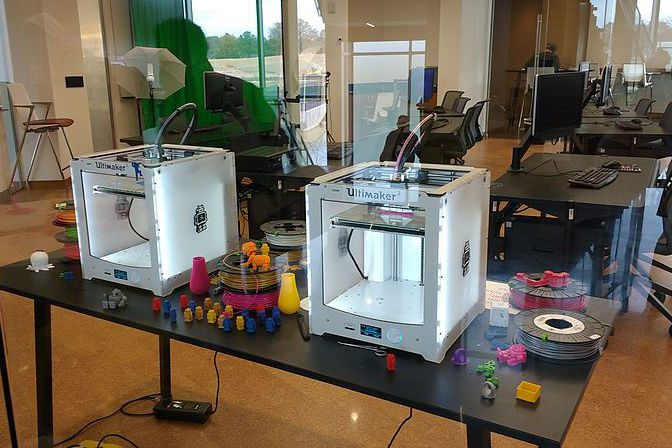
It’s hard to find a sector that hasn’t been affected by 3D printing. Manufacturing processes around the world have adopted 3D printing techniques to help solve their problems and improve efficiency. When used in mass production, 3D printing tends to be cheaper than any other method. When used to create prototypes, it’s typically the fastest option. But that’s just the beginning! Check just a few of the incredible ways that 3D printing is currently being used.
- Shoes: Companies like Feetz and 3D Shoes manufacture 3D-printed shoes on demand, with plenty of customization options. Bigger brands are getting into the business, too!
- Houses: Yes, we are printing 3D houses now, too! In fact, manufacturer Apis Ctor has developed a house that can be printed and painted in 24 hours.
- Healthcare materials: Common, disposable healthcare objectives, like sample cups, now often come from 3D printing systems. In the prosthetics world, 3D printing is used to create customized prosthetics for individual’s unique bodies and requirements. Advanced systems are even creating 3D skin grafts made out of biological ink.
- Custom ordering: At home or work and feeling left out of the 3D printing business? Thousands of printing companies now offer 3D printing where you specify objects, materials, and place your order online.
- Set Design: Set design and prop-making have fully embraced 3D printing as a far cheaper, faster way to create very specific props for today’s shows and theater. Think how much easier it is to create an alien environment when you can draw, program, and print a usable version of even the most outlandish or historical objects in no time at all!
What else can you make with a 3D printer, you ask? Take a look at 3D print Halloween costumes, 3D printed camping gear, and 3D printed household items.



