


“Frames win games.” That’s been Nvidia’s marketing campaign targeted at esports players since the introduction of Nvidia Reflex. It’s a great slogan, catchy with the right amount of truth, and the perfect pairing for Nvidia’s RTX technologies. In a new era of generated frames, though, it requires a bit of context.
Nvidia’s DLSS 3 generates frames on RTX 40-series graphics cards, massively improving your performance. The trade-off, however, is an increase in latency, which hasn’t been a big deal up to this point. In games like Ratchet and Clank: Rift Apart and Cyberpunk 2077, you don’t need to worry about gaining a competitive edge. But now, we’re seeing DLSS 3 for the first time in a competitive shooter: Call of Duty Modern Warfare 3. Originally, the game only included DLSS 3 in the single-player campaign, but after a few days, it was patched into all game modes, including Zombies and multiplayer.
I like seeing options for gamers, so don’t misconstrue this column entry as me calling for DLSS 3 to be removed from Modern Warfare 3. It’s a great tool, and it should be in the game. But if you plan on competing in the game at a high level, you need to know about the trade-off you’re making by generating frames. That will only become more important if we start seeing DLSS 3 in additional competitive titles.
How do frames win games?
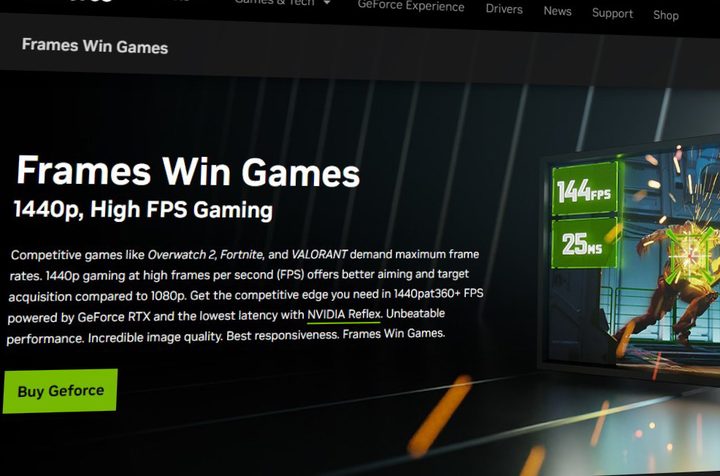
We need to talk about the idea behind frames winning games in the first place because Nvidia has a point with its marketing slogan. Your frame rate is just a representation of latency between each frame. If you’re running at 60 frames per second (fps), there’s 16.6ms between each frame. If you double that to 120 fps, you half the latency down to 8.3ms. With a higher frame rate, you see more information faster, allowing you to react quicker in a competitive setting.
This isn’t some high-level theoretical advantage, either. I saw that firsthand in Nvidia’s system latency challenge in the Kovaak’s aim trainer just how important latency is. LTT ran a test with professional esports players at different frame rates, too, showing that the best players hit their shots more often with a higher frame rate. Higher frame rates won’t make you a better player, but they will ensure that a great player is performing at their best.
That’s the benefit of more frames. But the real advantage is overall lower latency. There’s some latency between frames, but the latency across your entire PC can be much more significant. This breaks down into two areas. There’s total system latency, which is the total time is takes from when you perform an action (like clicking your mouse) to when the final result shows up on-screen. There’s also PC latency, which is the time from when your PC receives the input to the time it sends out a frame, ignoring latency from your input device and your monitor.
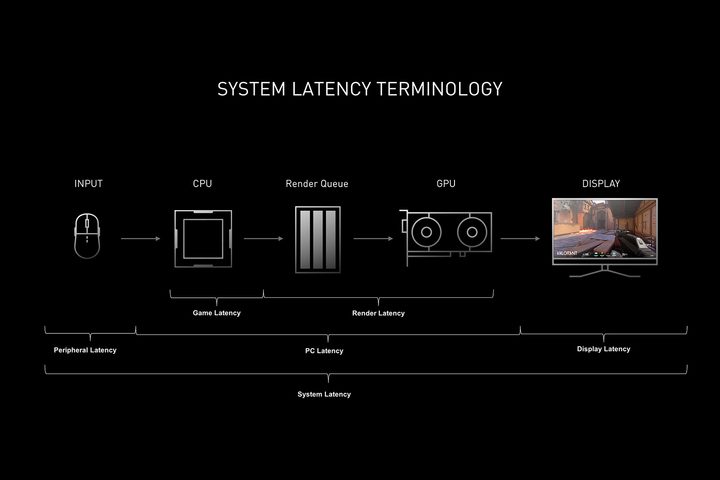
Nvidia also focuses on PC latency with its Reflex feature. This finds optimizations within your PC to ensure your components are as fast as they can be. This doesn’t improve frame rates — that’s tied to what Nvidia would call render latency, the time between each frame — but instead finds optimizations between your components to improve overall PC latency.
All of this important to lay out because low latency is vital in the context of a competitive game, and tools like Nvidia Reflex, coupled with a high frame rate ensure, that your PC latency is as low as it can possibly be. DLSS 3 Frame Generation, though, just throws a wrench into that plan.
When frames don’t win games
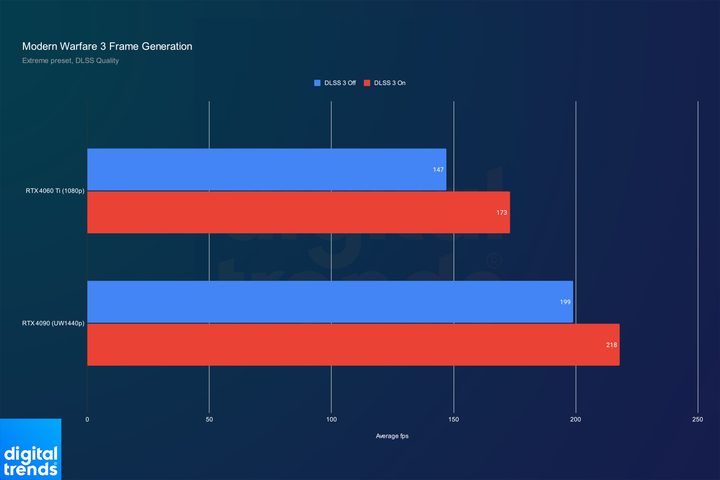
I tested Modern Warfare 3‘s multiplayer with two GPUs. One was my personal rig with an RTX 4090 and a 3,440 x 1,440 monitor, while the other was an RTX 4060 Ti with a 1080p display. In both cases, I kept the graphics preset to Extreme and enabled DLSS Quality mode for upscaling.
In both cases, Frame Generation provides a fairly large jump in performance. With the RTX 4090, it’s providing a 21% boost, and with the RTX 4060 Ti, we’re seeing an 18% increase. The game was already running at a high frame rate, but in an era where 360Hz monitors are common for competitive players, these performance improvements certainly aren’t insignificant. By the logic of “frames win games,” turning on DLSS Frame Generation would give you a competitive edge since we’re seeing a higher frame rate. So, why isn’t that the case?
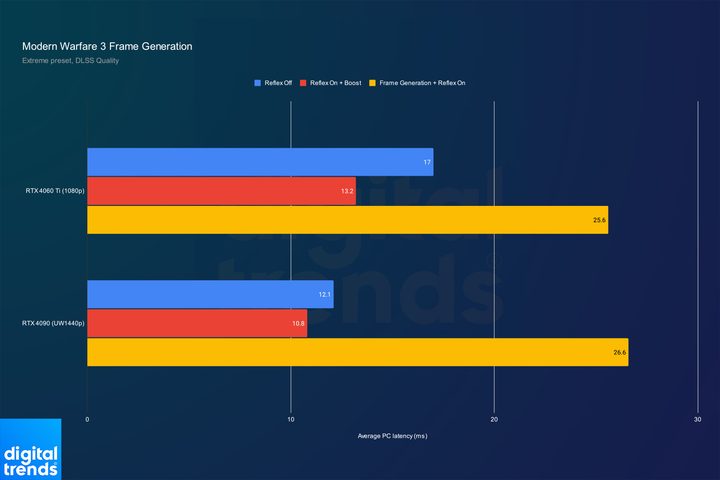
If you extend this graph out and look at the average PC latency, in both cases, there’s nearly double the latency with Frame Generation turned on, despite the fact that that we’re seeing a higher frame rate. And when we look at Reflex turned on without Frame Generation, the gap is even higher. Also keep in mind that Frame Generation forces Reflex on.
In a competitive setting, it’s pretty clear that you wouldn’t want to turn Frame Generation on. This average PC latency metric includes the render latency — that latency between frames your GPU is rendering — so the extra frames you’re seeing with Frame Generation don’t do much of anything. The game looks smoother, but from a competitive perspective where you want the lowest possible latency, those extra frames won’t help you win the game.
What’s going on?
So, if Frame Generation is giving you extra frames, and extra frames decrease latency, why are we seeing an increase with the feature turned on in Modern Warfare 3? Well, it comes down to how Frame Generation works, the overhead that it requires, and the fact that the frames you’re seeing aren’t all actually real.
Let’s start with how Frame Generation works. If you’re familiar with DLSS 3 or AMD’s FSR 3, you’ll know that these features insert a generated frame between each rendered frame. The way these features get the information to generate the frame is where latency is introduced. The features look at two rendered frames in sequence and use the data to estimate what a frame in-between them would look like.
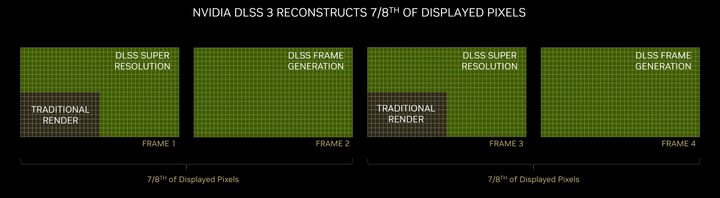
In practice, your graphics card renders two frames. They’re done. You see the first frame, but before you see the second one, the process of generating the artificial frame has to finish, and that frame needs to be displayed to you. The end result is that you’re seeing the second rendered frame later than you normally would, creating extra latency. The only case where there wouldn’t be extra latency would be if DLSS Frame Generation literally doubled your frame rate without any overhead. And even then, that’s just to achieve the same latency as you would have with Frame Generation turned on.
The tricky part about Frame Generation is that it hides the overhead it requires to work. If we take the previous results with the RTX 4060 Ti, we’re seeing 147 fps at 1080p. Those are all real, rendered frames. With Frame Generation, every other frame is generated, so we can cut that final number in half. With Frame Generation turned on, your graphics card is only rendering about 87 fps. That gap, between 147 fps and 87 fps, is a representation of the overhead Frame Generation requires.
It’s interesting to point out, but that overhead doesn’t account for much in the vast majority of games DLSS 3 is available in. The fact that Nvidia is able to deliver such high improvements in smoothness while keeping DLSS 3 games feeling responsive is a marvel. In Modern Warfare 3, however, you’ll want to leave Frame Generation off if you plan on playing competitively.
Up to this point, we haven’t seen the tech applied in any fast-paced, competitive setting. That may be because a lot of competitive titles like Overwatch 2, Valorant, and League of Legends aren’t too demanding. We are seeing some next-gen titles with a competitive angle, though, and I imagine the latency issues we’re seeing in Modern Warfare 3 will apply there, too.
A prime example is the upcoming The Finals, which is supposed to launch in December. The game features ray tracing and DLSS 3, and it definitely has a competitive angle. Once again, I appreciate the option for gamers who don’t want to sweat it out to be the very best. But for those looking to climb their way up the ranks in competitive games, you should leave DLSS 3 turned off.


