

If you’ve just picked up a new PS4 system and a game or two, you have just about everything you need to start enjoying the console. To get the most out of your Sony gaming system, however, you might want to purchase some additional accessories that will make your experience more immersive and your space more comfortable.
Best PS4 Accessories
When it comes to enhancing your gaming experience, it’s important to choose the right products for your console. The right headset can turn any game into an intense experience. Accessories like the PlayStation Camera and PSVR allow you to travel to virtual worlds and truly become your character. Things like compact chargers and carrying cases can just make your life a little easier.
PowerA DualShock 4 Charging Station

By default, the only way to charge your PS4 controller is to use a micro USB cable and plug it directly into the system. This is fine while you’re actually playing games, but it requires you to leave your console in rest mode instead of turning it off completely. With the PowerA DualShock 4 Charging Station, you can just drop your controller on top, and it will fully charge it before powering off. You can even charge two controllers at the same time, and it’s small enough to fit almost anywhere in your game room.
PlayStation Camera

Kinect has been a spectacular failure for the Xbox One, but Sony’s own PlayStation Camera has managed to avoid that fate by cleverly using the device for its games and apps. With a PlayStation Camera set up, you and your family can sign into the system with facial recognition, and whenever you want to stream your games on Twitch, you have a built-in facecam and microphone. Certain games also make use of the device as a gameplay mechanic, and it’s required for use with the PlayStation VR headset.
PlayStation VR

The PlayStation VR has become an essential part of any PS4 setup. Consisting of a headset, a breakout box, and several cables, Sony’s own VR headset is a little cumbersome, but it’s the only way to experience fantastic games like Moss and Beat Saber on the PlayStation 4. Everything from multiplayer shooters to atmospheric adventure games are available, but seeing is truly believing. Once you’ve experienced one of the PSVR exclusives, you’ll understand what all the buzz is about.
Read our full PlayStation VR review
PlayStation VR Aim Controller

Many PSVR games make use of the Move controllers, which were carried over from the PS3. The PlayStation VR Aim Controller is an alternative that can take the authenticity of your favorite shooter games to the next level. Shaped like a gun and containing all the buttons you’ll need — as well as a Move light at the tip — the PlayStation VR Aim controller is the definitive way to play games like Farpoint and Firewall: Zero Hour. It removes yet another layer of clunky un-intuitive hardware in your virtual reality experience, making you feel like you’re even more immersed in virtual worlds.
Turtle Beach Recon 200
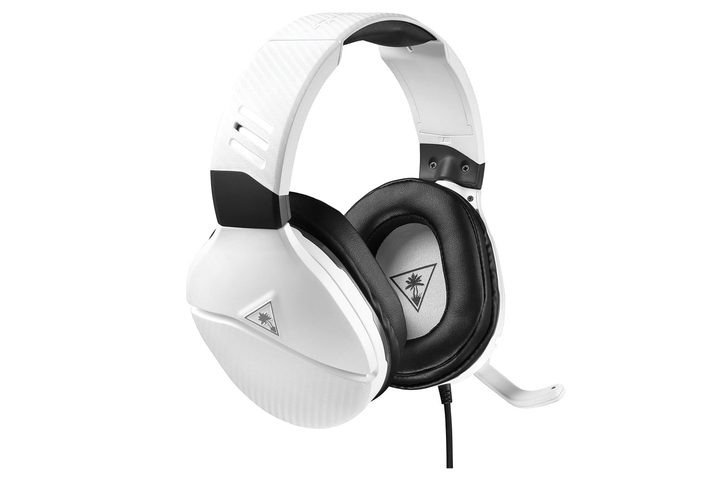
To get the most out of your gaming experiences, you need to have a headset that can keep up with the action, and at just $60, the Turtle Beach Recon 200 delivers the goods. Also compatible with Xbox One, Switch, PC, and mobile, the Recon 200 includes microphone monitoring, and the bass it’s capable of producing is impressive despite having 40mm speakers. It makes the headset an excellent choice for intense multiplayer shooters, and if you don’t need to use the microphone, you can simply flip it up to automatically mute it.
Read our full Turtle Beach Recon 200 review
Seagate 2TB Game Drive for PS4

Even if you purchase a newer PlayStation 4 with a 1TB hard drive, huge game file sizes mean it will be completely filled up in almost no time. Luckily, the system supports external hard drives that use USB 3.0, and can support up to 8TB. The Seagate 2TB Game Drive for PS4 is designed specifically for the system, and its storage capacity is added onto what you have on internal storage, giving you plenty of extra space for those content updates and free PlayStation Plus games each month.
GelTabz Performance Thumb Grips

The analog sticks on the PS4 controller are covered in rubber, which can make them comfortable but prone to falling apart after extended use. The GelTabz Performance Thumb Grips are studded to give you extra control during intense gameplay. They also help protect the rubber analog sticks underneath. Putting them on takes only a few seconds, and they’re cheap enough that you can replace them regularly to avoid replacing the whole controller due to wear and tear, instead.
Vertical Stand

By default, all three models of PlayStation 4 sit horizontally on your entertainment center, but you can turn them vertically with the addition of the console’s Vertical Stand. There are two different versions of the stand. The first only requires tightening a knob on the bottom, while the more recent version uses a small screw and piece of plastic so it can fit both the “slim” system and the PlayStation 4 Pro. Ventilation is still provided underneath, as well, so your console will stay nice and cool. Both are also designed with balance in mind, preventing the console from falling over if it happens to get lightly bumped.
Elgato Game Capture HD60 S
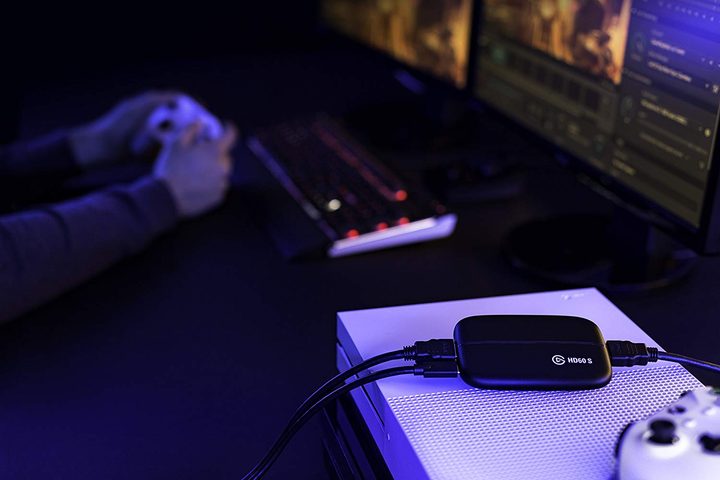
The PlayStation 4’s built-in sharing features let you record your gameplay directly from the console, but for longer play-sessions and the highest quality streaming, the Elgato Game Capture HD60 S is a great option. The capture device offers 1080p resolution at 60 frames per second, along with high-quality streaming and the ability to add live commentary as you’re playing. Its software is also built with streaming in mind, and it has a “flashback” recording option to capture anything you might have missed. All you need to use it are a PlayStation 4, an HDMI cable, and a computer, and you can be recording gameplay in just a few minutes.
USA Gear Console Carrying Case

Though not the PlayStation 4 isn’t a portable console like the Nintendo Switch or Sony’s own Vita, there will come times when you want to take your system with you on the road or to a friend’s place. The USA Gear Console Carrying Case has everything you need to do so, with a reinforced shell and customizable compartments to hold all the accessories you need to pack with the system. It fits all current PlayStation 4 models, and it even comes with a security strap so your system doesn’t jostle around as it’s being transported.


