
The next-gen version of Destiny 2 is here, allowing players to experience the game in 4K at 60 frames per second (fps) on consoles. It’s a big deal, but unfortunately, upgrading from the PlayStation 4 to the new PlayStation 5 version isn’t as easy as you might expect. On the Xbox side of things, it’s much easier to download the next-gen version of Destiny 2, thanks to Smart Delivery. But on PlayStation, you’ll have to jump through some hoops to acquire the enhanced edition.
With that in mind, we’ve got all the details on how to upgrade your copy of Destiny 2 from PS4 to PS5 using just a few easy steps. Remember, these steps are for the digital version of the game. There will likely be a physical edition of it on PS5 later down the line, but for now, you’ll need to stick to the digital version. Here’s how to get Destiny 2 on PS5.
Recommended reading:
- Destiny 2: Beyond Light’s stasis abilities get major changes after fan outcry
- Destiny 2 beginner’s guide: How to get the most out of your Guardian
- Destiny 2 is going free to play on Google Stadia for all players with an account
How to upgrade from PS4 to PS5

If you’re a Destiny 2 fan, you probably have the PS4 version installed on your PS5 right now. This might be causing some confusion with getting your upgrade, as many games allow you to “upgrade to PS5 for free” from the application’s landing page within your Game Library. Unfortunately, this isn’t an option with Destiny 2, and instead, you’ll need to manually search for the title via the PlayStation Store.

Once you type Destiny into the search bar, you should see an application titled Destiny 2 PS4 & PS5. That’s the one you want, so click on it and select the option to Download. You’ll need around 64GB of free space to install it onto your PS5.

Otherwise, you’ll get the notice below if you don’t have enough space.

After it’s installed, make sure you’ve got the right version. You can check it a couple of different ways. If the application tile simply says Destiny 2, you’re in business. The PS4 version will say Destiny 2 PS4. The other way to tell is by pressing the Options button on the tile and going down to Game Version. If you have the PS5 version, it’ll have a check mark next to PS5 | Full | Destiny 2.
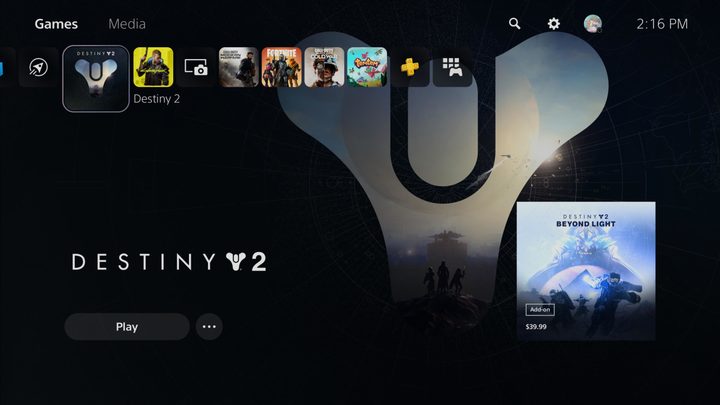
From here, you can launch into the game like normal. Do note that the PS5 version is a totally separate app from the PS4 edition. Now that you have the PS5 edition, you can delete the PS4 version from your hard drive to clear up some precious space. This also means there are two separate trophy lists, perfect for the avid trophy hunter. Upon launching the app and logging into your account, any trophies you’ve earned on the PS4 version will automatically unlock on PS5. That means if you got the platinum the first time around on PS4 , you’ll get it again on PS5 upon logging into the game.
Be sure to tinker with some of the new settings after launching into the game. These are things like an FOV slider, a new 120hz setting for Crucible only, and other visual options like enabling HDR.


