Soundbars are incredibly popular for a reason. They offer much better audio quality than you can get from your TV alone, and they’re easy to install and set up. Given the vast number of models, you’re sure to find one that fits your budget.
Not all soundbars are created equal. Some come with a wireless subwoofer for enhanced bass, while others go even further, featuring additional speakers for full 5.1 surround sound. However, if there’s one feature you need to know about before purchasing your next (or first) soundbar, it’s Dolby Atmos.
Dolby Atmos is appearing on soundbars from all major brands, including Sony, LG, Samsung, Vizio, Yamaha, Sonos, and JBL. It can significantly enhance your home theater experience. Here’s why your next soundbar should be a Dolby Atmos soundbar.
What is Dolby Atmos?

Before we get into the nuts and bolts of Atmos soundbars, here’s a little background. (If you’re already familiar with the basics of Atmos, please skip ahead.) Dolby Atmos (and its counterpart, DTS:X) is a way of recording and reproducing surround sound that lets audio mixers control each sound you hear — from a buzzing bee to a fighter jet — as an individual sound object.
When you combine this object-based control with the addition of overhead speakers, it’s possible to move a single sound anywhere in space, without changing any other part of the soundtrack, like the background music or dialogue.
What this means for moviegoers is a far more immersive experience in which the movement of an on-screen object is accompanied by a matched moving sound. When executed with care, it can be a thrilling, lifelike way to watch a movie.
In a movie theater, these objects can be manipulated across dozens of speakers, many of which are directly above the audience, creating a hemisphere of sound.
At home, Atmos and DTS:X are scaled down to match the tools at hand, topping out at 34 individual speaker channels and two bass channels. The most basic configuration is 5.1.2, which involves a typical 5.1 setup (left, center, right, and two surrounds), along with two height speakers, which can be mounted overhead or angled up from ground level to bounce sound down from the ceiling.
That may sound like quite a step down from a commercial theater, but make no mistake. Dolby Atmos at home can sound every bit as exciting if you have the right gear.
What makes Dolby Atmos soundbars different?

Just like standard surround soundbars, Atmos soundbars come in many flavors, including varying sizes, styles, and available channels. But two major features set them apart from their non-Atmos cousins.
First, and this might seem obvious, they’re compatible with Dolby Atmos content. In practice, this means that if you connect them to a Dolby Atmos source device, like an Apple TV 4K or a recent LG OLED TV, those devices will understand that they should provide a Dolby Atmos signal to the soundbar whenever one is available.
Second, they’re capable of reproducing the height channels that are part of the signature Dolby Atmos 3D surround sound experience.
Will my TV be compatible with a Dolby Atmos soundbar?

Because Dolby Atmos uses a lot of digital information (or bandwidth), it’s not compatible with the optical connections that have been used for years to connect TVs to external receivers and soundbars. So any Dolby Atmos content, whether from your Blu-ray player, streaming media device, or the TV itself, must be passed along to the soundbar via HDMI.
If the sound is coming from a Blu-ray player or media streamer, you can usually rely on one of the soundbar’s HDMI inputs. If it’s coming from your TV, your TV needs to have an HDMI ARC or eARC port. Unfortunately, some older TVs do not have one.
If your TV doesn’t have HDMI ARC, you might still be able to connect it to the soundbar if the soundbar in question also has an optical input. If it does, you’ll get sound to the speaker, but it won’t be Dolby Atmos sound. If it doesn’t, you will be stuck using your TV’s internal speakers for any sound that comes from the TV itself (like built-in apps, or free over-the-air TV channels).
Before buying a new Dolby Atmos soundbar, double-check the connections on both your TV and the soundbar to avoid frustration later. See our section on “What are some of the features I should look for in a Dolby Atmos soundbar?” below for more helpful buying tips.
What is required to get Dolby Atmos sound?

Even if your soundbar is Dolby Atmos compatible, and it has a powerful wireless subwoofer as well as dedicated surround speakers, you won’t get true Dolby Atmos sound if you don’t have a source of Dolby Atmos content. Your soundbar will still sound great, even with Dolby Digital 5.1 audio, but those object-based sounds we mentioned earlier simply won’t be a part of the experience.
It’s a little like playing HD content on a 4K HDR TV. The TV will do its best to make that HD content look amazing — and it will look considerably better than on a similarly sized HDTV — but it will never look as good as genuine 4K HDR content.
Making sure that you’re getting genuine Dolby Atmos sound can be a bit tricky, however, which why we’ve assembled this handy guide to getting great Dolby Atmos sound.
Why do some Dolby Atmos soundbars have separate speakers?

Technically speaking, to get a full Dolby Atmos experience, you need (at minimum) a 5.1.2 speaker configuration. This means one center speaker, left and right front speakers, left and right surround speakers, left and right height speakers, and a subwoofer.
Some Dolby Atmos soundbars, like the Vizio SB36514-G6, go all the way by providing discrete speakers for each of these channels, and even upping the ante by throwing in a second set of height channels (thus its designation as a 5.1.4 system).
But you can still get excellent Dolby Atmos from a single piece of equipment, and Sennheiser’s Ambeo soundbar is a great example. It contains a whopping 13 drivers in a single enclosure, including two dedicated upward-firing drivers.
Drivers, by the way, are the individual elements like tweeter, woofers, and mid-woofers that physically create the sound you hear. An individual speaker can have just one or multiple drivers.
The Ambeo’s drivers use a technique known as surround virtualization, which mimics the effect of having dedicated speakers beside you. Dolby Atmos’ height channels can also be virtualized, which we’ll discuss in a moment.
The recently released Sonos Arc Ultra does the same thing, but with fewer drivers. As tempting as it is to say that Dolby Atmos soundbars with separate speakers will sound better than those that place all of the drivers in one enclosure, it’s not necessarily true. There are a lot of factors that affect sound quality, and the number of discrete speakers is just one of them.
What are Dolby Atmos soundbars with height virtualization?

Strange as it may sound, a Dolby Atmos soundbar can use as few as two speakers — what we’d normally consider 2-channel stereo. When a Dolby Atmos soundbar doesn’t have any upward-firing drivers for the height channels, it can virtualize them using the other drivers. When it doesn’t have extra drivers to help with the surround sound or center channel, it can virtualize these too.
We’ve never tested a soundbar that virtualizes the Dolby Atmos height channel, so we can’t say how effective it is. However, TVs that support Atmos via their internal speakers don’t sound noticeably better than their non-Atmos counterparts. For now, we recommend sticking with Dolby Atmos soundbars that possess dedicated, upward-firing drivers to deliver height channel sound.
What are some of the features I should look for in a Dolby Atmos soundbar?
Today’s Dolby Atmos soundbars have tons of features. Which of those features will matter most to you will come down to how you plan to use it. Instead of telling you what you should buy, here’s a list of the most common features and how they might enhance your enjoyment of a Dolby Atmos soundbar.
- DTS:X compatibility: Believe it or not, although Dolby Atmos and DTS:X are similar, not all soundbars support both formats. If you have an extensive Blu-ray collection, you may want to ensure your soundbar supports DTS:X in addition to Dolby Atmos. While Atmos is currently the top 3D surround format on streaming services like Netflix, Disney+, and Amazon Prime Video, when it comes to disc-based media, DTS is still more common.
- HDMI inputs: While all Dolby Atmos soundbars receive their audio signals over HDMI (Atmos isn’t compatible with optical connections), not all of these soundbars let you plug your media streamer or Blu-ray player into them directly. The Sonos Arc, for instance, requires that you plug all of your devices into your TV’s HDMI inputs, and it then uses HDMI ARC/eARC to get the sound from the TV. That might be an awkward arrangement for some folks, plus not all TVs are able to pass Dolby Atmos back over HDMI ARC.
- 4K, HDR, and Dolby Vision pass-through: If you’re going to be plugging in streaming devices or disc players that use these video formats, you had best be sure your soundbar can pass them all through to your TV. Some soundbars that can pass through 4K and HDR10 can’t handle Dolby Vision, so double-check those specs.
- HDMI eARC compatibility: HDMI ARC is great for sending audio and video back and forth along one cable, but it is limited in terms of quality. Dolby Atmos comes in two flavors: Lossy (via Dolby Digital Plus) and lossless (via Dolby TrueHD). Only HDMI eARC supports Dolby TrueHD, so if you want to be as future-proofed as possible, this is an important feature.
- Voice assistants: A lot of new soundbars come with Google Assistant or Amazon Alexa built-in. The Sonos Arc even gives you the option to use either of them. Having a voice assistant in a soundbar is generally handy for music and smart home control, but in a home theater, it can do even more, especially if your TV is compatible with one or both technologies.
- Bluetooth: Bluetooth is very common on even the least expensive soundbars, but it’s not on every model. Double-check that a soundbar has this if you want to stream audio from your Android phone.
- Multiroom audio: If you have a multiroom audio system or plan to build one, it would make sense if your soundbar supported it. There are several ways to do multiroom, from Sonos’ proprietary system to Google’s Chromecast and Apple’s AirPlay 2. The key is to know which one you want to use and then ensure that all of your speakers work with it.
- An IR receiver and/or repeater: Despite the rapid increase in Bluetooth remotes, infrared (IR) is still the king when it comes to controlling home theater gear from the couch. A soundbar with the ability to receive IR commands will be compatible with most universal remotes. If it’s sitting in front of your TV, having a repeater means it can pass along any IR commands it might be blocking the TV from receiving.
- Wall mounts: Some soundbars come with one, but for many, it’s an optional extra purchase. If you plan to wall-mount yours, make sure you’re covered one way or the other.
- Subwoofer: When it comes to truly sofa-shaking low-end bass, size matters. That’s why so many soundbars ship with a dedicated (and usually wireless) subwoofer. There are several models that can get by without one (the Sennheiser Ambeo and Sonos Arc come to mind) but as a rule, soundbars can’t fill in that deep low end on their own.
- Hi-res audio: We’re not sure that the ability to support hi-res audio is super-important in a soundbar, but if it matters to you, make sure yours has it.
What are some examples of Dolby Atmos soundbars?
At Digital Trends, we’re constantly on the lookout for new Dolby Atmos soundbars to review so that you can do your research before buying. Here’s a list of our most recent reviews:
Sonos Arc Ultra ($999)

The Sonos Arc Ultra is the latest flagship soundbar from Sonos, building on the success of the original Arc with significant performance enhancements. Released in late 2024, this premium Dolby Atmos soundbar features an upgraded array of drivers, including dedicated up-firing speakers with improved dispersion for more convincing height effects. The Arc Ultra incorporates Sonos’ advanced TrueSound technology, which uses multiple microphones to automatically calibrate audio output based on room acoustics. It supports Wi-Fi 6E for faster streaming, includes enhanced HDMI 2.1 connectivity with eARC, and features Bluetooth 5.3 for direct device connection.
The soundbar seamlessly integrates with the Sonos ecosystem, allowing for wireless expansion with additional speakers and subwoofers. Voice control is available through multiple assistants, and the refined design maintains the elegant aesthetic Sonos is known for while housing more powerful internal components. The Arc Ultra particularly excels at delivering clear dialogue and precise spatial audio, making it equally suitable for movies, music, and gaming applications.
Read our in-depth Sonos Arc Ultra review
Samsung HW-Q990D ($1,700)

The Samsung HW-Q990D is the flagship soundbar for 2024-2025, providing an immersive 11.1.4-channel Dolby Atmos and DTS:X audio experience. It includes a soundbar, two wireless rear speakers, and a wireless subwoofer for 3D spatial audio. Features include Q-Symphony for syncing with compatible Samsung TVs, AI SpaceFit Sound Pro for automatic audio optimization, and Active Voice Amplifier Pro for clearer dialogue. Connectivity options include Wi-Fi, Bluetooth, and multiple HDMI inputs with 4K/8K passthrough. Control is easy with Samsung’s SmartThings app. With a refined design and about 656 watts of power output, the HW-Q990D is one of the most powerful Dolby Atmos soundbars available.
Vizio SB36514-G6 ($700)

The SB36514-G6 is Vizio’s shot across the bow of all other Dolby Atmos soundbars. In typical Vizio fashion, this soundbar with discrete surround speakers and a wireless sub sounds way better than its affordable price suggests. If you want separate speakers on the smallest budget, this is your soundbar.
Read our in-depth Vizio SB36514-G6 review
Sennheiser Ambeo ($2,500)
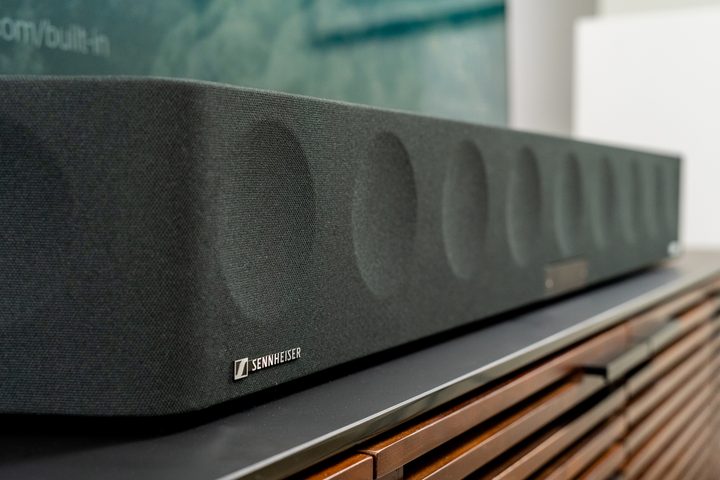
It doesn’t have separate speakers or a subwoofer, but one listen to Sennheiser’s huge (and pricey) Ambeo and you probably won’t care. If price is no object and you’re looking for a one-speaker Dolby Atmos solution, you can’t do better right now than the Ambeo.
Read our in-depth Sennheiser Ambeo review
Vizio Elevate Soundbar (under $999)

The Vizio Elevate is a revolutionary Dolby Atmos soundbar system known for its unique adaptive height speakers that physically rotate upward when Atmos content is detected. This 5.1.4 system delivers 18 high-performance speakers, including a powerful wireless subwoofer and two rear satellite speakers for true surround sound. The Elevate’s standout feature is its patented rotating speakers on both ends that automatically adjust their position based on content—pointing forward for standard stereo and upward for height effects in Dolby Atmos or DTS:X content. Connectivity options are extensive with HDMI eARC support, multiple HDMI inputs with 4K/HDR passthrough, Bluetooth, and Wi-Fi for streaming. The system outputs up to 107 decibels with impressive bass response down to 30Hz. Voice assistant compatibility, customizable EQ settings, and a backlit remote enhance the user experience.
Read our in-depth Vizio Elevate review
JBL Bar 9.1 ($1,000)

JBL’s Bar 9.1 uses two fully wireless, battery-powered detachable surround speakers containing up-firing drivers, making Dolby Atmos both effortless and satisfying. It’s an ambitious idea that mostly works — except for the slightly muddy dialogue. Nonetheless, it has enormous bass thanks to a massive wireless sub and stands up to most separate-speaker Atmos soundbars with its competitive pricing.
Read our in-depth JBL Bar 9.1 review
Should you buy a Dolby Atmos soundbar?
A Dolby Atmos soundbar is a fantastic alternative to a set up with dedicated A/V receivers and speakers. Many home theatre owners often put up with the frustration of building a system with separate A/V components. Still, with a Dolby Atmos soundbar, they can get amazing sound without dealing with a complicated setup.
You won’t regret shelling out the extra cash for the Dolby Atmos soundbar because it provides the same high-quality execution as a system with separate A/V components.
Dolby Atmos soundbars are on the expensive side, and there aren’t many budget-friendly options out just now. If you’re on a tight budget, do not despair. We recommend the Yamaha YAS-209 or the Sonos Beam (Gen 2) soundbars as perfectly adequate, low-priced alternatives.
What’s new with Dolby Atmos soundbars?
Dolby Atmos technology has evolved significantly for soundbars in recent years. The latest generation of Atmos-enabled soundbars feature more upward-firing speakers with improved driver technology, creating a more convincing overhead soundstage without requiring ceiling-mounted speakers. Many premium models now incorporate wireless satellite speakers that can be placed behind listeners for true 360° immersion.
Signal processing has also improved, with AI-powered room calibration that automatically optimizes sound based on room acoustics using integrated microphones. Several manufacturers have introduced slimmer-profile Atmos soundbars that deliver impressive height effects despite their compact form factor.
The newest units feature enhanced connectivity options, including HDMI 2.1 with eARC, allowing for seamless passthrough of high-bandwidth audio signals from the latest gaming consoles and streaming devices. Most premium Atmos soundbars now support a wider range of spatial audio formats, including DTS:X and Sony’s 360 Reality Audio, providing more versatility across content sources.