We’ve entered a new era for Google in the streaming video platform. And smart home platform. And in the battle for the major players — that includes Amazon, Roku, and Apple — to keep customers within a single ecosystem while supporting all the accessories and doodads that we use every day.
Welcome to Google TV Streamer. It marks Google’s return to a full-fledged streaming device, and not something that just made it easy to start a video on your phone and watch it somewhere else, or something that was pretty underpowered. This is new. This is better. And this does a lot more.
We have a complete rundown in a full, comprehensive Google TV Streamer review. We highly recommend you check that out. But here are the broad strokes.

What is it?
Google TV Streamer is the successor to Chromecast with Google TV, which was Google’s first self-produced full Android TV/Google TV device in quite some time. Like its predecessor (and unlike the original few iterations of Chromecast), it’s a full operating system based on Android TV. (Yes, the “Google TV” name continues to confuse things. Welcome to the way Google does things.)
In other words, this is a direct competitor to the likes of Roku, Amazon Fire TV, and Apple TV.
You’ll notice, though, that unlike the Chromecasts that came before it — and unlike most Roku and Fire TV devices — Google TV Streamer isn’t a diminutive dongle that lives behind your television. It’s bigger (not huge, though), and meant to be out in the open. Google says that’s for better network connectivity, and to better connect to the various smart home devices that can connect directly to it.
What is the Google TV Streamer price?
Buy at Amazon . That’s about twice as much as Chromecast with Google TV, and that’s going to be a tough pill for some to swallow. But this is much better than what came before it. And that’s also about the same price as the top end of the Fire TV line, and just under what Apple TV 4K costs. (And that’s still our top pick for the best streaming device you can buy.)
Will we see Google TV Streamer go on sale at some point? Almost certainly.

What’s new?
If you’ve ever used Google TV, you’ll know your way around Google TV Streamer. It’s almost exactly the same experience. The internals have been beefed up a bit — it’s a good deal smoother and faster, and it has much more storage for apps and movies and whatever.
Google TV also has the option for a wired Ethernet connection, if you need something faster (and probably more stable) than Wi-Fi.
But perhaps the biggest change is that Google TV Streamer is a smart home hub, utilizing the Matter and Thread standards. You don’t need to remember those names. Just know that devices like cameras and locks and thermostats and whatever can talk directly to Google TV Streamer — and can help those devices talk to other smart home systems, like Apple’s HomeKit or Samsung’s SmartThings.
And with all that comes a new Google Home panel in the user interface that lets you see your cameras on the TV, or adjust the thermostat. It’s pretty cool.
Also, the remote control is improved. It’s bigger, with buttons in better places, and an audible remote-finder chirp thing for when you drop it down the cushions.

Is this Google TV? Or Android TV?
Yes.
Seriously, Google doesn’t like to make things easy sometimes. Think of it like this: Google TV is the branding for the platform. This device is a Google TV device. Lots of smart TVs are Google TV, erm, TVs.
The software underneath them is called Android TV. But unless you’re a developer, you really don’t need to worry about that. Call it Google TV.

What’s in the box?
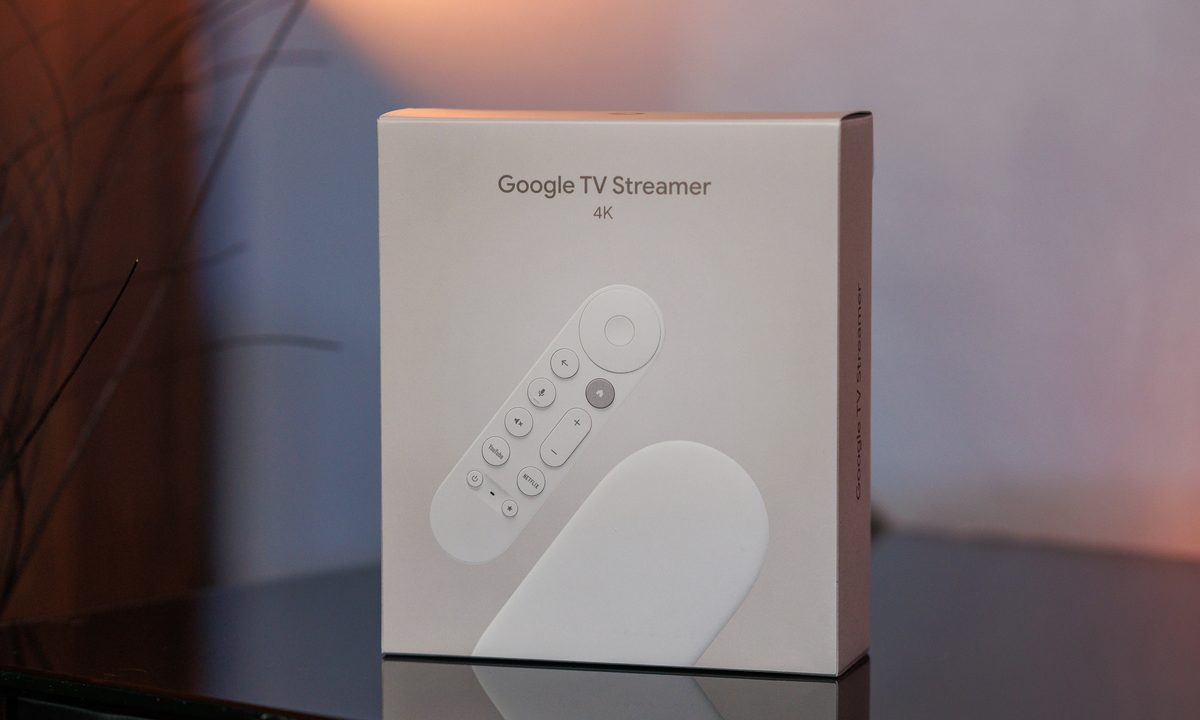
There aren’t any major surprises once you open the box. The packaging is pretty simple, made of a good bit of recycled material.
Inside the box you’ll find:
- The Google TV Streamer base.
- The Voice Remote, and 2 AAA batteries
- Power adapter
- 1.8-meter power USB-A to USB-C power cable
- Quick-start guide
- Other safety and warranty stuff you’ll probably not read
Note that there’s no HDMI cable in the box. You’ll need your own.
Google TV Streamer specs
We live in a world in which specs maybe shouldn’t matter quite as much as they do. But there’s a good bit going on inside Google TV Streamer. Here are the specs that matter:
| Form factor | Media console top |
| Price | $99 |
| Operating system | Android TV 14 |
| Processor | MediaTek MT 8696 |
| Storage/RAM | 32GB (26GB accessible)/4GB |
| Connectivity | Wi-Fi 6 (802.11ac), Bluetooth 5.1, gigabit Ethernet |
| Resolution | 4K, with Dolby Vision, HDR10, HDR10+, HLG |
| Video output | HDMI 2.1 |
| Smart home protocols | Matter, Thread |
| Size, weight | 6.4 x 3.0 x 1.0 inches, 5.7 ounces |
Is this better than the Onn 4K Pro?
We’ve got a complete comparison of Google TV Streamer versus Onn 4K Pro, and you should read it. But here are the broad strokes: Both devices run the Google TV operating system. It’s the hardware that sees the biggest differences.
Onn 4K Pro has an always-on microphone so you can do hands-free voice commands. Google TV Streamer doesn’t, but it does have the innards to serve as a smart-home hub. And both devices have find-my-remote capability.
It’s a tough call, for sure, especially when one is twice the price of the other.
Yeah, but this is no Nvidia Shield
You’re right. Nothing is. Next question.