  1. Home
  2. Phones
  3. News

Android tap-to-share leak offers a first look at Google’s new sharing tool

A leaked interface shows how Google may let Android phones send files and contacts by touching together.

Add as a preferred source on Google
Android Quick Share with iPhone AirDrop
Google Pixel 10 series' Quick Share works with iPhone AirDrop Google

Android may be getting a simpler way to move files between phones. A newly surfaced interface shows Google working on a sharing feature that appears built for quick transfers of contacts, photos, videos, links, location data, and other content by bringing two devices together. It looks like one of the clearest signs yet that Google wants a more physical, AirDrop-style handoff on Android.

What makes the reveal interesting is how specific the flow already looks. The screens suggest both phones need to be unlocked, facing up, and aligned near the top before the transfer begins. That gives the feature a more finished feel than a loose Android 17 rumor, even though Google still hasn’t announced it.

How the transfer actually works

The interface points to a broad set of supported items, which makes this more useful than a niche contact-sharing trick. If it works as shown, the feature could handle the kinds of everyday handoffs people actually care about, from a photo album to a saved location or a link sent in a hurry.

There’s still some friction in the design. Users reportedly need to keep the phones together until a visual confirmation appears, and if the connection fails, the guidance is to try again with the devices placed back-to-back. That means the idea is simple, but the real-world experience will depend on how reliably it works.

Android’s hardware challenge is obvious

The overlap instruction may be the most telling detail in the whole leak. Unlike the iPhone, Android devices don’t place NFC hardware in one standard location. Some phones position it near the camera area, while others place it closer to the top edge.

That likely explains why Google seems to prefer overlap instead of a neat top-to-top tap. It’s a practical workaround for Android’s hardware spread, but it also shows the tradeoff. A feature like this only feels magical when it works on the first try.

What happens after the leak

The report ties the interface to Google Play Services version 26.15.31 and points to Android 17 as the likely launch window. It also says the option has appeared experimentally in Samsung’s One UI 8.5, while Oppo is said to be planning similar support on the Find X9 series.

Recommended Videos

That reach will decide whether this becomes a real quality-of-life upgrade or just another feature demo people forget. If Google can make it work consistently across enough phones, Android may finally get the fast, low-friction sharing gesture it has been missing.

Paulo Vargas
Paulo Vargas is an English major turned reporter turned technical writer, with a career that has always circled back to…
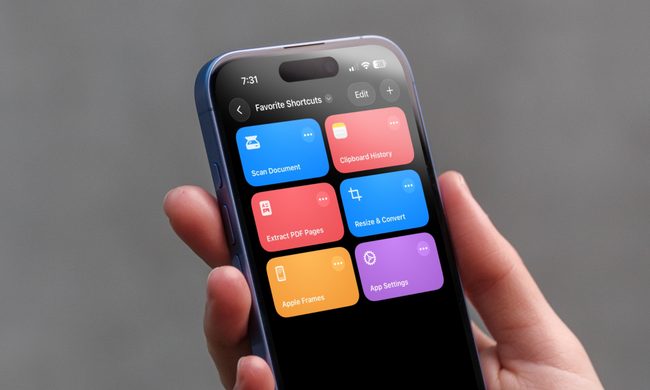
I can’t live without iPhone shortcuts. These 7 are my favorites that you must try, too.
I've been using these 7 iPhone shortcuts for years, and they've completely changed how I use my phone.
iPhone showing shortcuts app

The iPhone Shortcuts app reminds me of Minecraft. It might be relatively easy to jump into, but it offers nearly limitless potential, allowing you to build anything you want. The same holds true for the Shortcuts app, and that endless possibilities are what many iPhone users might find intimidating. But you don't have to.

If you are new to iPhone shortcuts, think of them as little automated helpers. You can build them yourself or find ones that others have built and use them. And that’s the beauty of shortcuts. If you don’t want to get your hands dirty, you can find shortcuts others have created and tailor them to your needs. 

Read more
Gemini Intelligence has strict requirements, and your phone may not qualify
Gemini Intelligence

Google’s new Gemini Intelligence platform is quickly becoming one of the biggest talking points in the Android world right now. After being highlighted during this week’s Android Show, the feature is already being tied to several upcoming premium foldables and flagship phones. But there’s a catch: not every high-end Android device will be able to run it. And surprisingly, even some of Google and Samsung’s latest foldables may miss out.

According to Google’s requirements, Gemini Intelligence isn’t just another software update you can casually push to older devices. The company appears to be building this around a much stricter hardware and long-term software support system. To qualify, a phone needs a flagship-grade chipset, at least 12GB RAM, support for AI Core, and Gemini Nano v3 or newer. That immediately creates a problem for several current-generation phones.

Read more
Meta’s Ray-Ban Display now types messages from your finger movements
Neural Handwriting is a really cool feature, but Meta opening the Ray-Ban Display to developers is the quiet announcement that turns a clever wearable into a platform with immense possibilities.
Meta Ray-Ban Display and EMG Band.

Six months into its life, the Meta Ray-Ban Display is starting to look less like an experiment, thanks to what is arguably the most significant update Meta has ever pushed for the device. 

The headline feature is Neural Handwriting, which is now available to every Ray-Ban Display owner, having spent its early months in limited access for Messenger and WhatsApp users. 

Read more
