

The cell phone in your pocket is a wonderful thing, and it has led to a massive overhaul of the way our lives function. In conjunction with the internet, the humble smartphone means you have access to an enormous amount of data whenever you need it.
Unfortunately, that access is reciprocal, and stopping your personal data from getting out there is tough. While it may seem trivial, little bits of information are all some criminals need to try and scam you out of more valuable data, like your bank details or passwords. One of the ways this is done is known as “phishing,” and it’s becoming more commonplace every year.
Despite strong security on both iOS and Android, it’s hard for your smartphone to protect you against phishing attempts. Don’t let your faithful smartphone lead to your financial downfall or worse — here’s how you can protect yourself from cell phone phishing attacks.
What is ‘phishing’ and how does it work?
Before we start, let’s answer this question: What is phishing? Phishing — pronounced fishing — is simply a scam where a criminal uses emails, phone calls, and other contact methods to pretend to be someone they’re not, in order to get access to important and often confidential information. Think of it as being a long-distance con man and you’re not far wrong.
The aim of a phishing scam is usually to get access to a person’s financial information — but the range of options open to scammers is as diverse as the internet. So, while it’s common for phishers to impersonate banks, they will also target Apple accounts, for example, or any other service where payment information can be found. Phishing scammers may try to pass themselves off in (but are not restricted to) one of these guises:
- Your bank informing you of a problem with your account.
- A service provider like Apple warning that your account will be closed if you don’t respond.
- A delivery company informing of an impending delivery.
- A retailer offering free gift cards, coupons, or huge discounts.
- A tax rebate from the IRS, or your local tax authority.
- The purchase of an expensive item, with a link to stop the transaction.
Phishers often prey on the natural fears of targets in order to get them to act quickly, and without caution. These messages will urge you to hurriedly sign into your account or confirm details without checking the source — and just like that, the scammer now has what they need to steal your money.
The only real defense against phishing is constant vigilance. With that in mind, here are some of the more common phishing attacks that may target you, and what steps you can take against them.
SMS-based phishing

Texting is one of the most common methods of communication — and that makes SMS messaging a tempting target for many phishers. SMS phishing — known as “smishing” — follows many of the typical phishing rules. Each text contains an internet URL, which will often take you to a convincing replica of your banking website or some other website that requires you to log in. When you sign into your account, you’re actually giving the attackers the information they need. Sometimes you’ll be prompted to download something, which allows attackers to get malware onto your system. From there, the scammer has the information or control they require, and you’ve been effectively “phished.”
It’s easy enough to avoid being taken in by these scams. Be skeptical. Phishers will use greed or fear against you, and will try to use them to goad you into action without prior forethought. Take a moment to look at the message you’ve received, and try to spot any of these giveaways:
- Errors in spelling, punctuation, or grammar.
- A lack of personal salutation — “sir,” “madam,” or “valued customer” instead of your name.
- The offer is too good to be true.
- It’s trying to get you to act quickly, without taking time to consider.
- This company or person has never contacted you in this way before.
- The originating number seems suspicious.
- A lack of personal information — legitimate companies never ask for information via text message.
Of course, these methods aren’t foolproof, and if you have any suspicions, do not act as the message requests — and never tap anything in the message. Instead, if it’s a message about an account you hold, contact that company directly without using the link or phone number in the text. If the text claims to be from your bank, use the number from the back of your card, or access their website independently from your web browser. For services and tax authorities, contact them via their authorized phone numbers, email addresses, or websites.
For offers that simply look too good to be true, just ignore them. After all, there’s no such thing as a free lunch. If you’re sure a text is phishing, make sure to block the number from contacting you again. Also, you can report the number to the Federal Communications Commission or the Internet Crime Complaint Center (IC3).
Call phishing
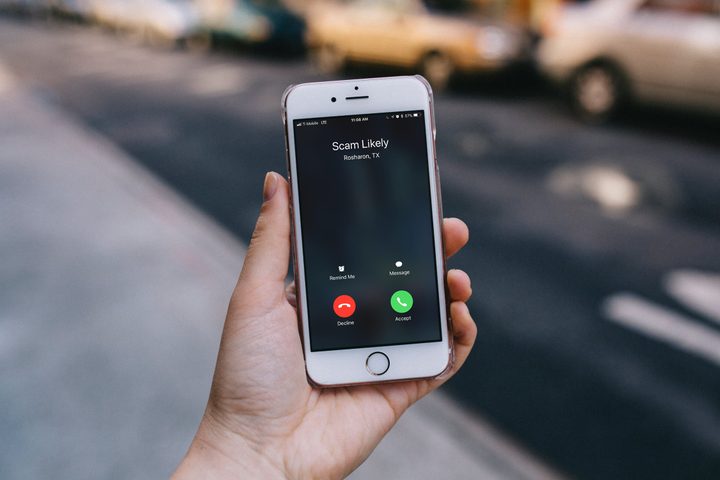
Another of the most common phishing methods is a direct phone call. Voice phishing — also known as “vishing” — involves a human element, and will normally come at you with a similar plan of attack as SMS smishing attempts. That means people pretending to be your bank, the tax authorities, or someone else trying to gain valuable information.
As ever with phishing attempts, there are some fairly big giveaways that you can use to figure out if a call is legitimate or not.
- You’re being asked to share your PIN number or other personal information — your bank will never do this.
- It’s too good to be true.
- The caller is trying to get you to act without thinking.
- The originating number seems suspicious.
This list is not exhaustive, and if you have any doubt at all, it’s worth excusing yourself politely and hanging up.
Explaining that you’ll ring back (to an official number) before divulging any personal information is a great way to avoid potential scams. Do not follow any instructions offered unless you’re absolutely sure it’s a legitimate call — and even then, companies should be able to offer the same service if you call back.
As with any text phishing attempts you uncover, make sure to block the number from contacting you, and report the number to the FCC or the IC3.
Other phishing methods to be aware of
Social media phishing
We live in an interconnected age, and social media is a huge part of that. However, not everyone is who they claim to be on social media. Formerly trustworthy accounts can be hacked, and through no fault of your own, lead to you surrendering money or information to a hacker’s phishing scam.
Always be wary of messages from friends requesting money, or odd-looking messages — especially if those messages use a link-shortening service like bit.ly to hide the link’s destination. Also exercise caution with social media quizzes and other fun games — these can be used to gather information from yourself and even your friends. The recent Cambridge Analytica scandal is a stark warning of what information can be gleaned from social media.
Fraudulent websites
If you’ve got your eye out for suspicious messages, then you’re less likely to directly interact with a fraudulent website. However, always be vigilant for websites masquerading as the real thing, especially websites like banks and online shops.
Always make sure to check the URL you’re clicking through to. For example, http://www.bank.example.com is not the same as http://www.bank.com — the first link would go to a specific page made to look like a bank site.
Those ones are easy to notice, but less easy to notice are those that use small differences to stand out, including underscores and dashes. As another example, www.my-bank.com and www.my_bank.com are two very different websites — but easy to confuse at first glance. When in doubt, always double check and try to use a known URL.
Preventative measures

It’s hard for security measures to guard against phishing, simply because it’s often just a phone call you receive, or a dodgy website you visit. However, there are ways to try and make sure you don’t get caught hook, line, and sinker.
Only install apps from authorized sources
To avoid an unauthorized app getting a hold of your data, it’s best to only download apps from your smartphone’s authorized vendors. For Android phone owners, that’s the Google Play Store, while for iPhone and iPad owners, it’s Apple’s App Store.
While some third-party app stores are legitimate, it can still be a gamble, and a malicious app can slip through the net. Google’s and Apple’s security is tried and tested, and exceptionally good. If you’re on Android, we also recommend an antivirus app, just to be safe.
Turn on caller ID or other services
Many carriers now offer a free service that highlights possible scam calls, like T-Mobile’s and MetroPCS’s “scam likely” service, and many phones now come with call-identifying capabilities built in. These abilities give a quick snapshot of whether the service thinks the call is legitimate, and allow you to report scam calls to a central database. If your phone doesn’t have one built in, consider downloading Should I Answer for Android or Truecaller for iOS.
Be vigilant, and always think twice
There’s no advice or app that replaces simple common sense, so always take a moment to reflect on what’s on offer. If it sounds too good to be true, it probably is. If someone is trying to force you to make a snap decision, or if they’re asking for confidential information, then they might be trying to rip you off. Be cautious and always think twice, and you hopefully won’t get scammed.


