  1. Home
  2. Tablets
  3. Mobile
  4. News

Check your Samsung Galaxy S22 for a big update right now

Add as a preferred source on Google

The Samsung Galaxy S22 in a purple color.
Samsung Galaxy S22 Andrew Martonik / Digital Trends

Samsung is finally fulfilling its promise in the post-Galaxy S24 launch era. The company, via an official newsroom post, has confirmed that the generative AI tricks that made its latest flagship phones stand out are now rolling out for the two-generation-old Galaxy S22 series phones.

The AI-loaded One UI 6.1 update is now going out in batches for U.S. users of the Galaxy S22 and several foldable phones, including the Galaxy Z Flip 4 and Galaxy Z Fold 4 In addition to phones, Samsung has also released a build for the Galaxy Tab S8 line.

The new AI features certainly add a whole new level of convenience to the aforementioned phones, but there’s a caveat. These Galaxy AI tricks will only be free to use until sometime next year. After that, Samsung will start charging a fee, but we don’t know just how much it is going to be. Also, for features like Live Translate, you will need to create a Samsung account if you don’t already have one.
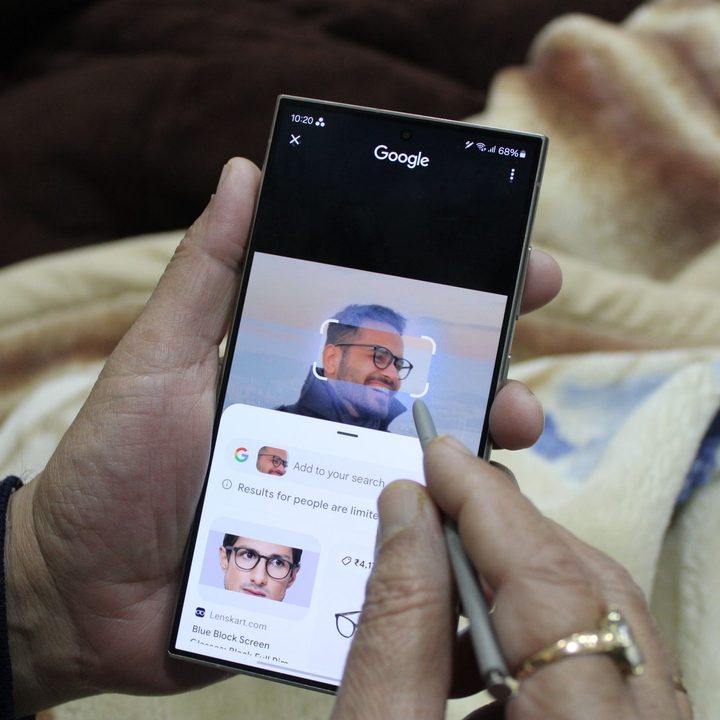
Circle to Search on Galaxy S24 Ultra.
Circle to Search Prakhar Khanna / Digital Trends

Among the most notable One UI 6.1 additions is Circle to Search. It’s my personal favorite, as it removes the whole chore of copy-and-pasting and/or launching a dedicated Google Lens search in a separate app. All you need to do is circle or draw around an object on the screen, and the internet-connected AI will find relevant information on it, including product listings.

Another cool addition is the photo-editing toolkit. It lets users select and move an object in a picture, enlarge or adjust the angle, and even automatically give post-analysis edit suggestions. It also lets you play with the background, add a splash of tonal hues, or have a great time with exposure effects, among other things.

On the more practical side, you have Live Translate, which can translate both voice and text during video calls. On foldable phones, the experience is even more rewarding with a split-screen approach. On a similar note, there’s Chat Assist, which offers translations and a tonal adjustment facility.
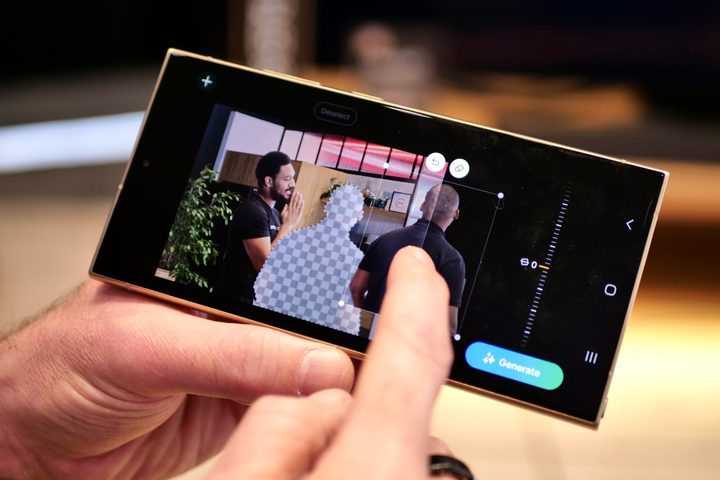
Editing a photo on the Samsung Galaxy S24 Ultra using the AI toolkit.
Galaxy AI photo-editing tool Andy Boxall / Digital Trends

For folks struggling with a horde of disorderly notes, there’s the aptly named Note Assist. It can neatly organize haphazard notes into beautifully formatted versions, complete with its own automatic summarization and translation facility in tow. Notably, this one also requires a Samsung account and limits users to notes with up to 4,000 characters per note.

If you’re a Samsung loyalist still rocking the Galaxy S21, Galaxy Z Flip 3, or Galaxy Z Fold 3, the One UI 6.1 update will sprinkle in some AI goodies as well. These phones will be treated to Chat Assist and Circle to Search features, says Samsung, but the other AI features are reserved for newer phones.

Nadeem Sarwar
Nadeem is the Managing Editor at Digital Trends.
Boox’s palm-friendly e-reader will please bookworms with its stylus and cutesy looks
Boox has added stylus support to the Go 6 e-reader for note taking
Boox Go 6 (Gen II) e-reader with stylus

Boox has launched the Go 6 (Gen II), its new 6-inch E Ink reader and the successor to the 2024 Boox Go 6. The new model keeps the small, lightweight format that made the original popular, but adds one major upgrade in the form of note-taking support.

The Go 6 (Gen II) is now available for pre-order through the official Boox shop for $199.99, with shipping expected to begin around June 17. It is still very much a compact travel e-reader, but the stylus support gives it a bit more flexibility than the 2024 model.

Read more
AT&T per-day plans put cellular services on your iPad, even if you’re not a customer
AT&T is selling cellular data like a one-day gym pass now
iPad

AT&T has introduced a new wireless offering called Unlimited Day Pass, giving eligible iPad users access to 24 hours of unlimited cellular data for a flat daily fee of $3 - even if they are not AT&T customers. The new service is designed for Wi-Fi + Cellular iPad models with eSIM support and marks one of the first major attempts by a U.S. carrier to offer truly on-demand tablet connectivity without contracts, subscriptions, or long-term commitments.

According to AT&T, the first Unlimited Day Pass is free for customers, limited to one iPad per person. After that, users can purchase additional passes directly from their iPad using a debit or credit card. The company says activation can be completed directly through the iPad’s settings menu without requiring an app or even an active Wi-Fi connection. Users simply need to open the Settings app, navigate to Cellular Data, and add the AT&T Unlimited Day Pass. Once activated, the 24-hour unlimited data session begins shortly afterward.

Read more
You can now buy the most affordable Kindle Scribe on Amazon
The Kindle Scribe without Front Light is now available for $70 less than the standard model
kindle-scribe-without-front-light

If you have been holding off on getting a Kindle Scribe because of the price, Amazon just gave you a reason to reconsider. The Kindle Scribe without Front Light is now available for purchase on Amazon for $429.99, making it $70 cheaper than the standard Kindle Scribe.

Amazon first announced this model back in 2025, and it has finally arrived. However, the one catch is right there in the name. There is no front light, which means reading or writing in dim environments will be trickier than on the pricier model.

Read more