

Apple’s next big Apple Watch update — watchOS 11 — is here. This software update was first announced by Apple at the Worldwide Developers Conference (WWDC 2024) in June and is packed with new and enhanced features that will benefit every type of Apple Watch user.
We have been using the various versions of watchOS 11 betas since Apple began releasing them. We have extensively tested the new features to understand their functionality. A few new and updated features stand out, including the latest version of Smart Stack, a redesigned Photos face, and exciting changes to the Activity Rings tool.
Here’s an in-depth look at watchOS 11, its features, and more.
watchOS 11 release date

At its recent “It’s Glowtime” event, Apple didn’t just introduce the iPhone 16. It also revealed the Apple Watch Series 10 and noted new features in the Apple Watch Ultra 2. It also told us when to expect the first public version of watchOS 11.
In addition to shipping out of the box with the Apple Watch Series 10, the new software update will be released on Monday, September 16, for all older Apple Watches.
Compatible Apple Watches for watchOS 11

The watchOS 11 update requires users to have the iPhone XS or later with iOS 18 installed. The update will come preinstalled on the 2024 Apple Watch model, the Apple Watch Series 10, and will also work on the following older Apple Watch models:
- Apple Watch SE (2nd generation)
- Apple Watch Series 6
- Apple Watch Series 7
- Apple Watch Series 8
- Apple Watch Series 9
- Apple Watch Ultra
- Apple Watch Ultra 2
Note that not all features are available on every single Apple Watch model.
The revised Smart Stack
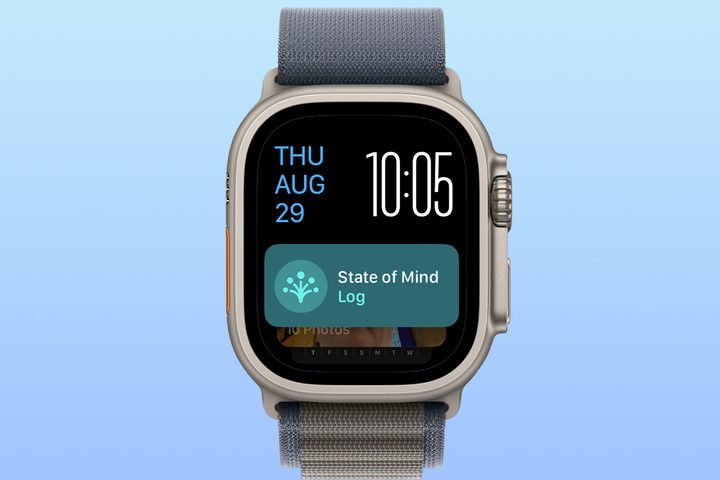
The Apple Watch Smart Stack tool was first introduced in watchOS 10 as a way to quickly display important information, such as the day’s weather, through widgets. With watchOS 11, Apple has improved Smart Stack by adding time and location elements to the screen through enhanced widgets and Live Activities.
For example, you may see weather widgets alerting you to an upcoming storm in your area or the latest score from your favorite sports team. The information on the Smart Stack changes throughout the day as time passes, your location changes, or you switch between activities.
The Smart Stack feature works with both native and third-party apps, and we anticipate it will become even more valuable over time as developers start to embrace it. To access this feature, simply turn the Digital Crown or use Double Tap on compatible watches. Smart Stack also includes links to frequently used apps such as Music, Workouts, and Messages.
More customizable activity rings

One of the most significant drawbacks of using the activity rings on Apple Watch has been the inability to skip a day without losing a streak or making adjustments for a specific day. Not anymore.
In watchOS 11, Apple is finally making it possible to pause activity rings and customize them on a per-day basis. This means you can pause your rings for a day, week, or month, and your achievement streaks will continue where you left off when you return.
These are welcome updates to the activity rings tool, adding much-needed flexibility. Previously, it was difficult to adjust goals for a given day or maintain a streak. With watchOS 11, doing so is easier than ever.
The new Vitals app

With the new Vitals feature in watchOS 11, Apple is making it easier to see critical overnight health metrics that can tell you a lot about your overall well-being. These metrics include your heart rate, respiratory rate, wrist temperature, blood oxygen level, and sleep duration. Which metrics you can use depends on the Apple Watch version you have.
For your well-being, the feature will also alert you when those metrics operate outside your norm. Better still, those alerts provide context on what might be causing the change — for example, a medication change, elevation, alcohol use, illness, etc.
Get to know your Training Load

Working out is beneficial until it becomes harmful. With the new Training Load calculator in watchOS 11, athletes and everyday users can now see the stress and strain their bodies undergo during daily physical activities.
The Training Load looks at the intensity and duration of each workout over the past week and compares it to what was done over the previous 28 days. It then classifies the current training load on a scale from “well below” to “well above.”
Part of this Training Load is calculated using a new effort metric. After most cardio-focused workouts, you rate yourself using this metric, which tracks how hard you exercised. It also considers your pace, elevation, heart rate, and personal data such as age, height, and weight.
Understanding this information allows for more informed decisions when planning future workouts. The Training Load tool is located in the Activity app.
Custom workout improvements

Each watchOS release introduces new workout features, and watchOS 11 is no exception. At least three new workout tools, not including Training Load, are expected to arrive.
The first is the addition of distance and route maps for workouts such as rowing, which were previously lacking. WatchOS 11 also allows you to create custom workouts for your time in the pool. All custom workouts will now provide an “Up Next” workout view, so you always know what to expect down the road or up the hill.
Updates to Cycle Tracking

Last year, Apple added Cycle Tracking to the iPhone and Apple Watch Health app. In watchOS 11, Cycle Tracking is transformed if the user is pregnant. In those cases, the Health app will show the gestation age and track the pregnancy across all health charts.
Cycle Tracking monitors various metrics and alerts users when factors such as heart rate fall outside the normal range. It will also customize alerts for factors like walking steadiness and mental health to accommodate the pregnancy.
Say bonjour to the Translate app

The official Translate app has been very popular with iPhone users. Now, translation capabilities are also available on the Apple Watch. The app supports 20 languages and allows you to translate by typing or dictating a phrase on your watch. You can also play the translation aloud and slow it down for better understanding. The best part is that you don’t need your iPhone with you to use it; you just need to download the language to the Apple Watch.
Translate is accessible through the new Smart Stack, making it constantly within your reach.
Redesigned Photos face
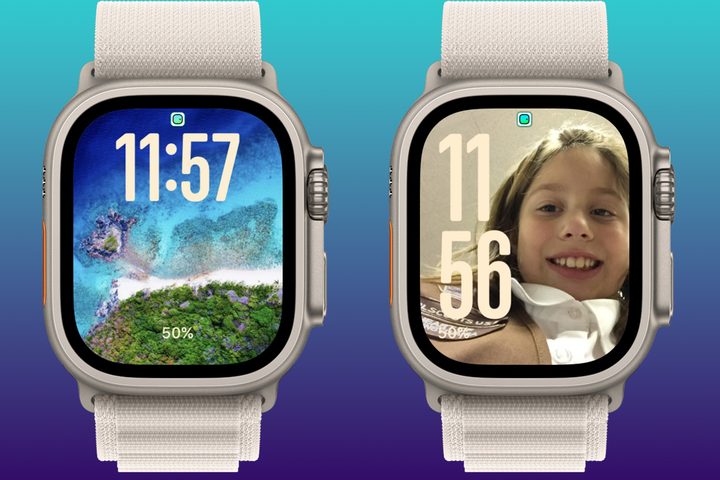
Apple seldom adds new Apple Watch faces, and it’s even more uncommon for the company to update older ones. In watchOS 11, Apple introduces a redesigned Photos watch face that uses machine learning to make the finished product look fresh.
With this feature, you can select photos from your existing collection in the Photos app or allow Apple to curate a selection based on image quality and subject matter. The result is an impressive new watch face that constantly changes in content and design.
Other watchOS 11 features

Depending on your interests, there are other watchOS 11 features worth exploring. For example, the Maps app now includes hikes for every national park in the U.S. You can use these offline and even use turn-by-turn voice guidance to get from point A to B.
The Double Tap feature is also gaining new capabilities. This exclusive gesture is available on the Apple Watch Series 9, Apple Watch Ultra 2, and upcoming models. It lets you perform quick actions on the watch by tapping your index finger and thumb. For example, Double Tap can scroll the Weather app or Smart Stack. With watchOS 11, Apple is adding an API so developers can bring this functionality to third-party apps.
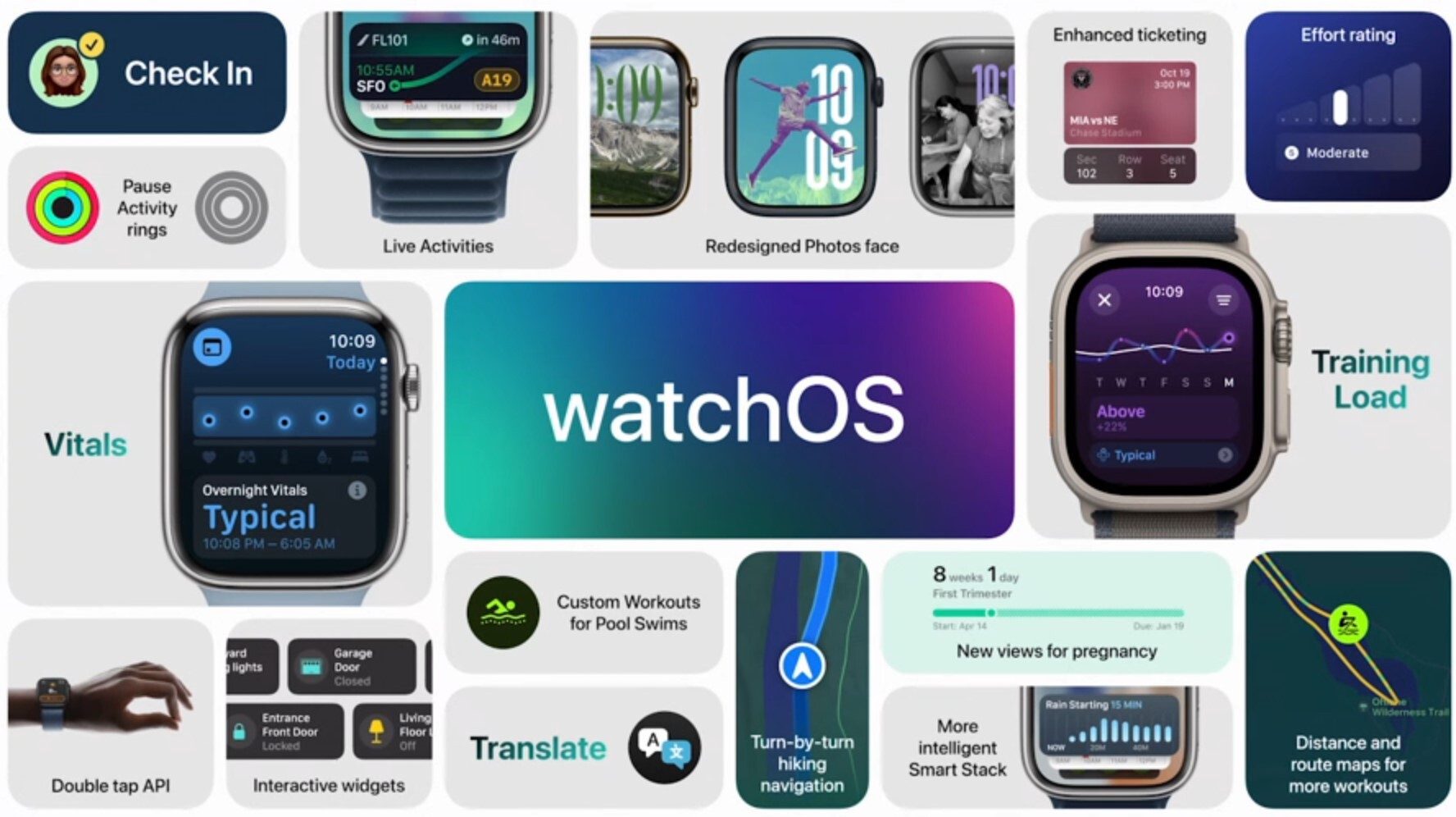
WatchOS 11 is also adding a Check In feature that makes it possible to notify a friend or loved when you’ve arrived at your destination. To get started, all you need to do is enter your destination or arrival time into the Messages app on your Apple Watch.
You can start a Check In from Messages by entering your destination or arrival time. Additionally, you can activate Check In through the Workout app to let your family and friends know that you’re out and about.
As you can see, watchOS 11 has many new-and-improved features. Get ready to download it on your Apple Watch beginning September 16.


