
MacOS Big Sur is the latest version of Apple’s operating system for desktops and laptops. It signifies a major overhaul to the Mac OS experience, moving the platform out of Version 10 after nearly 20 years.
So, what’s so great about this new version? Here we highlight the new visual design, better on-screen controls, an improved internet browsing experience, and so on. If you’re still on the fence about upgrading from Catalina, this roundup should change your mind.
Here are the best features in MacOS Big Sur we know you’ll love.
An all-new design

MacOS already looked pretty, but MacOS Big Sur ups the ante.
According to Apple, it’s the biggest visual update in years, touching every element of the operating system in small ways. Icons, windows, fonts, toolbars, and more have been spruced up, giving them a more modern look while keeping them in touch with their heritage.
The menu bar supports gradients that shift in colors to better blend in with the wallpaper. Meanwhile, the dock’s curvy figure is more iPad-like, bringing the two platforms closer together visually. The result is a subtle update, but one that looks utterly gorgeous.
It is not all about looks, though.

Apple redesigned many features to make them easier to use. For example, many apps have condensed toolbars so they are no longer in the way and are organized more efficiently. Apps like Finder (shown above) and Mail include new sidebars that enable you to quickly get where you need to go.

The Photos app borrowed the look of its iPadOS cousin, with a bigger focus on photos.
Easier on-screen controls
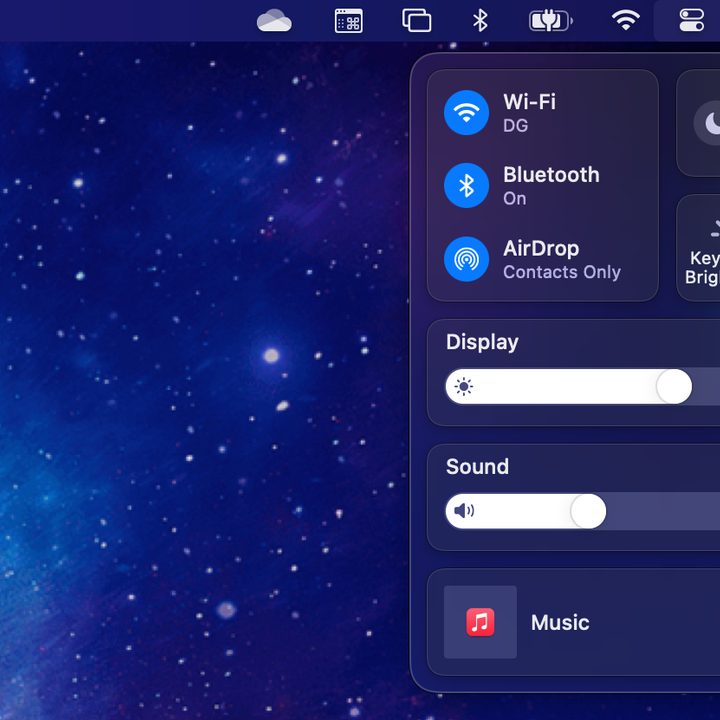
The MacBooks Pro’s Touch Bar has received more than its fair share of criticism, but one thing it does really well is quick access to controls. If you want to adjust the system volume, for example, you get a simple left-to-right slider at your fingertips.
That way of thinking is now baked into MacOS. On-screen controls, from volume to display brightness, now use a similar horizontal slider. It may seem like a small change, but it brings the Mac in line with the iPhone, the iPad, the Apple Watch — even the Touch Bar. Your muscle memory will be thankful.
In the screen’s upper-right corner, you can access key controls at a glance. Need to dive a little deeper? Just click on a setting to get more options.
Even better, you can drag settings out of the Control Center and onto the menu bar, giving you an even faster way to adjust the Mac to your liking.

That methodology applies to Notification Center as well. The Mac’s System Preferences app has always felt a bit disorganized, and it has never been as quick or as easy to find settings as we would like. Notifications can now be grouped together.

Widgets received an upgrade too. The widget library helps you discover new options, and they now come in various sizes. You can’t put them on your desktop yet like on the iPad, but it’s a big change to how Notification Center functions.
Safari steps up
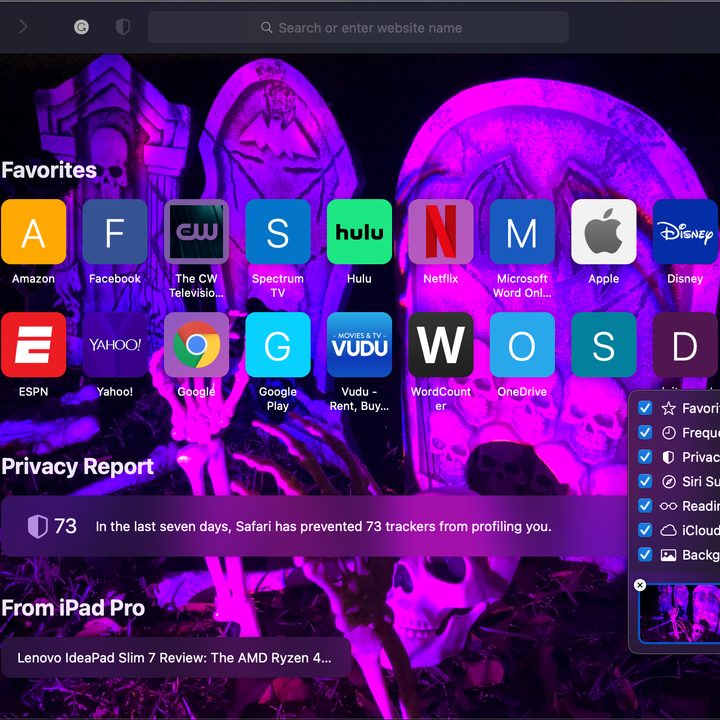
Safari plays a key role in the life of most Mac users, and Apple has updated in it a major way with MacOS Big Sur. It promises faster page loading times, stronger privacy controls, better extensions, and much more.
For instance, if you are concerned about how a website is using (or abusing) your private data, you can view Safari’s privacy report to see exactly what is going on. This can show you how many trackers have been blocked on each website, for example.

A new Safari Extensions category is on the Mac App Store. You can choose what data each extension accesses — and whether it can use it for just one day or on just one website. Apple says developers can easily bring their extensions over from other browsers like Google Chrome.

You’ll enjoy many more added features in this release. Apple is always looking to improve resource allocation, resulting in a fast performing operating system and enhanced battery life. Other goodies include quick translation, customizable startup screens, and enhanced navigation.
Messages app gets feature parity
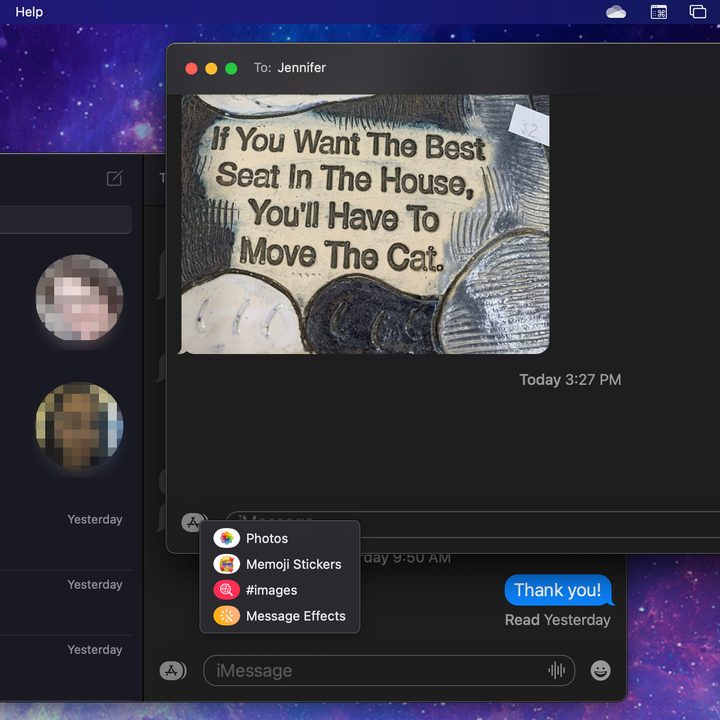
Apple’s Messages app for MacOS has been falling behind its iOS counterpart for a while now. Big Sur deals with some of these issues and provides some much-needed solutions.
For example, you can expect to see conversations placed at the top of the window, mirroring your favorite iOS device. More fun features such as Memoji and share stickers are also available on the new MacOS version. Many of the effects on your iPhone are in this version.
You can also find new updates like a redesigned photo selection menu and an enhanced search bar. The new Messages app is a useful way to stay connected and work all in one place.


