  1. Home
  2. Computing
  3. Evergreens

Does ray tracing work on the Intel Arc GPUs?

Add as a preferred source on Google

Intel is the newest player in the GPU market now that the company has finally launched its Arc Alchemist GPUs. Since these are first-generation products from a company that has almost no experience in making desktop-grade graphics, you might wonder if GPUs like the Arc A770 and A750 support modern features like ray tracing.

Intel Arc does in fact support ray tracing, just like AMD and Nvidia does, and the performance might even surprise you.

Recommended Videos

Does ray tracing work on Intel Arc?

The Intel logo on the Arc A770 graphics card.
Jacob Roach / Digital Trends

You might recall that in 2018, when Nvidia first introduced its Turing architecture with ray tracing capability, not all Turing GPUs actually had ray tracing support. All RTX 20-series cards had ray tracing, but not the lower-end to midrange GTX 16-series, which used significantly less complex silicon.

Given that Arc is both Intel’s first attempt at gaming GPUs for the desktop and also Intel’s first ray tracing-capable GPU, you might wonder if only the higher-end Arc cards have ray tracing support. In fact, all Arc GPUs have the hardware necessary for ray tracing, even the lowest-end A310.

On a software level, Arc supports ray tracing in DirectX 12 and Vulkan titles, which represents almost all games that have ray tracing. This puts Arc on equal footing with AMD and Nvidia when it comes to software compatibility.

Intel Arc Alchemist ray tracing benchmarks

Ray tracing benchmarks for Intel Arc GPUs at 1080p.
Image used with permission by copyright holder

Of course, being able to turn on ray tracing doesn’t mean much if the performance is bad. Again, this is a first-generation product for Intel in multiple aspects, and you’d be justified in being a bit skeptical about whether or not Arc can really perform. Well, as you can see in the above chart from our Arc A770 and A750 review, these midrange cards are actually quite good at ray tracing.

On average, the A770 is about 18% faster than the RTX 3060 and just 12% slower than the RTX 3060 Ti. AMD’s midrange GPUs can’t really hold a candle to Intel or Nvidia, which means that Arc is in at least second place in the ray tracing game.

Cyberpunk 2077 ray tracing benchmarks at 1080p.
Image used with permission by copyright holder

It is important to point out that ray tracing is extremely resource intensive and on midrange GPUs, the frame rate can be so low that there’s no point in enabling it.

In Cyberpunk 2077, which we tested at 1080p and with ray tracing set to Ultra, the performance wasn’t very good on Intel Arc or any other GPU, with only the RTX 3060 Ti achieving above 30 frames per second (fps). But that’s not the case for other games.
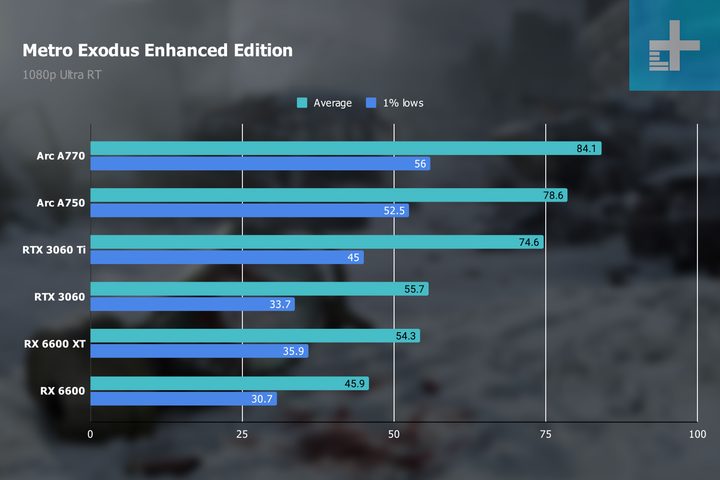
Metro Exodus ray tracing benchmarks at 1080p.
Image used with permission by copyright holder

In Metro Exodus, which we tested with similar settings, all GPUs were able to hit playable frame rates. The A770 and A750 even lead in this benchmark, beating the RTX 3060 Ti and RTX 3060 by a significant margin. None of these GPUs (Intel, AMD, or Nvidia) are for gamers wanting to enable ray tracing in every single game possible, but they do support ray tracing and can do it well enough in some games, which is better than nothing.

We haven’t tested lower-end Arc GPUs like the A380 or the A310, but based on the spec sheet alone, we can probably guess that they have very poor ray tracing performance. The A770 has 32 ray tracing units (or RTUs), while the A380 has eight and the A310 has just six, which means the A380 has a fourth of the RTUs the A770 has.

Some early reviews of the Arc A380 found that the GPU could just barely reach 30 fps in a few titles at 1080p, which is not great to say the least. While ray tracing is technically supported across the entire stack, that support is of questionable use depending on the performance. The A770 and A750 at least have some reason to support ray tracing, however.

Matthew Connatser
Former Computing Writer
Matthew Connatser is a freelance writer who works on writing and updating PC guides at Digital Trends. He first got into PCs…
Nvidia’s RTX Spark made me hate content creation a little less
Adobe's AI-powered demos showed me a future where masking, rotoscoping, and scene detection might finally stop being a chore.
NVIDIA RTX Spark for Creators Image Generation Demo Computex 2026

Every video editor has a list of tasks they'd happily outsource to someone else. Exporting isn't one of them anymore because modern laptops are already plenty fast. The real-time sinks are the boring bits: manually masking subjects, finding scene cuts in long recordings, rotoscoping frame by frame, or wrestling with tedious edits that require more patience than creativity.

That's exactly why NVIDIA's RTX Spark demo at Computex 2026 caught me by surprise. I walked into the booth expecting another presentation full of AI buzzwords and benchmark charts. Instead, I walked out thinking that for the first time in years, hardware might actually be changing the editing experience itself, rather than simply making renders finish a little sooner.

Read more
I tried Acer’s new 5K MiniLED Gaming monitor, and OLED kept popping into my head
After seeing it in action at Computex, I finally understand where MiniLED shines and where OLED still wins.
MiniLED vs OLED Hands On Computex 2026

If Computex 2026 taught me one thing, it's that monitor makers are no longer interested in building one-trick ponies. They want displays that can wear multiple hats, seamlessly switching between work and play without making users choose. Acer's new Nitro XV345CKR P is perhaps the best example of that philosophy, and after spending time with it on the show floor, I walked away impressed by its ambition while also questioning whether MiniLED is really the future for gaming monitors.

I've always had a slightly complicated relationship with MiniLED. On a massive living room TV, it works wonders because you're sitting several feet away, and the local dimming zones blend beautifully. Put the same technology on a monitor that's sitting barely two feet from your face, however, and suddenly you're no longer admiring the display, you're inspecting the physics behind it.

Read more
Ugreen’s portable monitor is utterly sharp, sleek, and costs a pretty penny
Computer, Electronics, Pc

Portable monitors have become the Swiss Army knives of modern tech. They travel with remote workers, expand cramped laptop screens, and occasionally double as gaming displays in hotel rooms. Most of them also follow a familiar formula: a basic Full HD panel, a foldable cover, and a price that stays comfortably under $250. Ugreen clearly looked at that formula and decided to ignore it.

The company's new AP16 portable monitor has officially landed in the U.S., bringing a feature list that feels more like a premium desktop display than something designed to slip into a backpack. The catch is that it costs $350, placing it well above many rivals.

Read more