
After nearly two years of exclusivity to the PS5, Returnal is finally available on PC. After playing for a little less than a week, I’m here to provide the best graphics settings I’ve found, as well as a few suggestions for how you can get the most out of upscaling and ray tracing in the game.
Overall, it’s a solid PC port with a ton of options. I encountered a few stutters and two hard crashes during testing, but that’s fairly stable for a game released in 2023. Hopefully, the few lingering issues will be resolved with a patch once the game is fully released.
The best settings for Returnal PC

Returnal‘s graphics preset can have a huge impact on performance and image quality. After testing the game for around 10 hours, here are the best settings I’ve found:
- VSync: On
- Max frame rate: Monitor’s refresh rate
- Screen optimization: DLSS (if available) or FSR
- Lighting quality: Medium
- Shadow quality: High
- Ray-traced shadows: Off (or medium on capable hardware)
- Screen space reflections: On
- Ray-traced reflections: Off
- Model quality: Medium
- Texture quality: High (if 8GB of VRAM, otherwise Low)
- Volumetric fog: Medium
- Particle quality: Medium
- Anti-aliasing quality: Medium
- Depth of field: Off
- Bloom: On
Although this is a good starting point, I’d encourage you to experiment further. Returnal shows you graphics changes in real time, along with a performance readout, so it’s easy to dial in settings and see how they’ll impact your performance and how the game looks.
Shadows and lighting are important, but the model and texture settings are what really change the look of Returnal. Model quality will remove some vegetation and decals from the game, while texture quality will vastly reduce how sharp the game looks overall.
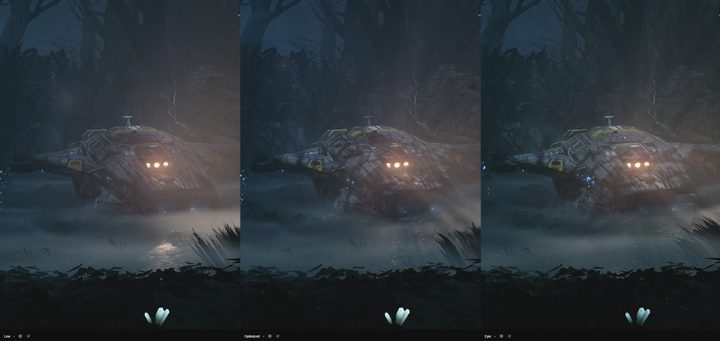
I chewed through over 8GB of VRAM with high textures, so I’d recommend leaving that setting turned down if you have less than 8GB available on your graphics card. I also left ray-tracing turned off for my optimized setting, but ray-traced shadows can have a big impact on how the game looks (more on that later).
Returnal PC system requirements
There was a big stir when Sony announced Returnal would require 32GB of RAM. That isn’t the case. Although the system requirement still calls for 32GB of RAM at maximum settings, you can get by with far less.
| Minimum | Medium | Recommended | Epic | Ray Tracing | |
| Average performance | 720p at 60 fps | 1080p at 60 fps | 1080p at 60 fps | 4K at 60 fps | 4K at 60 fps |
| Graphics settings | Low | Medium | High | Epic | Epic |
| GPU | Nvidia RTX 1060 6GB or AMD RX 580 | Nvidia GTX 1070 or AMD RX 5600 XT | Nvidia RTX 2070 Super or AMD RX 6700 XT | Nvidia RTX 3080 or AMD RX 6800 XT | Nvidia RTX 3080 Ti or AMD RX 6950 XT |
| GPU | Intel Core i5-6400 or AMD Ryzen 5 1500X | Intel Core i5-8400 or AMD Ryzen 5 2600 | Intel Core i7-8700 or AMD Ryzen 7 2700X | Intel Core i7-9700K or AMD Ryzen 7 3700X | Intel Core i9-11900K or AMD Ryzen 9 5900X |
| RAM | 16GB | 16GB | 16GB | 32GB | 32GB |
| Storage | 60GB HDD | 60GB SSD | 60GB SSD | 60GB SSD | 60GB SSD |
I topped out at around 6GB of RAM with everything turned up at 4K, suggesting you don’t need any more than 16GB to run the game smoothly. As mentioned above, the more limiting factor is VRAM, where you should have at least 8GB.
According to the specs, you can get by with a 6GB GTX 1060, but you should play the game with 8GB if you can. The good news is that you don’t need a crazy processor. A modern eight-core chip is more than enough to handle the highest graphics, while a quad-core will get you by with lower settings.
Returnal PC features

Returnal comes with a slew of PC-specific features. For starters, it includes ultrawide support for both 21:9 and 32:9 monitors, even supporting a display like the Samsung Odyssey Neo G9. I tested the game with a 21:9 Alienware 34 QD-OLED. Pre-rendered cutscenes are still in 16:9, but the game runs flawlessly in 21:9 otherwise. There’s even a handy toggle in the settings to change your aspect ratio.
In addition, the game includes an in-game benchmark that you can run by pressing Tab in the graphics settings. The benchmark covers seven scenes testing particle effects, reflection quality, meshes, and everything in between, and it’s very useful. You can save your results, compare them to new results after you make changes, and see how each scene stresses your GPU and CPU separately.
Finally, the game supports the DualSense and DualSense Edge controllers through a wired connection. Sony says the game supports haptic feedback, adaptive triggers, and the speaker on the DualSense, but none of them worked during my testing. Official support will likely roll out once the release patch goes live or shortly after.
Ray tracing in Returnal PC

Returnal includes ray-traced shadows and reflections on PC assuming you have one of the best graphics cards capable of ray tracing. Shadows should be your primary concern, though, and reflections do very little to add to the look of the game.
You can see the difference in the shadows above. Ray tracing helps extend the light through the fog and provides more atmosphere to the scene. Although you can’t see it in these screenshots, it also helps with the shadows of Selene, falling naturally over the back of her suit.

Reflections aren’t in the same boat, mainly because there aren’t a ton of reflective surfaces in Returnal. Puddles reflect with ray tracing turned on, but they don’t with it off (even with screen space reflections turned on). Note this just applies to puddles, though. I didn’t notice any difference with ray tracing turned on in the small ponds around the first biome.
I recommend leaving ray-traced reflections turned off because they represent a fairly large hit on performance without a big payoff in image quality. Shadows help add to the atmosphere of the game, so if you have the horsepower, you should turn them on. Still, like most ray tracing, you’re getting a relatively small bump in atmosphere for a decent performance drop.
Upscaling in Returnal PC

To help with ray tracing and the demanding settings available in the PC port of Returnal, it includes a few upscaling options. The main ones are Nvidia’s Deep Learning Super Sampling (DLSS) and AMD’s FidelityFX Super Resolution (FSR).
DLSS looks far better, as you can see in the screenshot above. I’m not sure if Returnal is using FSR 2, which is much better than the original version. FSR looks rough in Returnal, leading me to believe it’s using the earlier version. If you have an Nvidia RTX GPU, though, it doesn’t matter. Use DLSS.
The game also supports Nvidia Image Scaling (NIS), which is a driver-based upscaler available to Nvidia GPUs. It looks rough, so only resort to it if you’re not using an RTX graphics card.

In addition to these upscaling options, Returnal supports dynamic resolution and Variable Rate Shading (VRS). VRS is a solid option to boost your performance, but it slightly reduces detail for distant objects. Unfortunately, VRS isn’t available if you already have DLSS or FSR turned on, and those tools are far better options to boost performance.
Returnal on the Steam Deck

Returnal isn’t Steam Deck Verified, and as of publication, I haven’t heard if it will get a certification or not. I was still able to install and run the game, but it didn’t run well.
With the Low graphics preset, FSR set to Performance, and the Steam Deck locked to a 40Hz refresh rate, I wasn’t able to achieve a consistent frame rate. It hovered around 35 fps, but I saw constant stutters and hitching.
It’s possible that the game will receive an update if it gets official Steam Deck support. Sony’s other releases, such as Spider-Man, God of War, and Horizon Zero Dawn, have all received Steam Deck support. If Returnal is going to join their ranks, it needs a serious performance update.


