
Diablo has been a staple on PC for decades, so it’s a big deal when a new one releases. And Diablo 4 ups the bar for the franchise in both the gameplay and visual department. In this guide, we’re going to show you the best settings for Diablo 4 so you can get the most out of the game.
Thankfully, there are a ton of settings in the game to improve performance. I’ve tested the game for dozens of hours to arrive at the best settings, as well as looked at all of the other PC options available in the game.
Best settings for Diablo 4
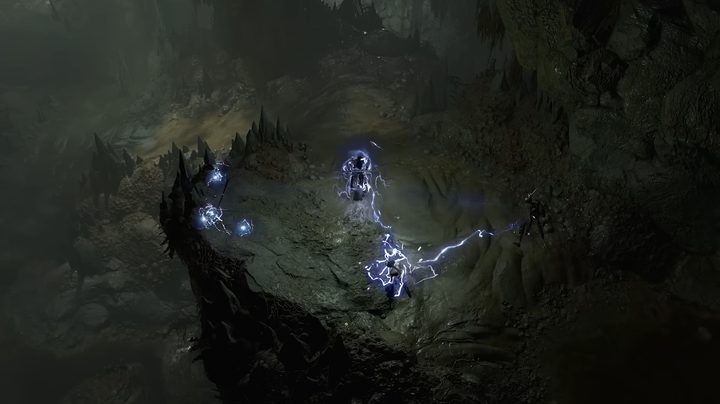
Diablo 4 is a highly scalable game, designed to run on just about anything. There’s a lot of range in its graphics options, but for most PCs, here are the best settings I recommend:
- Texture quality: High
- Anisotropic filtering: 8x
- Shadow quality: Medium
- Dynamic shadows: On
- Soft shadows: Off
- Shader quality: Medium
- SSAO quality: Medium
- Fog quality: Medium
- Clutter quality: Low
- Fur quality: Medium
- Water simulation quality: Low
- Anti-aliasing quality: High
- Geometric complexity: Medium
- Terrain geometry: High
- Particles quality: Medium
- Screen-space reflections: On
- Distortion: On
- Low FX: Off
This is the best middle ground of image quality and performance that I’ve found. You can see in the image below how these settings stack up to the Ultra preset, and it’s pretty close. You lose a hair of detail in the textures, but it’s not too much of a drop. That’s especially true when you factor in how ugly Diablo 4 can look if you turn all the settings down.
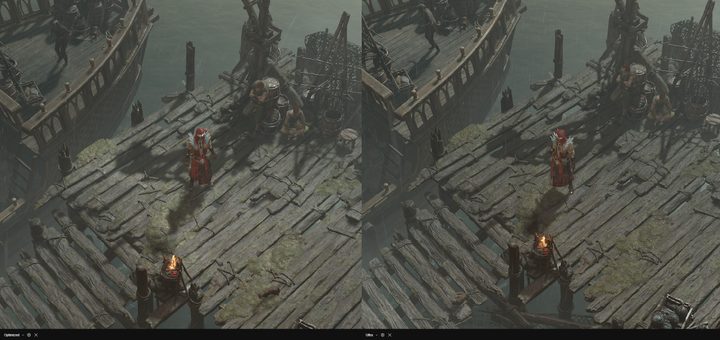
You can see below a comparison between the four quality presets. The Texture quality does a lot of the heavy lifting here, but there’s a massive difference between each of the four settings. The Low FX option also has a big impact on the quality, further reducing texture quality, foliage, and particle effects.

Texture quality also has the biggest impact on performance. If you’re running the game at 1080p, you can easily get away with the Medium setting, while 1440p should use High and 4K should use Ultra, assuming you have a GPU capable of driving those resolutions in different games.
Diablo 4 system requirements
Blizzard offers four different system requirements for Diablo 4. Here’s what the studio recommends:
| Minimum | Recommended | High | Ultra 4K | |
| Graphics preset | Low | Medium | High | Ultra |
| Resolution/frame rate | 720p @ 30 fps | 1080p @ 60 fps | 1080p @ 60 fps | 4K @ 60 fps |
| Processor | Intel Core i5-2500K or AMD FX-8350 | Intel Core i5-4670K or AMD R3-1300X | Intel Core i7-8700K or AMD Ryzen 7 2700X | Intel Core i7-8700K or AMD Ryzen 7 2700X |
| Memory | 8GB | 16GB | 16GB | 32GB |
| Graphics card | Nvidia GTX 660 or AMD R9 280 | Nvidia GTX 970 or AMD RX 470 | Nvidia RTX 2080 or AMD RX 5700 XT | Nvidia RTX 3080 or AMD RX 6800 XT |
| Storage | 90GB SSD | 90GB SSD | 90GB SSD | 90GB SSD |
You can run Diablo 4 on a quite dated system, even pushing higher resolutions. A big reason why is that Diablo 4 supports all three of the major supersampling technologies: DLSS from Nvidia, FSR from AMD, and XeSS from Intel.
There are a couple of interesting notes, though. First, Diablo 4 calls for an SSD, even in its minimum requirement. That’s becoming increasingly common in games, and it seems like an important requirement given how little you need for the minimum requirements otherwise.
The developers also note that it’s possible to run the game below the minimum requirements (including on a hard drive or integrated graphics). However, the developer notes that the gameplay experience “may be significantly diminished.”
Do you need 32GB RAM for Diablo 4?
Diablo 4 doesn’t require 32GB of RAM, but it is a RAM-intensive game. That’s particularly due to the texture quality. It has remarkably high-quality textures, and 32GB of RAM can make a difference in how stable the game is and how good the textures look.
If you’re running the game at at or below 1440p, you’re fine with 16GB of RAM. However, if you’re hoping to play the game at 4K with the Ultra textures enabled, you should have 32GB of RAM.
Upscaling and DLAA in Diablo 4
Diablo 4 takes a very unique approach to upscaling. It supports tech from AMD, Nvidia, and Intel, but you can’t can’t access all of them. Here’s how it breaks down:
- Nvidia RTX GPU: Nvidia Deep Learning Super Sampling (DLSS)
- Intel Arc GPU: Intel XeSS
- Any other GPU: AMD FidelityFX Super Resolution 2 (FSR 2)
The game automatically limits the upscaling option you have access to depending on which GPU you have. For example, Nvidia RTX GPUs are supported with FSR and XeSS, but Diablo 4 only allows you to use DLSS. Similarly, Intel’s Arc A770 and A750 can only use XeSS despite the fact that they work with FSR in other games.
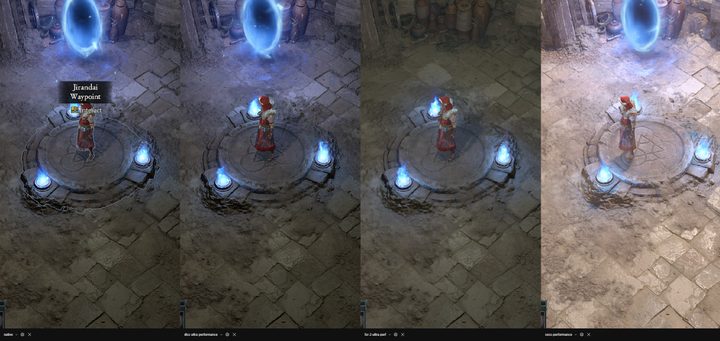
This limitation is strange, but it actually works out well in Diablo 4. As you can see in the most performance-focused preset with each tool, DLSS takes a clear lead, so it’s absolutely the option you should use if you have access to it. XeSS is slightly behind, while FSR takes last place in terms of image quality. The hierarchy the game sets up falls in line with the image quality, so you’re getting the best quality that your GPU is capable of.
In addition to upscaling, Diablo 4 supports DLSS Frame Generation on RTX 40-series graphics cards. I just don’t think it’s a great fit for a game like this. Diablo 4 already runs well on nearly all of the RTX 40-series graphics cards (and even more so with DLSS Super Resolution), so Frame Generation isn’t really necessary.
For my own gameplay, I’ve left it off most of the time. I’ve put over 50 hours into the game, and every time I turned on Frame Generation, it felt wrong. Due to how fast Diablo 4 is, and the extra latency that gets packed on with Frame Generation turned on, the game feels a little slippery with it enabled. The game is playable still, but if you don’t need to turn on Frame Generation, you should leave it off.
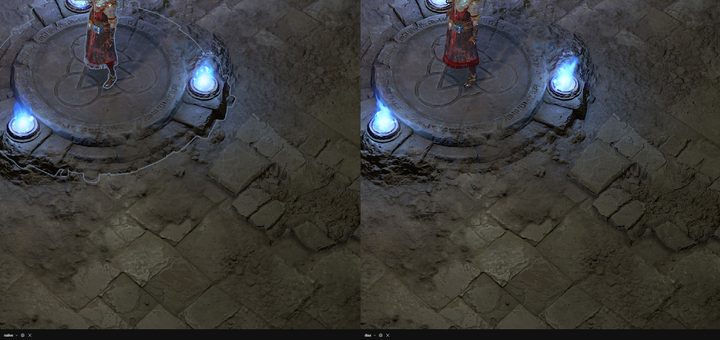
And, if you have a beefy graphics card like the RTX 4080, you probably don’t even need to turn on DLSS Super Resolution. Thankfully, Diablo 4 supports Nvidia’s Deep Learning Anti-Aliasing (DLAA), as well. This basically takes DLSS in the opposite direction. Instead of reducing image quality to improve performance, DLAA improves image quality at a slight cost to performance.
It’s a great setting, too. It’s doesn’t completely change the look of the game, but DLAA adds a bit of extra sharpness to the already high-resolution textures for a very minor performance cost. DLSS is still best to use if you’re struggling to fit the frame rate you want. However, DLAA is a good option if you’ve already hit your performance target at native resolution.
Does Diablo 4 have ray tracing?
Diablo 4 doesn’t include any ray tracing, despite coming with a smorgasbord of upscaling options. Instead, the game has standard screen-space reflections that you can turn off, if you choose. Due to the perspective of the camera in the game, standard lighting and shadow techniques do a lot to make the world realistic and save performance in the process.


