

In a game as open-ended and sandboxy in nature as Minecraft, it might seem like there’s no need to cheat. Unlike a game like Words With Friends 2, you aren’t necessarily competing with anyone in the game. Once you learn the best Minecraft tips and tricks, maybe learn about all the biomes, and how enchanting works, there isn’t much you can’t do.
Except that isn’t quite the case. There are actually a host of fun and useful cheats and console commands you can take advantage of to tweak the game without downloading any mods. Since Minecraft is a cross-platform game available on almost everything, we will go over how you can activate these cheats no matter which version of the game you’re playing on.
These cheats can provide additional layers of convenience or help you get a head start in a game by skipping over some of the more tedious aspects of starting a new Minecraft world (like the laborious process of building a Crafting Table and a set of tools).
How to enter console commands in Java Edition
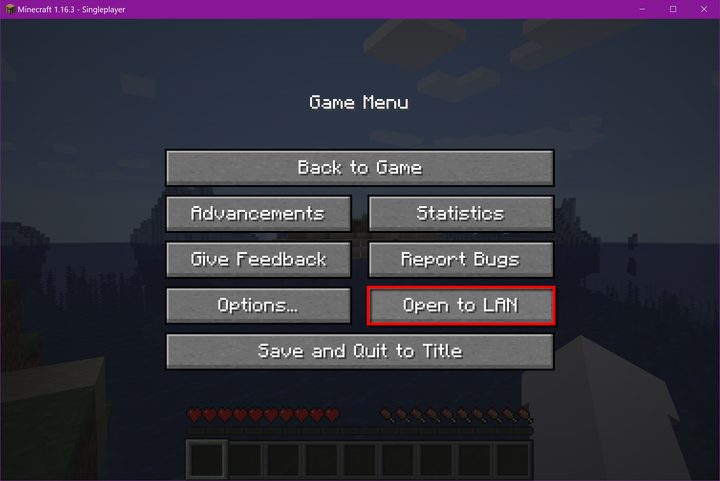
Activating cheats in the Java edition of Minecraft is by far the easiest. Start by creating a new world and make sure that the Allow Cheats option is set to On. Create your world and open the chat menu by hitting /. In this box, you can now begin entering any console commands to activate the cheat of your choice.
If you want to use cheats in an existing world, you can do so by going into the menu and selecting Open to LAN. From there, you can toggle the Allow Cheats option.
How to enter console commands in Bedrock Edition
Using cheats in the Bedrock Edition is slightly different but still easy to do. Start by creating or loading a world and opening the menu. Go to the Cheats tab and toggle them On. Now, just like in Java, you can open the chat menu and input / to start entering commands. If you’re playing with a controller, you will need to hit right on the D-pad and then select your cheat from a list of options or type using the digital keyboard.
All console commands
There are a ton of console commands, so here’s a comprehensive list of each one you can use and a description of what they do. This list is current as of 2025.
Game mode cheats
| /gamemode 0 | Switch to Survival mode |
| /gamemode 1 | Switch to Creation mode |
| /gamemode 2 | Switch to Adventure mode |
| /gamemode 3 | Switch to Spectator mode |
| /tp [player] [x, y, z] | Teleports the player to the command’s specific coordinates |
| /gamerule dofiretick false | Fire does not spread |
| / gamerule dodaylightcycle false | Stop the day and night cycle in the game |
| / gamerule keepinventory true | When you die, you don’t lose anything from your inventory |
| / gamerule domobloot false | Creatures do not will drop items |
| / gamerule domobspawning false | Creatures will not appear again |
| / gamerule dotiledrops false | Stage blocks won’t drop items |
| / gamerule mobgriefing false | Creatures will not be able to interact with blocks |
| / gamerule naturalregeneration false | Prevents health regeneration |
Player cheats
| / kill @r | You will eliminate a random player |
| / kill @e | You will remove all entities |
| / kill @a | You will eliminate all players |
| / kill @p | You will eliminate the closest player |
| / give [item] [quantity] | Add the specified item and quantity to a player’s inventory |
| / ride | You will transform the creature you are looking at into a mount |
| / instantmine | It will take just one hit to destroy blocks and extract materials |
| / freeze | You will paralyze all creatures |
| / falldamage | Enable or disable fall damage |
| / firedamage | Turn fire damage on or off |
| / waterdamage | Enable or disable water damage |
| / superheat | You will transform all the items into their fused versions |
| / instantplant | Planted seeds will grow instantly |
| / dropstore | You will store all the items in your inventory in a trunk that appears next to you |
| / itemdamage | Prevents items and weapons from taking damage or wearing out |
| / duplicate | You will copy the equipped item and place it before you |
| /effect give [Player Name] 1 [seconds] [Effect Level] | Provides the Speed effect to the indicated player, according to the chosen duration and level |
| /effect give [Player Name] 2 [seconds] [Effect Level] | Provides the Slow effect to the indicated player, according to the chosen duration and level |
| /effect give [Player Name] 3 [seconds] [Effect Level] | Activate the Mining Haste effect on the indicated player, according to the chosen duration and level |
| /effect give [Player Name] 4 [seconds] [Effect Level] | Activates the Extraction Fatigue effect to the indicated player, according to the chosen duration and level |
| / effect give [Player Name] 5 [seconds] [Effect Level] | Activates the Force effect on the indicated player, according to the chosen duration and level |
| / effect give [Player Name] 6 [seconds] [Effect Level] | Activates the Instant Heal effect on the specified player, according to the chosen duration and level |
| / effect give [Player Name] 7 [seconds] [Effect Level] | Activates the Instant Damage effect to the specified player, according to the chosen duration and level |
| / effect give [Player name] 8 [seconds] [Effect level] | Activates the Super Jump effect on the indicated player, according to the chosen duration and level |
| / effect give [Player Name] 9 [seconds] [Effect Level] | Activates the Nausea effect on the indicated player, according to the chosen duration and level |
| / effect give [Player Name] 10 [seconds] [Effect Level] | Activates the Regeneration effect to the indicated player, according to the chosen duration and level |
| / effect give [Player Name] 11 [seconds] [Effect Level] | Activates the Resistance effect to the indicated player, according to the chosen duration and level |
| / effect give [Player Name] 12 [seconds] [Effect Level] | Activates the Firefighting effect to the indicated player, according to the duration and level chosen |
| / effect give [Player Name] 13 [seconds] [Effect Level] | Activates the Water Breath effect to the indicated player, according to the chosen duration and level |
| / effect give [Player Name] 14 [seconds] [Effect Level] | Activates the Invisibility effect to the indicated player, according to the chosen duration and level |
| / effect give [Player Name] 15 [seconds] [Effect Level] | Will provide the Blind effect to the indicated player, according to the chosen duration and level |
| / effect give [Player Name] 16 [seconds] [Effect Level] | Will provide the Night Vision effect to the indicated player, according to the chosen duration and level |
| / effect give [Player Name] 17 [seconds] [Effect Level] | Will provide the Hunger effect to the indicated player, according to the chosen duration and level |
| / effect give [Player Name] 18 [seconds] [Effect Level] | Will provide the Weakness effect to the indicated player, according to the chosen duration and level |
| / effect give [Player Name] 19 [seconds] [Effect Level] | Will provide the Poison effect to the indicated player, according to the chosen duration and level |
| / effect give [Player Name] 20 [seconds] [Effect Level] | Will provide the Decomposition effect to the indicated player, according to the chosen duration and level |
| / effect give [Player Name] 21 [seconds] [Effect Level] | Will provide the Extra Hearts effect to the indicated player, according to the chosen duration and level |
| / effect give [Player Name] 22 [seconds] [Effect Level] | Will provide the Absorption effect to the indicated player, according to the chosen duration and level |
| / effect give [Player Name] 23 [seconds] [Effect Level] | Will provide the Saturation effect to the indicated player, according to the chosen duration and level |
| /xp | Gives or removes experience points from a player |
Enchantment cheats
| /enchant [Player name] [aqua_affinity] [Enchantment level] | Aquatic Affinity |
| /enchant [Player name] [bane_of_arthropods] [Enchantment level] | Bane of the Arthropods / Nightmare of the Arthropods |
| /enchant [Player name] [binding_curse] [Enchantment level] | Curse of Linkage |
| /enchant [Player name] [blast_protection] [Enchantment level] | Explosion protection |
| / enchant [Name of player] [channeling] [Enchantment level] | Conductivity |
| / enchant [Player name] [depth_strider] [Enchantment level] | Aquatic agility |
| / enchant [Player name] [efficiency] [Enchantment level] | Efficiency |
| / enchant [Player name] [feather_falling] [Enchantment level] | Feather drop |
| / enchant [Player name] [fire_aspect] [Enchantment level] | Aspect of Fire / Aspect of Fire / Aspect of Burning |
| / enchant [Player name] [fire_protection] [Enchantment level] | Fire protection |
| / enchant [Player name] [flame] [Enchantment level] | Flame / Fire / Incendiary Arrow |
| / enchant [Player name] [fortune] [Enchantment level] | Fortune |
| / enchant [Player name] [frost_walker] [Enchantment level] | Ice Cream Step |
| / enchant [Player name] [impaling] [Enchantment level] | Impalement |
| / enchant [Player name] [infinity] [Enchantment level] | Infinity |
| / enchant [Player name] [knockback] [Enchantment level] | Backspace |
| / enchant [Player name] [looting] [Enchantment level] | Loot / Plunder |
| / enchant [Player name] [loyalty] [Enchantment level] | Loyalty |
| / enchant [Player name] [luck_of_the_sea] [Enchantment level] | Luck marine / Luck of the seas |
| / enchant [Player name] [lure] [Enchantment level] | Lure / Attraction |
| / enchant [Player name] [mending] [Enchantment level] | Repair |
| / enchant [Player name] [multishot] [Enchantment level] | Multi-shot |
| / enchant [Player name] [piercing] [Enchantment level] | Drilling |
| / enchant [Player name] [power] [Enchantment level] | Power |
| / enchant [Player name] [projectile_protection] [Enchantment level] | Projectile Protection |
| / enchant [Player name] [protection] [Enchantment level] | Protection |
| / enchant [Player name] [punch] [Enchantment level] | Punch |
| / enchant [Player name] [quick_charge] [Enchantment level] | Quick charge |
| / enchant [Player name] [respiration] [Enchantment level] | Breathing |
| / enchant [Player name] [riptide] [Enchantment level] | Water propulsion / Marine current |
| / enchant [Player name] [sharpness] [Enchantment level] | Edge / Sharpness |
| / enchant [Player name] [silk_touch] [Enchantment level] | Silk Touch |
| / enchant [Player name] [smite] [Enchantment level] | Hit / Punishment / Pounding |
| / enchant [Player name] [sweeping] [Enchantment level] | Raging Edge / Sweep |
| / enchant [Player name] [thorns] [Enchantment level] | Thorns |
| / enchant [Player name] [unbreaking] [Enchantment level] | Unbreakable / Durability |
| / enchant [Player name] [vanishing_curse] [Enchantment level] | Curse of Disappearance |
World cheats
| / time set 18000 | You will change the time to midnight |
| / time set 6000 | You will change the time at noon |
| / difficulty [peaceful/easy/normal/hard] | You will change the level of difficulty to that indicated in the command |
| / summon | You will invoke the corresponding entity (a full list can be found here) |
| / atlantis | You will raise the sea level in the world |
| / weather [clear/rain/thunder] | You will change the world’s climate to the one indicated in the command |
| /seed | Shows your world seed code |
| /locate | Shows coordinates of nearby places of interest |
| /setworldspawn | Sets the spawn point of all players to current location |
| /spawnpoint | Sets your spawn point to your current location |


