

In modern PC games, you have the difficult decision between Nvidia’s Deep Learning Super Sampling (DLSS) and AMD’s FidelityFX Super Resolution (FSR). Both are upscaling tools that promise higher frame rates while using the best graphics cards, but there are some key differences between them.
I’ve been testing DLSS and FSR for years across dozens of games. Choosing between them isn’t easy, but after closely examining the two upscalers so many times, there’s a clear winner between them.
FSR vs. DLSS: What’s the difference?

FSR and DLSS, despite accomplishing the same goal, are very different technologies. At a high level, both tools render your game at a lower resolution to improve performance. After, the algorithms upscale the image to fit your monitor and fill in missing information based on various inputs. The specifics are where things get messy.
DLSS is a supersampling algorithm that’s bolstered by AI. The dedicated Tensor cores on RTX graphics cards run an AI model that assists in upscaling, which helps fill in the missing information from the lower internal resolution. The model is fed with temporal, or time-based, data, which show the motion of objects from one frame to the next. This helps the algorithm spot new details that it wouldn’t be able to achieve with a still frame.
Despite AI, DLSS is similar to Temporal Super Resolution (TSR), which we saw for the first time in Ghostwire Tokyo. FSR uses a similar approach, but only in the second version.

As if the differences between FSR and DLSS weren’t confusing enough, there are two versions of FSR. FSR 1.0 is fairly basic. It uses an established algorithm to upscale the image and fill in the missing details before applying a sharpening filter. Critically, it happens after anti-aliasing, so it’s trying to reconstruct an image that has already had some cleanup done. That generally leads to much worse image quality.
FSR 2.0 uses the same algorithm and sharpening filter, but it happens before anti-aliasing and takes more inputs from the game. It’s basically TSR with AMD’s branding. It incorporates temporal data for more information, and it works with a clean render before anti-aliasing. That leads to much better image quality than the first version.
FSR vs. DLSS: Performance
In the early days of DLSS and FSR, there was a big conversation around performance. FSR came out ahead with a big hit to image quality, while DLSS tried to strike a balance between good performance and image quality. Today, DLSS and FSR trade blows, and that mostly comes down to the implementation of the features in individual games.
I tested both features with an RTX 3060 in Cyberpunk 2077 and Returnal. This is the most common GPU among PC gamers right now, so it’s a good representation of what you can expect out of these tools.
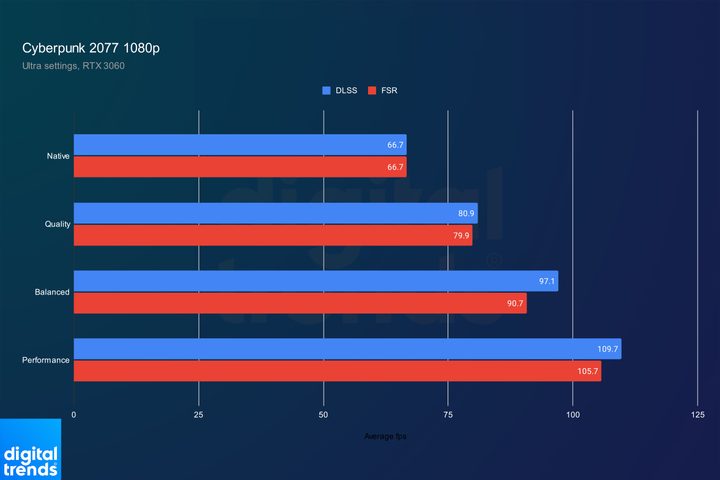
Starting at 1080p, FSR and DLSS provide almost identical performance with their Quality modes. As you go to the more demanding performance modes, however, DLSS claims a small lead. Performance is pretty similar here, largely because of how these tools struggle with a CPU bottleneck as you go up to the demanding performance modes.
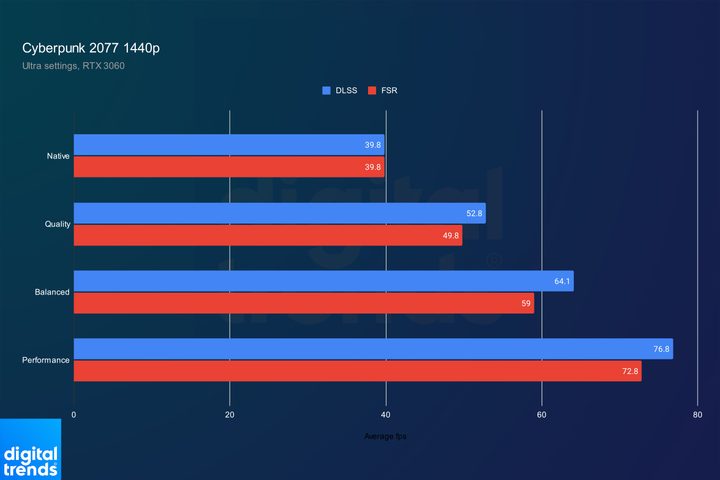
You can see that in action as we go up to 1440p. DLSS is able to maintain a more consistent lead over FSR, providing a few frames of extra performance across the performance modes. The difference here isn’t meaningful enough to impact the gameplay experience, but there’s no denying that DLSS is ahead.
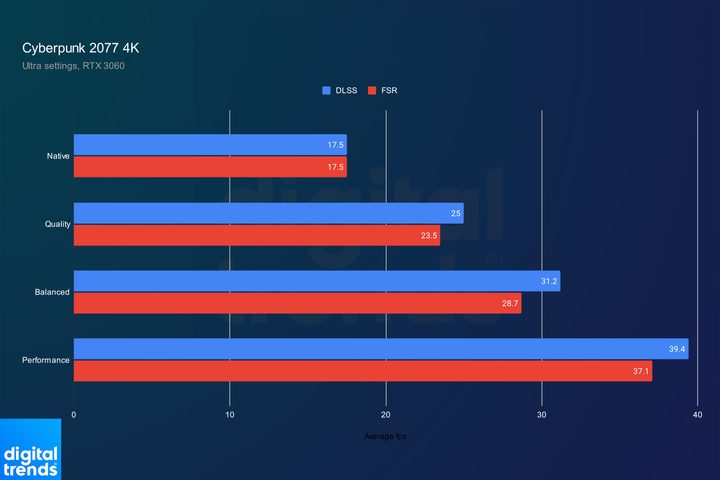
Going up to 4K tells a similar story, with DLSS consistently ahead of FSR. The jump in performance for both tools is much more stark here than it is at the lower resolutions, however. You can see with both FSR and DLSS, the Performance mode more than doubles the base frame rate.
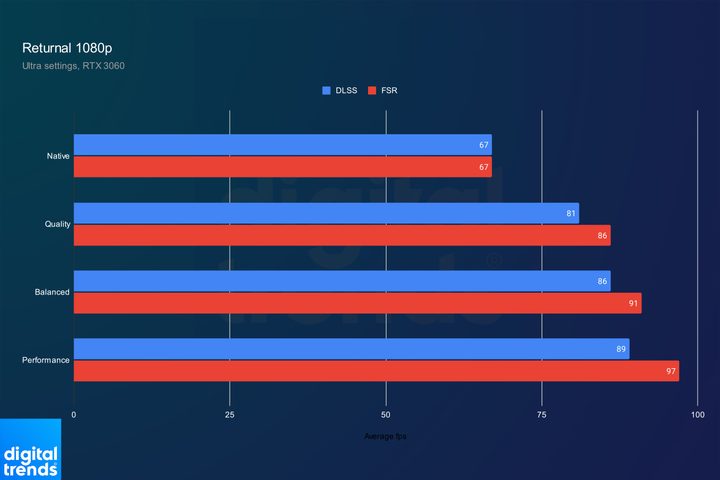
Returnal flips the script. In this title, FSR is consistently ahead at 1080p. The jump here is much smaller than what I saw with Cyberpunk 2077, however. Despite starting with an almost identical base frame rate, Returnal wasn’t able to scale up into the triple digits at 1080p.
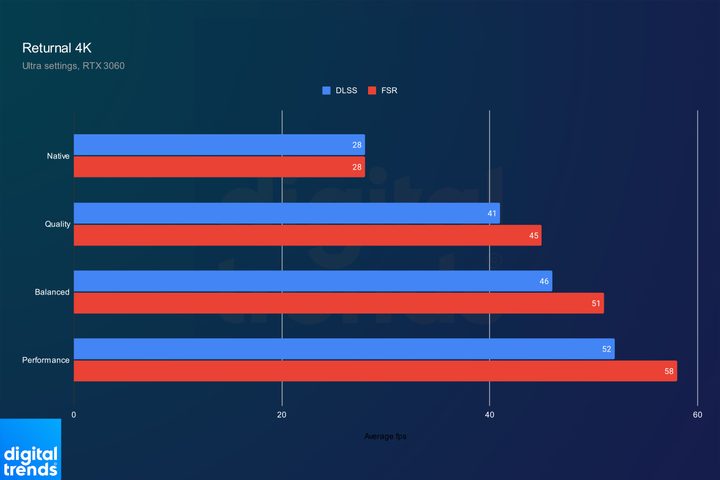
Jumping up to 4K, the scaling is much better, but it’s still below what I saw with Cyberpunk 2077. FSR was able to achieve more than double the base frame rate at its Performance mode, but DLSS wasn’t. At this resolution in Returnal, there is a fairly meaningful difference in performance between DLSS and FSR that would impact the gameplay experience.
As Returnal and Cyberpunk 2077 show, DLSS and FSR trade blows with performance. In some games, FSR is faster, while DLSS takes the lead in others. It comes down to the individual game. The boon for Nvidia is that FSR and DLSS are both available to its graphics cards — you’re free to try out both and see which provides a larger performance boost. With AMD, you’re stuck with FSR.
FSR vs. DLSS: Image quality
I’ve tested DLSS and FSR in dozens of games, and there’s a clear trend between them: DLSS looks much better. That mostly comes down to the stability of Nvidia’s feature. It’s able to keep fine details locked in place with its temporal reconstruction, while FSR often shows a faint flickering on distant objects.
You can see that in action in Returnal above. With FSR, there’s instability on the hallway leading to the big blue beam, as well as on the collar wrapping around the main character’s neck. DLSS is able to keep these details stable. DLSS isn’t free of problems, however. If you look at the red sparks that occasionally fall, you can see some ghosting behind them with DLSS, which isn’t present with the upscaler turned off.
It’s not a big deal in Returnal, but those details can be distracting. Marvel’s Spider-Man is a good showcase of that. There’s flickering on the distant trees and buildings, as well as the window close to the camera, the garbage bin next to Spider-Man, and even Spider-Man’s suit.
Sometimes the flickering shows up in different ways, such as in Cyberpunk 2077. The fine details are a bit more stable here, but FSR struggles to place the shadows correctly on the banister in front of the camera. The shadows faintly bounce around in chunks, while DLSS holds the shadows stable.
These issues are distracting, and they take away from the fact that FSR is just softer than DLSS is overall. Horizon Forbidden West shows that. Aloy’s hair is washed out with FSR, and the detail in the sand in front of her isn’t nearly as sharp.
There’s no contest here: DLSS looks significantly better than FSR does. Although more recent versions of FSR have vastly improved image quality, the instability of fine details can hurt the experience.
FSR vs. DLSS: Compatibility
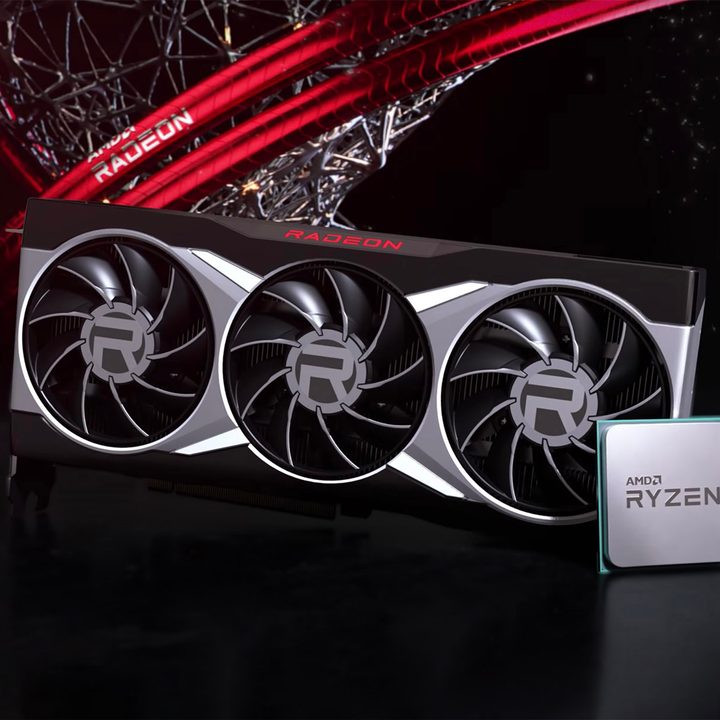
One of the biggest differences between FSR and DLSS is compatibility. DLSS is an RTX feature, so it’s only available on Nvidia RTX GPUs. FSR, on the other hand, works with GPUs from AMD and Nvidia, as it doesn’t require the dedicated Tensor cores.
AMD has recommended hardware for FSR, but it should work on most graphics cards — including integrated GPUs in many cases. FSR is also available on Xbox Series X, and because it doesn’t require specific hardware, it can work on platforms like PlayStation 5, as well (though it’s not officially supported).
FSR is available for free for developers, and it’s built on open-source code. For a while, DLSS was locked behind Nvidia’s walled garden. But mounting pressure from FSR caused Team Green to go the open-source route, as well. This is a stark change from DLSS 1.0, which required developers to work closely with Nvidia and train the AI model on a per-game basis.
Still, there’s a clear winner here. Although DLSS is easier for developers to access now, the fact that it only works on recent Nvidia GPUs is a major hindrance.
FSR vs. DLSS: Game support

A couple of years ago, Nvidia had a pretty signficant edge in game support. DLSS has been around much longer than FSR has, so Nvidia got an early jump on support. AMD support was slower to pick up. Today, however, it’s tough to find support for one upscaler but not the other. In the games where that’s the case, such as Starfield, community backlash usually pushes developers to add the missing upscaler.
DLSS has the edge here simply because it has been around longer. The general trend we’re seeing from developers is that DLSS and FSR are both included, usually not one or the other. That’s even more true with recent developments
FSR vs. DLSS: The verdict
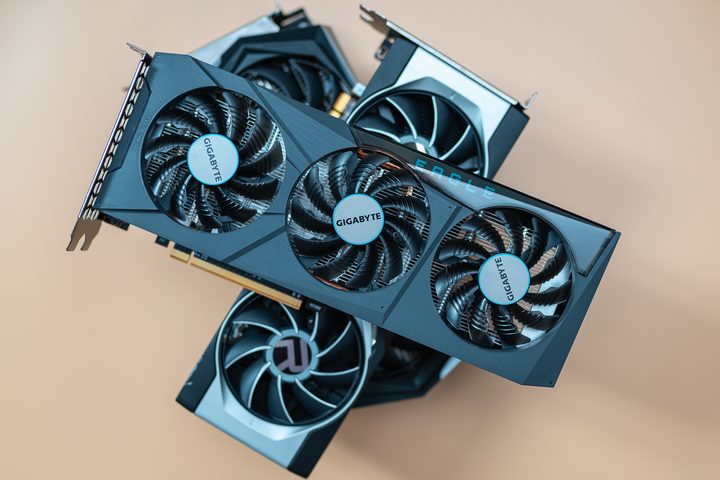
Between DLSS and FSR, Nvidia’s tech is the winner. It offers comparable performance, it’s available in more games, and it achieves much better image quality. Add on top of that broader support for frame generation and new features like Ray Reconstruction, and DLSS quickly becomes a reason to buy an Nvidia GPU.
FSR has its strengths, though. It works with anything, including devices like the Steam Deck OLED, and that broad support means it’s a solid foundation for just about any gaming device. The point remains, however, that if you have access to an RTX GPU, DLSS is often the way to go.


