
Professionals in need of an Apple desktop finally have several high-end choices to consider, because Apple finally updated the Mac Pro and Mac Studio. Both equipped with Apple’s latest M2 silicon, including the powerful M2 Ultra, these computers are fully equipped to handle some of the most demanding tasks you can throw at a computer.
The Mac Studio and the Mac Pro each come in a couple of different configurations, but there’s definitely some overlap between the things they might be used for. Which one is better? Let’s dive in and compare them.
Price and availability

Both the Mac Studio and the Mac Pro were announced by Apple on June 5, 2023, with pre-orders opening that same day. They’re also both going to start shipping on June 13. That’s pretty simple, but the pricing is less straightforward.
If you look at the cheapest model of the Mac Studio and the most expensive configuration of the Mac Pro, there’s a massive gap. This should come as no surprise — the Mac Pro has long been Apple’s most powerful and most expensive computer. We just haven’t seen it for a while, because while the M1 Mac Studio only came out in 2021, the last Mac Pro was launched in 2019 and still included an Intel chip. This time around, the Mac Pro is now fully running on Apple silicon, but it’s still drastically more expensive than the Mac Studio.
Let’s start with the base options. The M2 Max Mac Studio costs $2,000 for the default model, and the M2 Ultra version bumps the price up to $4,000. Meanwhile, the Mac Pro tower starts at $7,000, and the rack starts at $7,500.
But that’s not all. Both the Macs can be decked out with a lot of extra features, such as a better GPU (76 cores instead of 60 cores), more storage (up to 8TB SSD), and more unified memory (up to 192GB). Those add-ons aren’t cheap, so the price goes up exponentially if you go for the ultimate version instead of the default.
At its most expensive, the Mac Studio can cost up to $9,300, and the Mac Pro maxes out at $12,950. This includes pre-installed software for both — Final Cut Pro ($300) and Logic Pro ($200). The Mac Studio wins out in price, though the Mac Pro still has some advantages that could justify spending more, including open PCIe Gen4 slots.
Design

There’s a large difference in price between the Mac Studio and Mac Pro, but an even larger difference in design. The Mac Pro is a full tower computer with carrying handles and feet, while the Mac Studio is a beefier version of the Mac Mini. If space is a concern, the Mac Studio is for you.
The Mac Studio is significantly lighter, too. The Mac Pro weighs just shy of 40 pounds, while the Mac Studio clocks in at a light 6 pounds for the M2 Max and 8 pounds for the M2 Ultra.
Although the Mac Studio saves a lot of space, the Mac Pro still has its place for people who want a standalone PC, and there’s also a rack option too. The Mac Studio, with its smaller size but outstanding computing power, could also pay the price of limited airflow and heat up quite a bit.
It’s worth noting that both the Mac Studio and the Mac Pro retained the design from their previous versions. Apple focused on changing the insides while keeping the outside intact.
Performance

We may not have our hands on either of the new Macs just yet, but we have some idea of how they will perform.
For starters, both are highly upgradeable, but the Mac Pro only comes with an M2 Ultra chip while the Mac Studio also supports configurations with M2 Max. The M2 Ultra is essentially two M2 Max chips stitched together, so at its worst configuration, the Mac Studio will be a great deal slower than even the base Mac Pro.
The Mac Studio with the M2 Max chip sports a 12-core CPU and can be configured to have either a 30-core or 38-core GPU. The M2 Ultra options are the same for both: a 24-core CPU paired with a 60-core or 76-core GPU.
As mentioned above, you can also deck out the PC with up to 192GB of unified memory and an 8TB SSD, and this applies to both Macs, but the M2 Max Mac Studio only supports up to 64GB memory (or 96GB if you go for the chip with the 38-core GPU). The Mac Pro also has the option of adding a Magic Mouse + Magic Trackpad for $150 in total, which the Mac Studio doesn’t offer.
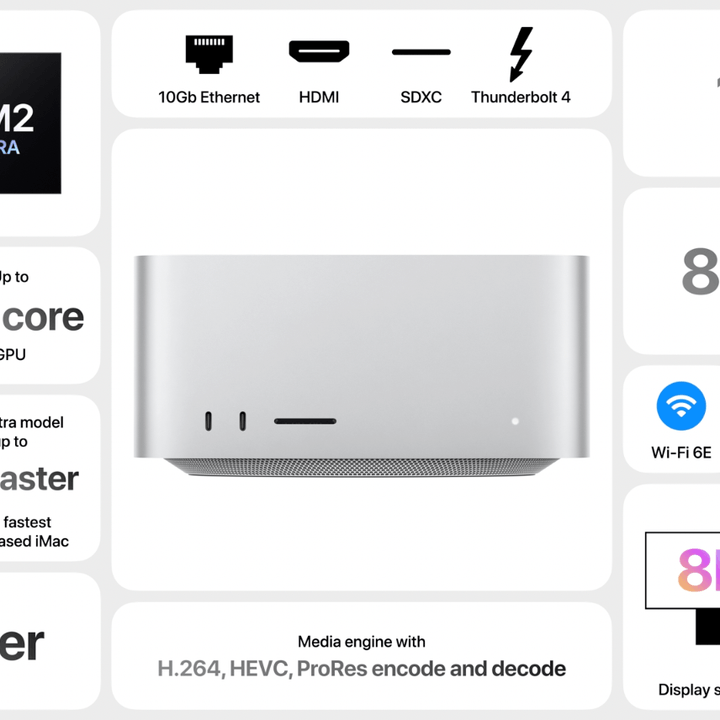
With that out of the way, we have some idea of how these new PCs are supposed to perform. Apple promises that the M2 Max Mac Studio can render up to 50% faster than the M1 Max counterpart, and it also improves Xcode performance by 25%.
The M2 Ultra gives you further upgrades, with three times faster 3D rendering in Octane and 50% faster video processing in Da Vinci Resolve. Apple predicts that the M2 Ultra chip should have an up to 20% faster processor and a 30% faster graphics card, so those improvements are also expected to be visible when comparing the two.
The new Mac Pro offers a larger performance jump compared to its previous version, as it should — the Intel-based Mac Pro launched in 2019 and gets outperformed by various devices that are much cheaper, such as the $600 M2 Mac mini. For now, Apple promises that the M2 Ultra Mac Pro will be up to three times faster at 3D simulations and video transcoding. It can also ingest 24 4K camera feeds simultaneously. On another note, both the Mac Studio and the Mac Pro can play 22 streams of 8K ProRes video all at once.
How do the two compare? It’s difficult to tell without testing them ourselves, but as we can expect the M2 Ultra chip to double the power of the M2 Max, we can make an educated guess. We’ve already tested the M2 Max chip inside the 14-inch MacBook Pro, so that gives us an idea of what to expect. It’s worth noting that even with the same configuration, the Mac Pro might have a bit of an edge due to the larger case and improved cooling that we expect to see.
The M2 Max averages around 700 in PugetBench for Premiere Pro, so the M2 Ultra could reasonably hit above 1,400. For comparison, a regular PC with an RTX 4090 can hit around 1,500, so this power is definitely attainable outside of the Apple ecosystem. Similarly, the M2 Max benchmarks around 15,000 in the Cinebench multi-core test, which means the M2 Ultra might resemble the performance of the Intel Core i9-13900K.
The only problem is that both the Mac Studio and the Mac Pro might deliver very similar performance, but they still have a huge discrepancy in price.
Ports

One of the things Apple had to address with the new Mac Pro was the lack of ports on the 2019 model. When we last compared the M1 Mac Studio to the 2019 Mac Pro, this was an easy win for the Studio; this time around, it’s a much more even battle.
The Mac Pro comes with eight Thunderbolt 4/USB-C ports. Six of those are on the back of the enclosure and two are on the top. Those eight Thunderbolt 4 ports can drive up to six Pro Display XDRs at once, which is pretty impressive. It supports Thunderbolt 4 tech up to 40GB/s, DisplayPort, USB 4, and USB 3.1 Gen 2.
There are also two of each of the following ports: USB-A, HDMI, 10Gb Ethernet, and a single 3.5mm headphone jack. In terms of connectivity, the Mac Pro offers access to Wi-Fi 6E and Bluetooth 5.3 aside from the aforementioned Ethernet ports.
The Mac Studio differs a bit in that there are fewer ports overall. You’re getting four Thunderbolt 4 ports, which means support for all of the same tech that the Mac Pro can offer. There are also two USB-A ports, an HDMI port, one 10Gb Ethernet port, and a 3.5mm headphone jack. The M2 Max version also sports two USB-C ports and an SDXC card slot on the front, while the M2 Ultra instead offers two extra Thunderbolt 4 ports alongside the card slot.
Upgradability

The Intel-based Mac Pro featured Apple’s MPX modules, which allowed users to upgrade the machine with slot-in modules and basically no experience with building a PC. It’s a great concept, but the Apple silicon Mac Pro seems to have gotten rid of MPX modules. This does make some sense, as those modules were previously used for things like adding an extra discrete GPU, but now Apple is using a system-on-a-chip (SoC) with its own GPU and it seems to have moved on from MPX modules in the Mac Pro.
That is not to say the Mac Pro doesn’t offer any upgrade options. It comes with six full-length PCIe Gen 4 slots, including two x16 slots and four x8 slots. There’s also a single half-length x4 PCIe Gen 3 slot that’s already occupied by Apple’s I/O card. Still, many users are likely to mourn the loss of MPX modules.
The Mac Studio doesn’t have any modular elements. The machine you get is the one you’re stuck with.
A surprising verdict

Who would have thought that Apple’s (historically) most powerful PC would fail to impress?
Of course, the new Mac Pro is a formidable PC and a powerhouse. Professionals in need of a high-end solution will still enjoy it for its blazing-fast performance, heaps of memory, expansion options, and improved connectivity. However, when you put it side by side with the Mac Studio, it suddenly looks a lot less enticing.
Since both PCs can be configured to a great extent, let’s talk about the top configurations for both, with M2 Ultra chip with a 76-core GPU and 192GB of unified memory. At that stage, when both the Mac Studio and the Mac Pro have equal specifications, what edge does the Mac Pro have over the Mac Studio?
Sure, it’s roomier, it offers expansion options, and it has a rack option if you prefer that. The size alone gives it a bit of a boost because while the M2 Ultra Mac Studio might find itself held back by its own power versus size ratio and the lack of airflow in the tiny 8-pound case, the Mac Pro doesn’t have to worry about that at all.
The Mac Pro also has more ports, meaning you can hook up more Pro Display XDRs to it and expect it to do well. There’s also an extra Ethernet port, and you can use those PCIe Gen 4 expansion slots for anything you might need (aside from an extra GPU).
That’s all great, but that doesn’t change the fact that you’re paying almost $4,000 more for the Mac Pro than the Mac Studio at the top configuration with the same storage and memory. That’s a lot — even the Apple Vision Pro is cheaper.
Long story short, it’s an interesting time to be a fan of Apple PCs, but the truth is that the Mac Pro might be dead on arrival if all you care about is raw performance. It has other uses, but it’s no longer the reigning leader of all things Apple, and the Mac Studio is likely to be trailing right behind it in future benchmarks.


