1. Home
  2. Computing
  3. How tos

How to type an em dash on a Mac

Add as a preferred source on Google
Apple MacBook Pro 14 top down view showing keyboard and touchpad.
Mark Coppock / Digital Trends

The em dash (—) punctuation is a useful stylization in writing and editing that can replace a comma, colon, or parenthesis. Accessing this symbol on a computer can be challenging, depending on the operating system.

You have several options to type or insert the em dash in Windows – for example, using a word processor or text box. However, macOS is well known for having a system integrated methods of accessing the em dash — some you may know and some that might not be as obvious.

Recommended Videos

Keyboard

Apple has made inserting an em dash into your text very simple with a keyboard shortcut. Press the Shift (⇧) + Option (⌥) + Minus (-) keys on your keyboard, and the em dash will appear in your word processor or text box automatically.

This keyboard shortcut is program agnostic, so you can use it in a Windows environment, Google space, or any third-party text area, in addition to Mac applications.

Menu bar
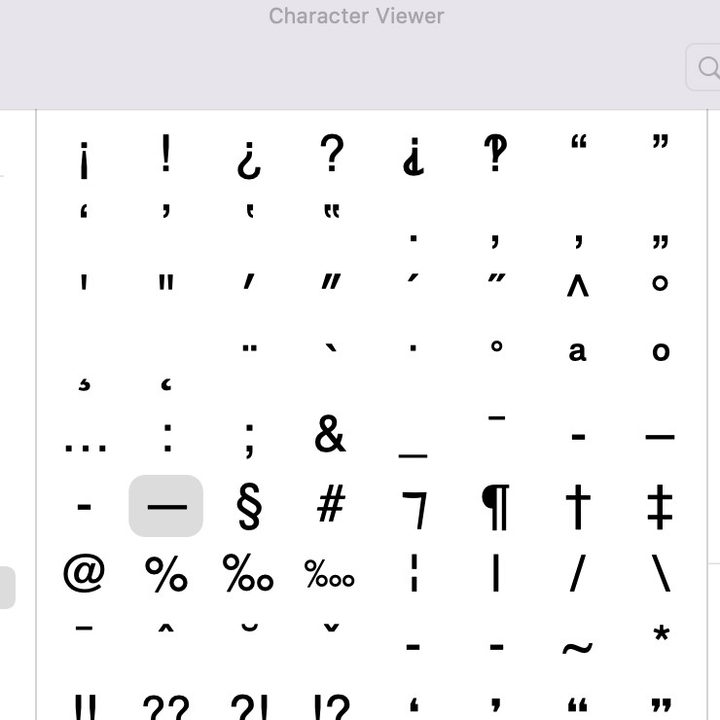
Character View settings on macOS.
Apple

An alternate option is to select the em dash accent from the macOS character viewer, which is located in the drop-down Menu bar at the top of your desktop screen. Select Edit > Emoji & Symbols.

If you’re only seeing emojis, click the small icon in the upper-right corner to expand the window to Character View. Select the Punctuation option in the side menu. Find the em dash, which will be detailed by name on the right once you’ve selected a character. Double-click it to insert it into your word processor or text box.

Search engine

After exploring the other em dash typing methods for macOS, this one might seem a bit pointless. Even so, you can search the term “em dash” in your search engine of choice, copy the symbol, and paste it into your word processor or text box.

Often, the primary search result will be a definition of “em dash,” which includes the proper symbol in parenthesis. This is the case in the Apple Safari browser. Typically, an em dash is not used often in a text, but if you need it again, you can copy and paste it from the original punctuation you pasted.

Looking for more keyboard tricks? The Mac’s text replacement feature is an easy way to create a shortcut for regularly repeated words and phrases.

Fionna Agomuoh
Fionna Agomuoh is a Computing Writer at Digital Trends. She covers a range of topics in the computing space, including…
ASUS fanboys can now spend $16,578 on its 20th anniversary gaming gear
ASUS ROG Family Bucket Collector’s Edition Featured

ASUS’ Republic of Gamers brand is celebrating its 20th anniversary by bringing a five-figure collection of its coolest gaming hardware. The company just revealed pricing for its ROG 20th Anniversary Family Bucket Collector’s Edition, a monster bundle that costs 112,026 yuan, or roughly $16,578. The collection is apparently selling through an offline flash sale in Shanghai from June 20 to July 19, with buyers being selected through a lottery system.

This is more than your typical PC upgrade. ASUS is selling you the whole ROG lifestyle starter pack, which will attract collectors after their next limited edition bundle.

Read more
Gemini Live can finally remember what you told it in past conversations
A quiet update brings chat history recall to Gemini Live, a feature text-based Gemini has had for over a year.
Home screen of Gemini Live with camera and screen sharing.

Talking to Gemini Live no longer means starting from a blank slate every time. Google has quietly extended memory access to Gemini's conversational mode, allowing it to recall details from past conversations when answering new questions.

What the update brings

Read more
macOS 27 Golden Gate: Everything we know about the new features landing on your Mac
Apple’s next Mac update is all about Siri AI and a cleaner Liquid Glass design
macOS 27 Golden Gate

Apple has officially unveiled macOS 27 Golden Gate, the next major version of macOS coming to supported Macs later this year. And while last year’s macOS Tahoe update was all about giving the Mac a fresh Liquid Glass redesign, Golden Gate looks more like Apple’s cleanup and Apple Intelligence update.

macOS Golden Gate is jam-packed with new features, including the redesigned Siri AI, a new standalone Siri app, Visual Intelligence on Mac, more capable Apple Intelligence features across core apps, performance improvements, and some much-needed design refinements. It is also a notable update, since Intel Macs are no longer part of the supported device list.

Read more