
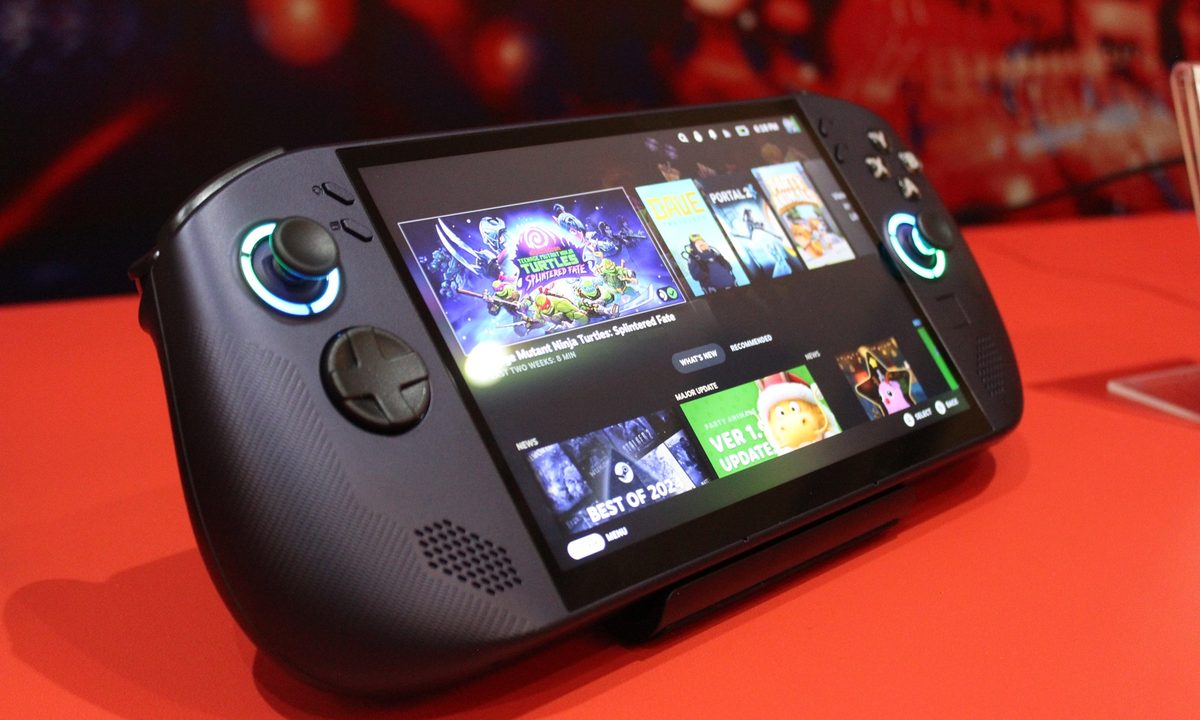
The leaks were right. Lenovo is making the first handheld gaming PC licensed to use SteamOS, finally breaking the operating system out of Valve’s own Steam Deck. The Legion Go S Powered by SteamOS — that’s the official name that I’ll be ignoring from this point forward for obvious reasons — is a handheld packing an 8-inch display, the updated Legion Go S shell, and a black color. It starts at just $500.
We may put handhelds like the Asus ROG Ally and Steam Deck up against each other, but the real power of Valve’s handheld is that it’s affordable. For as good as devices like the original Lenovo Legion Go are, they’re hundreds of dollars more expensive than what you can pick up the Steam Deck for. The Legion Go S with SteamOS is changing that story.
Lenovo says the handheld is slated to launch in May, and it’ll come with one of two chip options. You can either configure it with the Ryzen Z1 Extreme that we’ve seen in several handhelds or with the new Ryzen Z2 Go processor. The Ryzen Z2 Go is actually the weaker of the two options, however. It’s a quad-core chip based on AMD’s Zen 3 architecture, while the Z1 Extreme comes with eight cores based on the newer Zen 4 architecture. Thankfully, the Z2 Go comes with the same RDNA 3 graphics architecture as the Z1 Extreme, and with the same 12 compute units.
As I wrote about a few weeks ago, Lenovo and AMD are holding an event here at CES 2025 — later today at the time of publishing, in fact — so hopefully I’ll get my hands on the device in short order. Maybe I’ll even have a chance to see how the Z2 Go performs. That’s certainly a big question given the aggressive pricing on this Legion Go.
Lenovo tells me that the Ryzen Z2 Go is designed exclusively for the Legion Go S, likely to get the price down. Fret not if you want more power, though. Lenovo tells me that the Legion Go S — across both SteamOS and Windows versions — will get an update in May with the Ryzen Z2 Extreme processor.
Although I haven’t used the SteamOS version, I have used the Legion Go S that’s packing Windows and using a white shell. Lenovo made a lot of changes to its handheld, ditching the detachable, Switch-style controllers for a more traditional handheld. As a result, it’s significantly more comfortable in the hands, with a smaller overall body that’s nonetheless packing an 8-inch screen.

Due to some thick grips on the sides, the Legion Go S is more comfortable in the hands than the MSI Claw, though slightly less comfortable than the Steam Deck. Still, Lenovo packs in a few extras, including a tiny touchpad below the right joystick for controlling the mouse onscreen, as well as adjustable triggers that give you a tactile, rapid trigger mode.
The touchpad is smaller than the tip of a finger, and I thought it wouldn’t work properly, but I was wrong. The large trackpad on the original Legion Go or Steam Deck still provides more precise control, but the trackpad on the Legion Go S is serviceable. You can quickly swipe across it to reach either end of the screen, but there’s still enough control when you leave your finger on the trackpad for precise inputs. Given how much better the Legion Go S feels in the hands, I’m happy with compromising on the trackpad.
The screen is also new, at least compared to the original Legion Go. Lenovo downsized to a 1080p display at 120Hz, which is much more fitting for a handheld. It still looks very sharp at 8 inches, and the glossy coating on the display means colors still pop. They aren’t quite as rich as the colors on the Steam Deck OLED, but they’re close.

Elsewhere, the Legion Go S carries a lot forward from the original Legion Go. You get dual USB 4 ports so you can have an external GPU connected while charging the device, and there’s a micro SD card slot so you can easily expand your storage. The internal SSD is also upgradable, just like the original Legion Go.
This Windows-based version is arriving first, shipping this month with the Ryzen Z1 Extreme chip, and Lenovo says it’s not replacing the original Legion Go — at least not yet. As mentioned, the SteamOS version is coming in May, launching alongside a new version of the Windows-based model, with both packing up to a Ryzen Z2 Extreme. Pricing starts at $500 for the SteamOS version and $730 for the Windows version, though Lenovo hasn’t revealed all of the configurations and their pricing details yet.


