
The Thunderbolt 3 connection is fantastic. It offers advantages over vanilla USB-C in nearly every way. The problem? For years, it’s been a technology reserved for expensive PCs only.
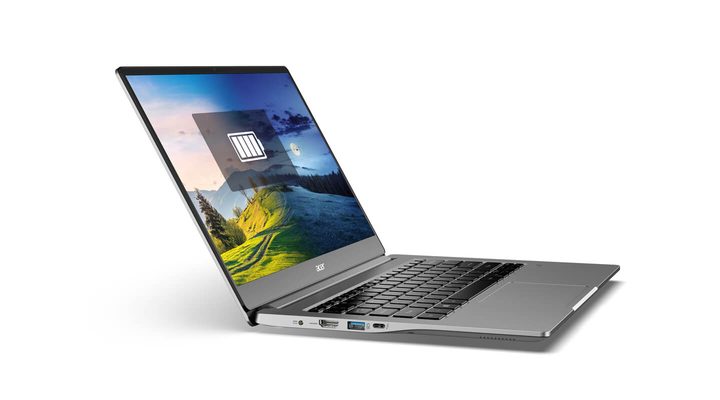
But the tide has begun to turn. A recent budgetl aptop we looked at, the Acer Swift 3, is a prime example of the changes afoot.
For just $700, the Swift 3 shows just how fast this technology has transformed our laptops, and how it’ll impact the laptops of the future.
Acer’s Swift 3 brings Thunderbolt 3 at a budget price
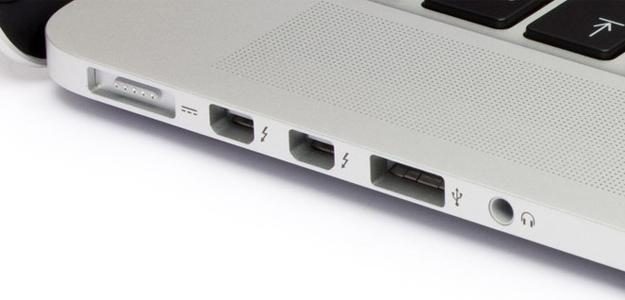
Today, you’ll find Thunderbolt 3 on the best laptops that cost over $1,000, whether that’s the Dell XPS 13, MacBook Pro, or HP Spectre x360. All these devices enjoy the fast transfer speeds, integrated DisplayPort, and 100-watt power delivery that Thunderbolt 3 offers.
Thunderbolt 3 has been a largely premium feature since its debut in late 2015, when Intel added support to its Skylake platform. Some Windows manufacturers implemented the technology starting in December 2015, and Apple added Thunderbolt 3 to its MacBook line in October 2016. But because adoption was slower than it wanted, Intel dropped its licensing fees for Thunderbolt 3 in 2017.
That leads us back to where we are today, where laptop manufacturers pick and choose which laptops to include with Thunderbolt. If you’re like most people, though, and are looking to spend a bit less on your next laptop, you’re out of luck.
A great example is the Asus ZenBook 13 UX333, which starts at $850. It’s a laptop we often recommend under the $1,000 mark because it hits all the marks, whether that’s a solid display, great battery life, and a highly-portable chassis.

It doesn’t, however, have a Thunderbolt 3 port. And looking at a comprehensive list of laptops with Thunderbolt 3, it’s clear that $1,000 is the point at which manufacturers feel compelled to add the port. That’s the angle the HP Envy 13 takes as well. The laptop starts at $750, but it only gets Thunderbolt 3 when you pass into the $1,000 configurations.
The Acer Swift 3 breaks that pattern. It’s an otherwise utilitarian laptop with little in the ways of stand-out features or designs. It won’t catch your eye as your pass it on the shelf at Best Buy, which is true of most laptops that cost just $700. But the Swift 3 builds in a nifty Thunderbolt 3 port, which makes it quite an achievement — if for that reason alone.
Why do we care about Thunderbolt 3?
Thunderbolt 3 won’t be a game-changer for everyone. The speed is nice, and yes, it’s the fastest connection you can get on a laptop. Where USB-C 3.1 Gen 2 (the fastest non-Thunderbolt 3 connection) tops out at 10 gigabits per second (Gbps), Thunderbolt 3 can max out at 40 Gbps. If you rely on transferring large files off an external drive, you’ll notice the difference.
But Thunderbolt 3 is about more than just transfer speeds. It’s also about turning the Swift 3 into a serious work and play laptop.
For work, Thunderbolt 3 supports more video protocols — both DisplayPort and HDMI by default. It’s a simpler, cleaner connection, that even allows for power delivery of up to 100 watts. For a small laptop like the Swift 3, that means one cord for both video output and power, so long as your monitor supports power delivery.
Add a decent Thunderbolt 3 dock to the mix, and your home office is complete.
USB-C can utilize an “Alt Mode” that supports DisplayPort and HDMI connections for external displays, but it’s optional and thus up to the manufacturer to implement. USB-C can also support up to two 1080p displays at 60Hz.
Again, Thunderbolt 3 takes video output a step further by supporting up to two 4K displays at 60Hz. You can even daisy-chain devices together, for support of up to six additional connected. Add a decent Thunderbolt 3 dock to the mix, and your home office is complete.
For some, the most compelling Thunderbolt 3 capability will be the ability to connect to external GPU enclosures. Plug a fast graphics card into an external box, connect that to the Swift 3 via Thunderbolt 3, and suddenly this mundane budget laptop can play modern games at decent resolutions and playable frame rates.
An external GPU enclosure, although not as fast as a native GPU, can be fast enough to rival some midrange gaming laptops. And such a low starting investment gives more cash for a faster GPU. For both work and play, Thunderbolt 3 makes the Swift 3 a far more versatile device.
The start of a trend?

The Swift 3 is not alone, of course. Dell’s latest Inspiron 13 7000 is only slightly more expensive at $750 with similar specs, following Acer closely in bringing Thunderbolt 3 to the masses. Lenovo’s IdeaPad 720s ($849) and 730s ($899) also offer a similar feature set, though none offer Thunderbolt for as cheap as the Acer Swift 3.
Now that Acer has set the bar, other laptop manufacturers will be forced to follow suit. By next year, we hope to see Thunderbolt 3 as common as USB-C is today. Of course, Thunderbolt 4 (and USB 4) will also make their debut in 2020, possibly positioning its predecessor as a budget option.
That’s not a bad turn of events. Thunderbolt 3 would still be a significant upgrade over the current status quo and make for a much more powerful standard than simple USB-C. The best part? It’s backward compatible, allowing to support legacy USB-C devices released since that standard was adopted.


