The opening keynote for WWDC 2022 has come and gone, leaving us with a mountain of updates for iOS, WatchOS, MacOS, and more. Coming off the heels of a relatively modest update with iOS 15 last year, iOS 16 is poised to shake up your iPhone in a few significant ways — the most notable being your lock screen.
The iOS lock screen has had an embarrassing lack of utility for years. It shows your notifications, the current time and date, and has a couple of shortcuts for the camera and flashlight. And that’s it! You can’t change what the lock screen clock looks like, add helpful widgets, or keep the lock screen enabled as an always-on display. These are all things Android has offered for years, thus making the iOS lock screen feel antiquated by comparison.
But that’s (mostly) set to change with iOS 16. Along with new features for Apple Maps and iMessage, iOS 16 introduces many new options for the lock screen. Apple calls it the lock screen’s “biggest update ever,” and it’s a bold statement that holds true. There are new customization options and an impressive widget system. It looks sleek, well-executed, and thanks to a few key features, better than anything Android has offered.
Huge potential for lock screen widgets
As much as I love what Apple’s doing with lock screen customization in iOS 16, its approach to lock screen widgets has me the most excited. Two years after adding home screen widgets with iOS 14, iOS 16 brings them to the lock screen. Whether you want to edit your lock screen to show the current weather conditions, your Apple Watch’s activity rings, or upcoming calendar appointments, all of that’s possible with iOS 16.
It’s important to note that these aren’t the same widgets you place on your home screen. Instead, they’re part of a new widget design that takes “inspiration from Apple Watch complications.” They’re smaller, more compact, and designed to look like a natural part of your lock screen. How these lock screen widgets will work with third-party apps remains to be seen, but this is an area where Apple’s already put in the work. Developers have been creating Apple Watch complications for years, meaning there’s a vast library of small widgets just waiting to be used on an iOS 16 lock screen. Assuming Apple has a system in place that’ll allow developers to quickly bring their Apple Watch complications to the iOS 16 lock screen, we could see dozens of third-party lock screen widgets ready to go from day one.
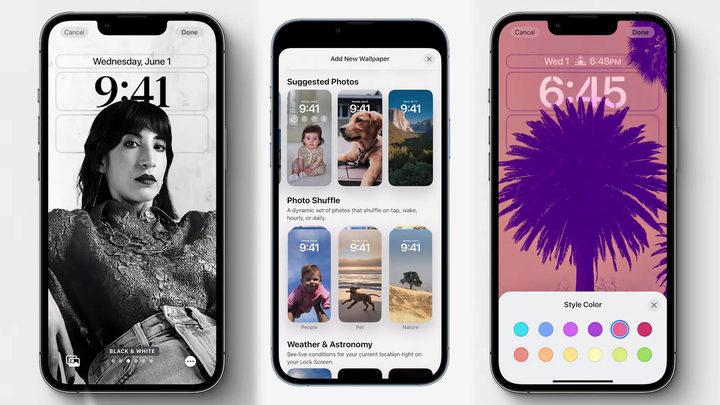
Surprisingly deep customization
And, of course, there’s Apple’s suite of lock screen customization tools. I would have been happy with a couple of clock options and nothing more. But Apple did so much more than that. It offers different clock fonts, customizable colors, and Portrait mode photos that add a subtle 3D effect. You can also have your lock screen automatically shuffle through images throughout the day.
The best part? You can create different lock screens for different Focus modes, allowing you to quickly change your entire lock screen setup on the fly. This is something that’s proven incredibly useful with iOS home screens over the past year, so seeing it expand to the lock screen is fantastic.
Beating Android at its own game
Did Apple invent any of these lock screen features? Not at all. But just like when it added home screen widgets, Apple’s execution of its lock screen changes in iOS 16 looks like what Android phones have been trying to do for years. You can add lock screen widgets on a Samsung Galaxy S22, but you’re limited to a handful of stock widgets with no hope for third-party support. You can also change the clock style and color, but there’s nothing comparable to switching your entire layout with a Focus mode.
This is where Apple has always succeeded with previous versions of iOS. It’s never the first to roll out a new feature, but when it does finally come to the table, it’s usually with something like home screen widgets that was worth the wait. We can’t say with any certainty if that will be true of the iOS 16 lock screen until we’ve used it, but based on what we’ve seen so far, I’m inclined to say Apple (once again) made the right call.