
Apple’s Vision Pro is arriving soon, and early adopters will be interested in learning what they can do with this exciting new spatial computer. With a powerful Apple M2 processor, immersive 4K-per-eye displays, and multiple cameras for tracking your eyes and hands, there’s unlimited space for viewing and interacting with screens and 3D content.
But in the end, it will always be the apps that show off the abilities of a device like the Vision Pro. While we don’t have a complete list yet, I’ve compiled a list of the apps that Apple bundles with the Vision Pro and some third-party apps that will soon be available.
Preinstalled Vision Pro apps

Like any Apple device, you’ll get several system apps optimized specifically for your Vision Pro. You can browse the internet on Safari with multiple giant virtual screens, making it hard to go back to your MacBook or even with a Pro Display XDR connected.
You’ll get Apple Mail, Messages, and FaceTime to keep in touch with people while you’re wearing the Vision Pro. You can organize your life with Freeform, Notes, and Files. Media is available in the Photos, Music, and TV apps.
Apple includes the Encounter Dinosaurs app to give you an immediate sense of the impact of immersive 3D experiences. Mindfulness is another experience that surrounds you with color and motion, a great example of upgrading 2D apps to take advantage of depth.

Of course, you can find more apps in the visionOS App Store, which is currently only viewable from the Vision Pro. Apple has an App Store Preview website for iOS and iPadOS apps, which is a handy way to check out what’s new without using an Apple device.
It might take a year or two before Apple releases a similar App Store Preview website for the Vision Pro. Currently, the selection will be limited compared to the nearly endless selection of iPhone apps.
It’s worth noting that the Vision Pro has the capability to run most iPhone and iPad apps. However, that doesn’t mean you’ll be able to install every app you own. I’ll discuss that more below.
To customize visionOS and Vision Pro apps, you can use the familiar Settings app. There will be options to adjust the appearance, options, and permissions to make the Vision Pro suit your preferences.
According to MacRumors, Apple preinstalls some apps not specifically designed for the Vision Pro, like Books, Calendar, Maps, News, Podcasts, Reminders, Shortcuts, Stocks, and Voice Memos.
It would be fun to see Maps in an immersive view or fly through a city or neighborhood with Look Around, but these apps will behave like iPad apps and appear in 2D windows.
MacRumors also noted that the Keynote app is preinstalled and optimized for the Vision Pro, while the more popular iWork apps like Pages and Numbers are not.
Vision Pro App Store apps

Apple listed a handful of productivity apps that will be available in the App Store for the Vision Pro. Most notable are a couple of apps used by millions of people for work. Microsoft 365 can handle most of your office document needs, and Slack is a popular messaging app.
Only two other productivity apps were mentioned besides those that were preinstalled. Fantastical is a calendar and task app to organize your workflow. JigSpace is an AR app that lets you create and review 3D presentations with exploded views, animated slides, and cutaway images to see inside objects.
Apple said several streaming apps will be ready for the Vision Pro, including Disney+, Max, Amazon Prime Video, Paramount+, Peacock, Pluto TV, Tubi, and Discovery+. You can watch sports on apps from ESPN, NBA, MLB, PGA Tour, and Fubo. Additional streaming content will be available in apps from Crunchyroll, Red Bull TV, IMAX, TikTok, and MUBI.
Netflix and YouTube won’t have Vision Pro apps, but Safari supports streaming video and should work with any service available on your iPad. Streaming from the browser probably won’t support immersive environments. Disney+ is the only service to offer background scenes that wrap around you while watching videos. Apple mentioned four options: Disney+ Theater, the Scare Floor from Pixar’s Monsters Inc., Marvel’s Avengers Tower, and the cockpit of Luke Skywalker’s landspeeder.
Mark Gurman, who often has inside information on Apple products, shared on X that the visionOS App Store will have over 230 native Vision Pro apps, which will be designed to take advantage of its unique features. Most are focused on an AR experience, including apps from Lowe’s and JCrew. Both retailers have created AR experiences for the iPhone.
So far, about 230 visionOS native apps are ready for release. That’ll likely rise by Feb. 2 – but I doubt significantly. There are new AR heavy apps coming from Lowe’s and JCrew, and the rest are from indie developers or the entertainment + productivity apps Apple has announced.
— Mark Gurman (@markgurman) January 21, 2024
According to iMore, the Vision Pro will get Adobe Lightroom for photo editing, Zoom and Cisco Webex for web conferences, a popular iPad calculator PCalc, and Sky Guide for exploring constellations.
Gaming on Vision Pro
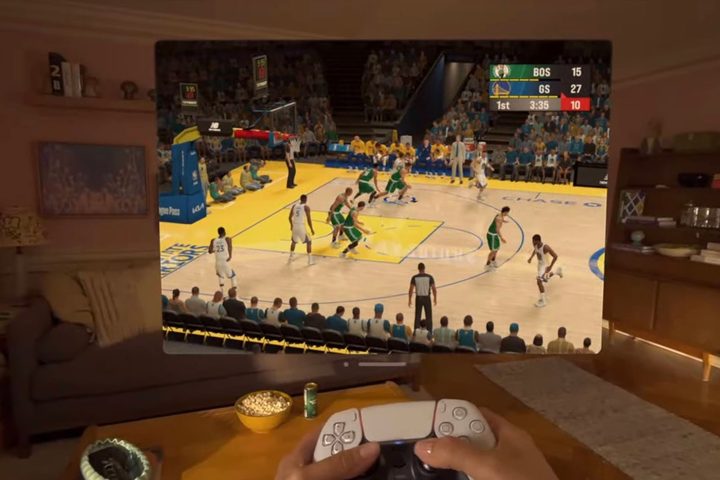
Apple said the Vision Pro will have access to more than 250 games on Apple Arcade, which is a good start. But when we’re talking about gaming on the Vision Pro, adding that there will be “brand-new spatial experiences built for visionOS.” The iPhone and iPad have some great games, but you probably expect more than a big-screen Apple Arcade with a Vision Pro that’s capable of putting you in the middle of an entirely new world.
UploadVR said some interesting VR games are coming to the Apple Vision Pro. Most notable are Demeo, a mixed reality D&D-inspired board game with animated pieces, and Just Hoops, which lets you play arcade-style basketball with free throws in your living room or in various environments.
We’d already heard of a few immersive games for the Vision Pro. What The Golf is a miniature golf game you can play without leaving home. Super Fruit Ninja VR allows you to slice fruit like a master, using only your hands.
iPhone and iPad apps on Vision Pro

Apple boasts the Vision Pro is compatible with over a million iPhone and iPad apps. That’s great news and should help early adopters enjoy their purchase despite the lack of native apps.
It’s worth noting Apple made similar claims about the first Macs to launch with Apple Silicon. The lack of native Mac apps was worrying, and Apple couldn’t guarantee the performance and compatibility of Intel apps running through Rosetta. Since Apple Silicon could run iOS and iPadOS apps, that should have eased concerns.
It soon became apparent that many iPhone and iPad apps aren’t available in the Mac App Store, and sideloading isn’t supported. Intel apps run well even on an M1 MacBook Air, so complaints quickly fell away.
However, it’s not easy to move an app designed for one device to a very different platform, even if the code runs on a chip with the same architecture. There’s no touch interface for the Vision Pro, and the motion sensor detects head movement, not hand movement. Plenty of apps will have issues even if they’re available to download. That means Vision Pro owners really need native apps.
Native Vision Pro apps
Developers know that the best and most popular Vision Pro apps will need to be native to the platform with features meant for spatial computing. AR apps that blend graphics with your surroundings show off this new device in all its glory.
Immersive apps featuring content that surrounds the wearer will have a huge impact on people new to VR. The quality possible with the Vision Pro could even surprise people with years of experience using the best VR headsets. That’s important because the “killer app” that makes the Vision Pro a must-have device will arrive at some point in the future, and it won’t exist on a two-dimensional screen.


